



Photoshop Desktop AI Assistant (Early Beta)
Describe what you want, and the AI Assistant makes multi-step edits across your whole composite.
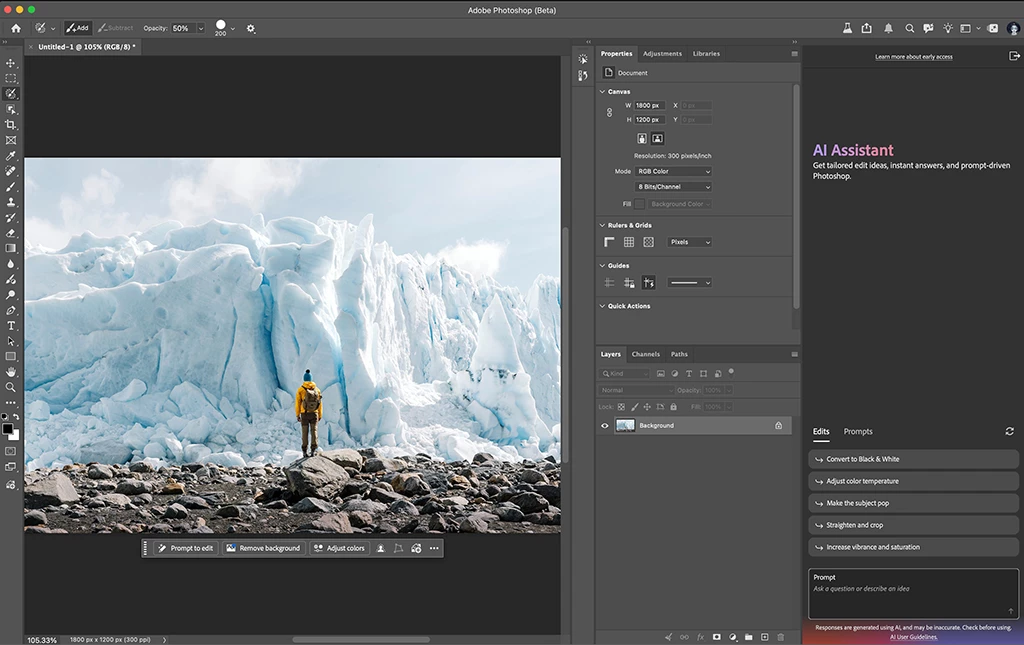
The AI Assistant works directly inside the Photoshop desktop app. Tell it what you want done, such as swapping a background, resizing for every platform, or cleaning up your layers, and it applies the changes across the whole composite. Every change stays fully editable. As you work, it also suggests edits tailored to the image you have open, next to a prompt field where you can type your own.
What you can do
Remove & Replace Backgrounds
- Replace a background by describing the one you want.
Smartly Resize Images and Assets
- Export your design in any format you need for a poster, ad, or social post. Layouts and object positions adjust to fit each size.
Rename and Organize Layers
- Clean up your layer stack: delete empty layers and give the rest clear names.
How to try it in Photoshop (beta) for desktop
- Click the AI Assistant icon in the top toolbar (the speech-bubble icon, between Search and the light bulb) to open the panel.

- Pick a suggestion from the Edits or Prompts tab, such as "Recover Highlights," "Straighten and crop," or "Remove background," or type your own in the prompt field.
- The assistant applies the edits across your composite. Review the result and keep prompting to refine it.
Use the thumbs up or thumbs down on any AI Assistant response to tell us what worked and what didn't. For overall feedback, use the feedback section in the Beta Panel, or comment in this forum thread.
A note on credits: Generative features the assistant can use, such as Generative Fill and Generate Image, use generative credits, the same as elsewhere in Photoshop.
We want to hear from you!
Thank you for trying this Photoshop beta feature.
 AdChoices