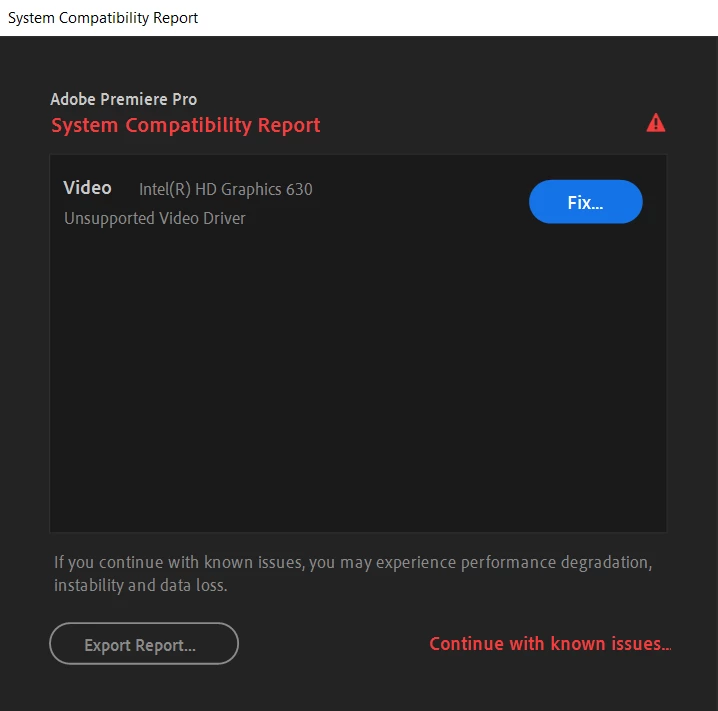
Here's the problem:
If the manufacturer of your system or motherboard uses OEM-specific drivers for the Intel HD Graphics, that error (usually) means that the OEM-specific drivers are legacy drivers rather than DCH drivers, and that the OEM itself had not updated its OEM-specific drivers to a recent-enough version to be "supported" in Premiere Pro. That HD Graphics 630 is indicative of a 7th-Generation (Kaby Lake) CPU, which is within Premiere Pro's hardware support. And current versions of Windows 10 love to automatically revert Intel drivers back to the most recent OEM-verified version even if that driver version is obsolete, whether you want it or not. And this occurs regardless of whether or not you updated the driver to a current generic version (legacy or DCH). Generic Intel drivers, legacy or DCH, cannot be installed cleanly over OEM-specific drivers - period.
Also, your system was manufactured prior to mid-2018. So, legacy drivers were the rule for OEMs. DCH was not yet released at the time of your system's manufacture. Only newer systems that were manufactured after Fall 2018 came with DCH Intel drivers. And the newest generic Intel DCH drivers can now be installed cleanly on top of OEM-specific drivers, so long as the OEM driver itself is also DCH (not Legacy).
Speaking of the legacy Intel drivers, Intel had now depreciated its availability since Fall 2018. The last generic Legacy driver version was version 26.20.100.6373, which dated from the 1809 version of Windows 10. Since then, legacy Intel drivers for 6th- and newer-generation CPUs have only been available via Microsoft's Windows Update service, and are no longer available directly from Intel.
In other words, blame Windows for that behavior. Not Adobe.
Help is on the way, however: With the forthcoming major update to Windows 10, driver updates will be moved to the "Optional updates" section of the Windows Update page in the Settings. That means that the obsolete driver will no longer be automatically downloaded or installed, although you may still do so if you wish to.



 AdChoices