



Harm_Millaard
Inspiring
January 11, 2012
Question

What PC to build? An update...

  • January 11, 2012
  • 25 replies
  • 130896 views

What PC to build, updated January 2012


A question often asked is what system to build for NLE.


The previous article about this topic dates back to March 2010, so it was due an update because there were so many new developments in the past two years, including CS5.5

Basically you can think along three roads, a budget PC, an economical PC and the warrior PC. Notice that MAC is not mentioned here. There are three reasons for that, one is I'm not qualified to really advise on MAC's, two is that they are way overpriced and three they are severely limited in component choices. So this is all about PC.

Whether you want to have a budget, economical or warrior PC, there are a number of common components that you will always need, a case, a PSU, CPU cooler, monitor, keyboard, mouse, DVD/BR burner and stuff like that so I'm not going into those components, with the exception of case, PSU and CPU cooler.

CASE:

While the case of your choice is often determined by looks and what appeals to you (or your CFO, the wife), I want to stress that for all categories, budget, economical or warrior, it is better to use a BIG tower, instead of a mid tower.

Why, you may wonder. Actually there are a lot of reasons. Mid towers can limit your choices in CPU coolers, because the case is not wide enough to install certain CPU coolers. The height of the cooler does not fit in the case. They can limit your choice of video card, because these have grown in length significantly and mid towers often do not allow the installation of certain video cards due to the limited depth or prevent you from installing hard disks in certain slots. Mid towers will limit your expansion capabilities (less drive cages), make installation of components more difficult, have limited cable management features, have limited airflow and tend to become hotter than big towers and thus more noisy (the fans need to run at higher speed) and limit overclockabilty.

A BIG tower is the (only) way to go.


PSU:

The PSU is one of the most crucial components in any system but also the one component most often overlooked. A good PSU will give you years of reliable work on your PC, a suboptimal or mediocre PSU will give you tremendous headaches and unexplainable crashes, hangs or errors, causing you to miss deadlines.

Go to eXtreme Power Supply Calculator Pro v2.5 and get the Pro version. Enter all your components, including planned expansions, set the Motherboard to High End - Desktop, set the CPU Utilization (TDP) to 100%, set System Load to 100% and Capacitor Aging to 30% and press the Calculate button. Add 10 - 15% to this Wattage for safety and note the required amperage on the various rails (+3.3V, +5V and +12V). Based on these figures, select a good GOLD label PSU, that meets the total wattage and the amperage on each rail. It is your best guarantee for long and reliable, troublefree editing.

Budget, economical or warrior system


Before going into these three systems, you can consider them to be a rough 'Best-buying Guide', let me remind you of the basic practical system requirements for CS5.5 and consider your own workflow to interpret these charts.

It starts with the codec:
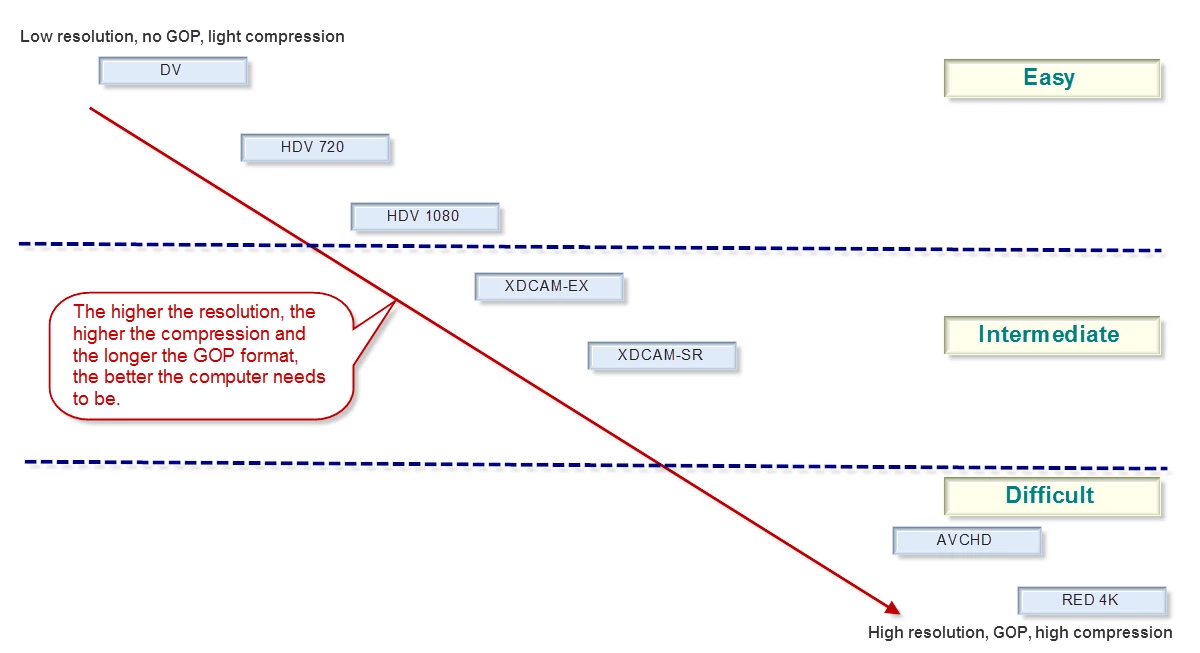
Since DSLR is getting so popular, let me remind you that this is ranked under the 'Difficult' codecs and P2 is an 'Easy' codec. The more difficult the codec you use, the higher the system requirements. See:
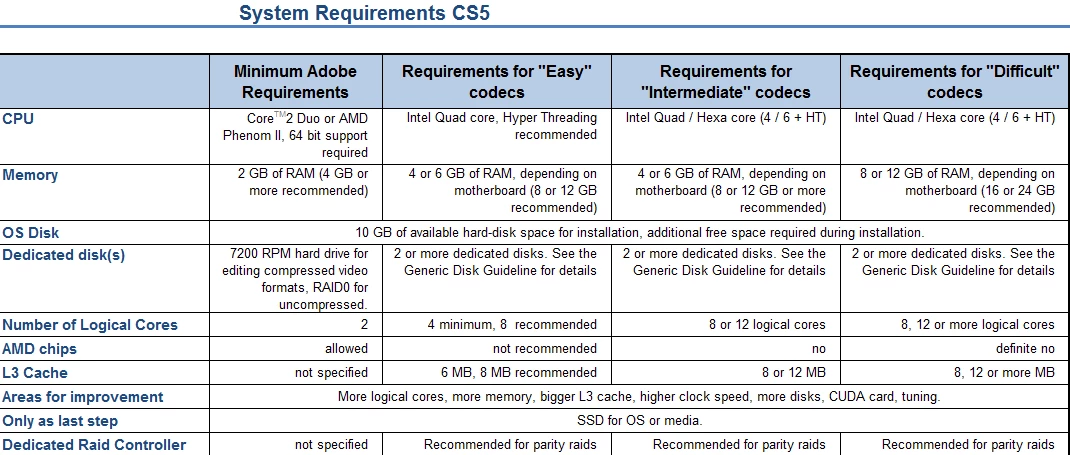
For the full article, see Adobe Forums: System requirements for CS5

As a rough translation from 'Easy', 'Intermediate' and 'Difficult' to the kind of system you want to build, you could say that 'Easy' can be handled quite well with a 'Budget' system, 'Intermediate' is best handled by an 'Economical' or better system and 'Difficult' requires an 'Economical' or better system. A 'Budget' system may struggle with the load of such 'Difficult' codecs.

Note that in the following table, I have mentioned components in each category. These are just examples of what could fit in each category, they are not necessarily a combination of components that I would build per se.

Also note that I have not chosen the fastest CPU in each category, but only unlocked CPU's. Each can be overclocked for optimal results and then will deliver a better Bang-For-The-Buck (BFTB) than the highest clocked CPU in that range. Finally, note that the budget system can benefit from increasing memory to 4 x 4 GB for only € 38 extra. That is the weakest link in the budget system.

Prices mentioned are current day prices in the Netherlands (01-11-2012) including 19% VAT.

Here are my suggestions:
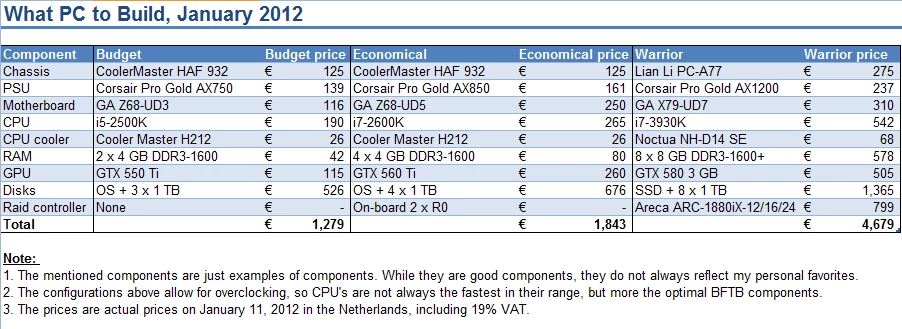
The main difference in comparison to the previous guide, is that the i7-3930K appears to be faster and better affordable than a dual Xeon X5680 system.

Anyway, I hope this helps people comtemplating a new system to get the right components in an affordable system.

This topic has been closed for replies.

25 replies

Participant
February 22, 2015

I do not know if I can stand this boring peace on all fronts.

Great job Harm!

Participant
January 2, 2013

What you think about this test? Looks like GTX 680 2GB is the best option.

Participant
October 9, 2012

Hi!

What would you say, what should I upgrade next from my PC? Case and PSU are pretty good so those are out.

Hardware:

  • Intel i7-870 (HT on)
  • 16GB 1333Mhz ram
  • GeForce 660 TI (Asus DC II)
  • Harddrives
    • Samsung F3 1TB 7200 rpm for OS
    • Samsung F3 1TB 7200 rpm x 2 in RAID0 for Cache, previews, captured audio and video. Also for the rendering to a final clip
    • Samsung F4EG 2TB 5400 rpm for footage
  • 650W Chieftec power
  • Windows 7 Home Edition 64bit

I'd love to get more juice for Premiere and After Effects. It takes 4,5min to RAM-preview a 16s footage with current setup, what should I upgrade first or should I start from scratch?

Inspiring
October 11, 2012

....of course, Harm,Scott, Bill, RJL, and others more knowledgeable than me can provide a better answer. However, for a simple start, your CPU,Ram, and video card all look decent. The OS drive and RAID 0 setup looks good. Power supply may be OK with that 870 CPU.

   The big , glaring problem is the 5400 RPM single drive for footage !!  That is below Adobe requirements, ( minimum 7200rpm drives).

   I am sure others would recommend creating a second onboard RAID array, just like the first one, to place your footage,(media) on.

This should provide improved performance. Of course, you would need to back up that second RAID... that's where your existing 5400 RPM HDD can be used.....to contain your original footage, that you copy to your second RAID for performance during editing. However, it may be faster to feed that second RAID using a 7200RPM drive instead.

     After Effects benefits from having more system ram.....you would have to have Windows 7 Professional to have more than 16GB ram....with your Dual-channel memory setup and motherboard, I do not know if you can put in more memory...32GB would be great,esp. for AEffects.

     With the new cache system on After Effects CS6, you may be able to benefit performance by assigning it to  your first RAID array.

    Other tweaks would be to make sure all indexing and compression are turned off on all drives, ( under properties tab for each drive), static  Windows page file,( at least 1.5 x system memory), is placed on your first RAID array, real-time virus monitoring turned off, and proper memory assigned to both After Effects and PPro,( done inside each program's settings). You can find a more complete list of Windows tuning here on this forum.

Participant
October 12, 2012

Okey, I tried making up a RAMdisk which does about 5000Mb/s read and 4000Mb/s write and I tried to move my cache to it, video footage, media cache and I tried with different combinations. The problem is, the RAM-preview didn't fast at all, the difference is roughly 1-2 seconds. The speed difference between 5400rpm and 7200rpm is very very minor.

My Cache is on my current RAID array. Indexing is off, compression is off, Page file and hibernate files are on my current RAID array. Real-time virus monitoring is still on but the performance with and without is negligible.

Currently, I've allowed to PPro and AE to use 6/8 cores of my computer and I've put the ram usage so there would be 2GB per core. I've allowed those softwares to use 13Gb ram while leaving 3Gb for other applications.

My board doesn't support over 16Gb ram and I think P77 series doesn't even support over 16GB so it would be new board and CPU.

So, is there any ways to improve this more so that the difference between speed would be noticable?

Participant
August 1, 2012

How about the E-5 2687 CPU on an Z9PE-D8 WS board?

How does it perform commpared to a i7 3960x Setup?

Any thoughts on the ssd cacheing on the z9pe-d8?

Participating Frequently
August 1, 2012

I am in the process of bullding a new Win64 box for Lr4.1 and PS6 working with Nikon D800/E 14bit NEFS and maybe a little Premeire video work, mosty photos though.

I am thinking about running an Intel Ivy Bridge Core i7-3770 with 32GB ram, Windows 7 64, A couple of sata III 128 GB drives for OS Programs and the second SSD for LR4 cagesatalog and a 4TB Hitachi drive for images.

I was wondering if it would be worthwhile to spend the extra $$ and get the Intel Core i7-3930K Sandy Bridge 6 core processor, yes it is older then the Ivy Brige but it has 6 cores vs 4 and 12mb L3 cache as opposed to 8mb. plus LGA2011 motherboards support 64GB of ram...

Will LR4.1 take advantage of 6 cores over the Quad Core or will it not be much faster?

Thanks

Steven

ECBowen
Inspiring
August 2, 2012

LR and PS will work fine on either platform and you will not see a significant difference in performance by changing to the X79 platform with those 2 applications and the system configuration your looking at above overall. You are well beyond what you need for those applications alone.

Eric

ADK

Participant
June 25, 2012

I'm buying a new video editing computer but i'm unsure what build I should aim for. I am interested in the idea of using Hackintosh to use Final Cut Pro, but I may consider using Adobe CS6 instead. Currently right now I'm using Sony Vegas 11, but I feel the other two editors offer some great features that I would like to use. My build is on a budget of $1800 and I use formats such as MOV and AVI on 1080p. I plan on purchasing the Nikon D800 or the Blackmagic Cinema Camera in the near future. This build is intended as video editing as a serious hobby and gaming machine that runs 1080p at 60FPS.

So far if I continue with a Final Cut Pro build, it would be this

Motherboard: Gigabyte Z77x-UD5H

CPU:intel i7 3770k

CPU Cooler: Noctua NH-D14

GPU: Gigabyte Windforce x3 gtx 670 2GB

PSU: Rosewill Capstone 750W Gold

Case:NZXT Phantom $119.99

SSD:Crucial M4 256GB SSD

HDD:Samsung F4 2TB HDD

HDD:Samsung F4 2TB HDD

Ram: Corsair 16GB Vengeance Low Profile 16mhz

DVD Drive:ASUS Optical Drive $16.99

Top Fan: NZXT 200mm

If I don't create a hackintosh build, I'll switch to a X79 build.

i7 3930K $538.74

---------------

Seagate Barracuda 2TB $118.51

-------------- 

Gigabyte X79-UD3 Motherboard $238.99

Samsung F4 2TB HDD

Crucial 128GB SSD $122.49

Noctua NH-D14 SE2011 $84.95

Geforce GTX 580: $345.02

Cooler Master HAF932 $139.99

Corsair 750W PSU $99.92 (used Thermaltake Power Supply Calculator and seems like i'm very underpowered and need to stretch to a 1000W PSU)

Sony AD-7280S-0B 24x SATA Internal DVD Drive $21.05

Corsair Vengeance Blue Low Profile 16GB DDR3 $97.99

Again, I'm very unfamiliar with advanced/professional video editing setups and workflows.

Participating Frequently
June 26, 2012

kimchitaco wrote:

i7 3930K $538.74

---------------

Seagate Barracuda 2TB $118.51

-------------- 

Gigabyte X79-UD3 Motherboard $238.99

Samsung F4 2TB HDD

Crucial 128GB SSD $122.49

Noctua NH-D14 SE2011 $84.95

Geforce GTX 580: $345.02

Cooler Master HAF932 $139.99

Corsair 750W PSU $99.92 (used Thermaltake Power Supply Calculator and seems like i'm very underpowered and need to stretch to a 1000W PSU)

Sony AD-7280S-0B 24x SATA Internal DVD Drive $21.05

Corsair Vengeance Blue Low Profile 16GB DDR3 $97.99

Again, I'm very unfamiliar with advanced/professional video editing setups and workflows.

Looks pretty good to me.

Are you going to OC this system?  If so make sure you have a board that has good power control.  If you're not going to OC you probably don't need the Noctua.

(ii) The best Corsair PSUs are made by Seasonic, so I went straight to the source and got a Gold-rated fully modular Seasonic 750W for $120.  If concerned about power, go for the Seasonic Platinum 1000W.  Gold and Platinum refer to efficiency and are very important. 

(iii) 128GB is going to feel cramped on an SSD.  I found a Crucial 256GB for only $179.  The 256GB model is a bit faster too.

(iv) This system cries out for a bit more RAM.  32GB?

Participant
June 26, 2012

i agree on top except that corsair AX series are made by seasonic, sometimes one is cheaper than the other

http://slickdeals.net/f/4746302-SeaSonic-X750-Gold-750W-SLI-Ready-80-PLUS-GOLD-Certified-Full-Modular-Power-Supply-119-99

Participant
April 19, 2012

Thanks for a awesome guide Harm Millaard!

I'm building a workstation used mostly with RED or equal material.

This is what I was thinking about:

OCZ Z Series Gold Modular 850W

Gigabyte GA-X79-UD5

Intel Core i7 3930K

Noctua NH-D14

Corsair XMS3 Vengeance DDR3 PC12800/1600MHz CL10 4x8GB 10-10-10-27 latency (CMZ32GX3M4X1600C10) 1,5V

Crucial m4 2.5" 128GB

4x Western Digital VelociRaptor WD5000HHTZ 64MB 500GB @ 10000rpm

Going to do 2x raid0 with the VelociRaptor disks for different source and output disks.

Do you guys think that will be okay?

I'm also wondering if I should use GTX580 with 3GB VRAM or if I should go for a GTX680 with 2GB?

And what do you think about the memory, will I have any problems using them with the 3930k?

Thanks in advance!

Participant
June 6, 2012

Yo!

Very helpful info, learnt allot from it. Thanks Harm and everyone else

I wish to create a system mainly for simple photo editing in Lr and very little Photoshop, but also for editing DSLR H.264 footage in Pr (mainly simple colorgrading etc.) and very little in Ae.

Unfortunately I am on a very tight budget

I already have:

An external raid: CalDigit S2VR HD 1.5TB (This craves eater eSATA 2.0 or PCIe-x8)

2x 2TB WD Caviar green

500GB WD Caviar blue

Cooler Master Silencio 550

I intend to stripe the external raid for video editing in Pr and Ae (Is it overkill to stripe 5x 7200rpm drives for H.264 footage?).

One of the 2TB drives will function as my main data drive, the other as external backup via SATA slot in the front of the cabinet.

The 500GB drive will ether function as my OS drive, or as an extra data drive (if i choose to go SSD).

I got the Cooler Master cheap. It is not a huge case, but i am not too concerned about fan noise (the raid is f****** noisy anyway!) and i can always upgrade this part.

So... Now i just need all the important parts. I cant decide whether to go with a Z77 motherboard + i5 3550 or i7 3770, or a X79 motherboard and i7 3820.

GPU wise i am thinking MSI GTX 570 1.28GB (it would be nice to render my color gradings with the mercury engine).

PSU: Corsair TX V2 750w

RAM: Corsair Vengeance 4x 4GB 1600mhz CL9-9-9-24 1.5v

120GB SSD (havent come to a conclusion with this one yet.. I can see there has been a bit of a debate about it already)

ICY BOX card reader (i use CF cards).

Sony Optiarc DVD

Later optional addons: Corsair H60 (if its too noisy/gets too hot)

I know nothing about OC'ing, but i would like to try it.. I am attracted to the Asus motherboards, because they have the one button OC feature.

Hope you guys can help

Participant
April 17, 2012

This is greate stuff, but it seems like you always state that this may not be what you would use. I would like to know what you would use, since it seems that you are on top of this ever changing platform. This way I would have the BEST chance to create the BEST system according to the BEST advice I can find, thanks.

Harm_Millaard
Inspiring
April 17, 2012

In your own thread I gave you the link to my own planned build, http://ppbm6.com/Planning.html

Participating Frequently
April 18, 2012

That is a dream system Harm. I love it.

Legend
March 1, 2012

Harm,

Regarding the "Budget" versus "Economical" system:

Unless one is going to use part of the RAM as cache, Premiere Pro CS5.5 works best with about 2GB of RAM per logical core. This means that the i5 system doesn't take much if any advantage of more than 8GB of total installed RAM. I discovered this today when I ran the PPBM5 benchmark on "Randall's Flying Pig" (my i5-2400 auxiliary editing rig) with both 8GB and 16GB of RAM. However, for an i7-2600K or 2700K system, one would need 16GB of RAM in order for CS5.5 to perform its best. And for an i7-3930K, 32GB is recommended.

Participating Frequently
February 24, 2012

Videoguys DIY9 Update

Feb 2012 update with 3 recommended builds! You can mix & match components between the two P9X79 builds or go with a budget system based on the P8Z68 and i7 2600K processor. We tried to get as close to $2K as possible for our system, but we went over.


  • We are leaning towards the base Asus P9X79 motherboard over the Pro. We'll save some bucks and we feel we'll still need FireWire for capturing our older legacy DV & HDV footage.  
  • We're going to go with an SSD boot drive even though it adds almost $200 to the cost of the build.
  • I'm still thinking we may go for the full 32GB of RAM. I think we may be penny wise and pound foolish going with just 16GB.
  • We're also going with a GTX570 to save costs, although for Avid you really want to go with a Quadro2000 or 4000.

Unfortunately we still have not had the chance to build our DIY9 machine. Some internal IT issues have taken the bulk of our tech teams time over the past few weeks. We are also finding the i7 3930K processor in very tight supply.

Gary

Participant
March 3, 2012

Great thread, Harm.

I wanted to share my experiences with my new build, which was inspired by the Videoguys DIY9 original specs. 

www.shawnlam.ca/2012/premiere-pro-cs6-video-editing-computer-build/

I chose the Asus P9X79 Pro over the base model because it supports a 2 disk RAID via the Marvell controller using the ASUS Disk Xpert.  You can read about my experiences trying to get the base model to work with the Intel RAID - basically I couldn't get it to work (and didn't really want a software only RAID solution) so RMA'd the board and upgraded to the Pro.

I shared my results with Videoguys and they have updated their recommendation to the Pro board over the base ASUS P9X79 board.

I posted a quick benchmark there as well comparing my 2600K build to my 3930K build with GPU enabled and software only.

Legend
March 4, 2012

Shawn,

Thanks for that link. However, it redirected to a "Page Not Found" portion of the site until I removed the extra "/http://" at the end of the address. Then, I realized that the MPE software-only mode really needed a strong hexa-core CPU just for that mode to perform nearly as well (relatively speaking) as the MPE GPU accelerated mode. The 4-core, 8-thread i7s do not perform nearly as well in MPE software-only mode, especially with Maximum Render Quality (MRQ) enabled - and I would expect the cheapest LGA 2011 CPU, the i7-3820, to perform significantly slower than the i7-3930K in MPE software-only mode (again, due to the 3820's four-core, eight-thread configuration versus six cores and 12 threads in the 3930K).

On the other hand, with GPU acceleration enabled in Premiere's MPE, the Sandy Bridge quad-core CPUs perform nearly as well as the i7-3930K (again, relatively speaking).

Participant
February 13, 2012

First I must give appropriate props to Harm......thanks for taking the time to lay down all this info in one place..........its much appreciated.

I would like some input on the type of system I need for my client...my knowledge is advanced in hardware but I have really none in the adobe suite, particularly AFTER EFFECTS 5.5 and video rendering. Any advice on the grade of system (  BUDGET,ECONOMICAL,WARRIOR) …and specifics on RAID, CPU, RAM…..would be greatly appreciated.

The client will be working mostly in AFTER EFFECTS…..here is the info I was given:

We use a DSLR Camera that only shoots in 1080p with an h264 codec usually Also we need a Mac computer so we can edit videos in After Effects and render big projects like ten greenscreen videos over night. We also have to backup 6TBs and I thought getting externals would be the way to go but is it cheaper or possible to put that into the Mac computer plus like an extra TB into the computer for programs?

It didn’t take much to get him off of the ‘Mac’….all I did was stated the facts…haha.  Again…any and all feedback is GREATLY APPRECIATED. Thanks and God Bless.