

fcvideo
Inspiring
Jun 14, 2019 5:42 PM UTC
Answered

Putting Wedding on a USB - looking for DVD style play-back

I have just moved to CC, but also have CS6, so I do have the use of Encore.

I am filming a wedding soon, and the client is looking for a DVD & USB. The DVD side I can do in encore (OK, looses quality but not a lot of can do based on size). The main output will be to USB, where i am looking to retain as much quality as I can.

Now I could just do the menu items as listed files (01 Bride Prep, 02 Groom Prep etc) and access it through Windows Explorer. However, ideally I would like it to run on a similar line to a DVD - so they put it into the PC and either it starts, or the click on a single file (TV working even better!). There would be a menu etc, and a play-all etc etc etc

But I cant see how to do this. I tried to do a test with Encore building a Blu-Ray folder and then an ISO but with no luck (ISO kind of worked, but didn't look great).

Am i looking for a holy grail that does not exist? Is there a way to do what I want through Adobe CC/Encore CS6?

Also, what would you recommend for a File Format to output the files into?

Any help appreciated - thanks
    This topic is closed to new replies. Start a new post to keep the conversation going.
    fcvideo
    fcvideoCorrect answer
    Inspiring
    Jul 1, 2019 12:39 PM UTC

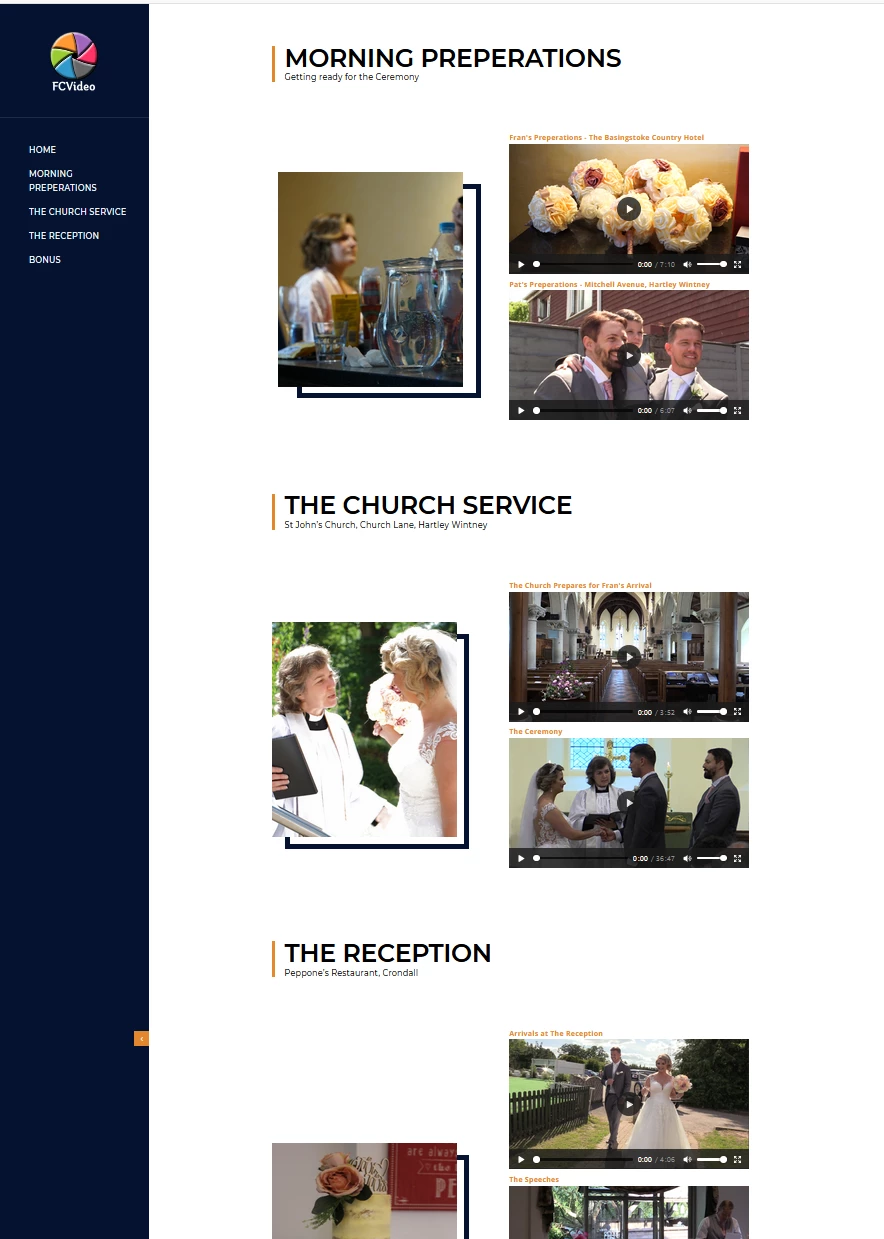
    OK - so eventually went for a webpage - brought a template from VideoHive (Sure others could easily find some) - and 'butchered it' in Dreamweaver (was originally a CV page!). But came out fine in the end, and will be the basis for me going forward.

    All files  were placed onto the USB Stick - to HTML file, CSS etc, Video Files. There is no access to the internet required

    7 replies

    fcvideo
    fcvideoAuthorCorrect answer
    Inspiring
    Jul 1, 2019 12:39 PM UTC

    OK - so eventually went for a webpage - brought a template from VideoHive (Sure others could easily find some) - and 'butchered it' in Dreamweaver (was originally a CV page!). But came out fine in the end, and will be the basis for me going forward.

    All files  were placed onto the USB Stick - to HTML file, CSS etc, Video Files. There is no access to the internet required

    Translate
    fcvideo
    fcvideoAuthor
    Inspiring
    Jun 15, 2019 7:28 PM UTC

    So is a single HTML website the way to go? And if so, any idea how to get one created (can't get my head around dremweraver).

    Translate
    fcvideo
    fcvideoAuthor
    Inspiring
    Jun 15, 2019 7:59 AM UTC

    Looking on other sites - one of the suggestions would be to create a simple webpage - as shown here

    The trouble is I don;t know how to do that - and not sure I have the time to start learning Dreamweaver before it is needed.

    Any other options?

    Translate
    Kevin J. Monahan Jr.
    Legend
    Jun 14, 2019 7:55 PM UTC

    Thanks for your question. We are seeing more of these kinds of questions now. Let's get a discussion going.

    Regards,
    Kevin

    Translate
    Kevin Monahan - Sr. Community and Engagement Strategist – Adobe Pro Video and Audio
    Community Expert
    Jun 15, 2019 10:56 AM UTC

    Not wishing to hijack the thread, I would also like to known how to make non dvd or online distribution cost effective. I often film amateur dance and musical performances and I have only ever been asked for dvds, I can make a couple of hundred that are easily affordable, what is now the 'on line' equivalent of this?

    Translate
    Stan Jones
    Community Expert
    Community Expert
    Jun 15, 2019 5:06 PM UTC

    Not a hijack in my opinion; selling events is a key requirement. I don't have all my notes on this topic in one place. No perfect solution yet...

    Translate
    Peru Bob
    Community Expert
    Community Expert
    Jun 14, 2019 5:58 PM UTC

    VLC player can play an iso file with menus.

    Translate