May 20, 2020
Question

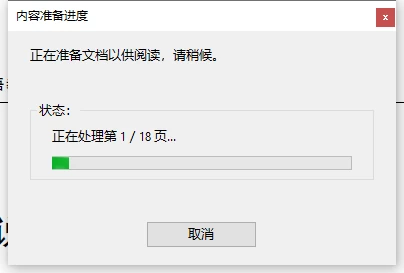
如何禁止显示内容准备进度?

  • May 20, 2020
  • 2 replies
  • 2375 views

如何禁止显示内容准备进度?

每次用adobe reader打开pdf文件,都会出现内容准备进度。已经有差不多一个时间了。
This topic has been closed for replies.

2 replies

Adobe Employee
May 21, 2020

Hi,

This dialog is displayed when some assistive technology (like screen reader) is running/has been used on the system. However, some other tools like some keypress tracking tools are also detected as assistive technology.

If you are not an assistive technology user, just go to Acrobat Preferences -> Accessibility and uncheck the option "Enable Assistive Technology Support". This will stop the dialog from appearing.
If you are an assistive technology user, then go to Acrobat Preferences ->Reading and Under “Screen Reader Options” select “Only read the currently visible pages”. This will stop the dialog from appearing.


Thanks
Rachit

AkanchhaS8194121
Legend
May 20, 2020

Hey there,


Sorry to see the trouble caused.

Have you recently installed any patch or updated Reader DC? Or this issue has been there in past too?

Cause of the error:

When setting up documents for reflow this message may be displayed. Changing the preference within Reading allows Acrobat to process the current page only.


Solution:

1. Go to Edit > Preferences > Reading.

2. Under "Screen Reader Options" select "Only read the currently visible pages".>OK>Reboot Reader


Hope this helps!


Thanks,

Akanchha
