Hsin26350168
Participant
April 14, 2017
Answered

Acrobat 17.9.20044.25828 FAILED to start

  • April 14, 2017
  • 2 replies
  • 1290 views

Hello Community/Adobe Support.

(my favorite language: Traditional Chinese)

Since yesterday we to have Application Errors from acrobat.exe (acrobat.dll) on 2 different OS (win 7 enterprise SP1 & win 10.14393 education, where the Updater installed the new Version 17.009.20044 automatically.

- Singal Error Message by all users (Admin too) when opening Adobe Acrobat DC Continuous (even without any window shown) every time.

(Adobe Acrobat DC has stopped working

  A problem caused the program to stop working correctly. Please close the program.

  --> Stop the program.

  --> Debug the program.)
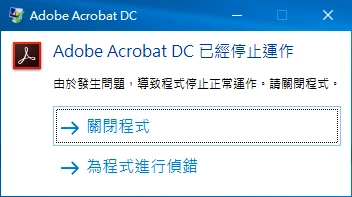
- Already tried restarted Windows and Repair / Reinstall (install newest Acrobat after Uninstall it).

BTW,downgrade acrobat to version 15 (2015.023) in windows 7 working well.

Any Ideas?

Thanks

Mini dump link:Dropbox - acro_17.dmp and Error log below (win 10):

-System

-Provider
[ Name]Application Error

-EventID1000

[ Qualifiers]0
Level2
Task100
Keywords0x80000000000000
-TimeCreated

[ SystemTime]2017-04-14T02:34:15.616400900Z
EventRecordID479433
ChannelApplication
ComputerDESKTOP-68QUJON
Security
-EventData

Acrobat.exe
17.9.20044.25828
58e430d1
Acrobat.dll
17.9.20044.25828
58e430b0
c0000005
0005e888
3b70
01d2b4c79b8ea125
C:\Program Files (x86)\Adobe\Acrobat DC\Acrobat\Acrobat.exe
C:\Program Files (x86)\Adobe\Acrobat DC\Acrobat\Acrobat.dll
29278be1-8709-400e-959b-cbac21d853be
This topic has been closed for replies.
Correct answer Hsin26350168

Actually, the main cause of the problem is registry below:

HKEY_CURRENT_USER\SOFTWARE\Adobe\Adobe Acrobat\DC\Originals

bDisplayAboutDialog DWORD value is 1

modify value to 0 or delete bDisplayAboutDialog..... All down.

2 replies

Adobe Employee
August 11, 2017

With the latest release of Acrobat on 8th August 2017, this issue has been addressed.

To get the latest product update, within the product, click on the menu Help-> Check for updates.

Hsin26350168
Participant
April 14, 2017

When we uninstall acrobat and install again (with cleanup temp directory), it works again !!!

Hsin26350168
Hsin26350168AuthorCorrect answer
Participant
April 14, 2017

Actually, the main cause of the problem is registry below:

HKEY_CURRENT_USER\SOFTWARE\Adobe\Adobe Acrobat\DC\Originals

bDisplayAboutDialog DWORD value is 1

modify value to 0 or delete bDisplayAboutDialog..... All down.