
May 22, 2013
Answered

Acrobat Pro XI 11.0.3 not recognising email client

  • May 22, 2013
  • 16 replies
  • 291919 views

Windows 8

Office 2013

Acrobat Pro 11.0.3

Error: "Either there is no default mail client or the current mail client cannot fulfill the messaging request.  Please run MS Outlook and set it as the default mail client etc."

I've confirmed Outlook in default prog', I've tried the various registry hacks and also deleated MSMAPI32.DLL.

This error appeared after updating Office 2013 and Acrobat Pro 11.0.3.

A fix would be appreaciated.

Thank you.
This topic has been closed for replies.
Correct answer jwilfongAZ

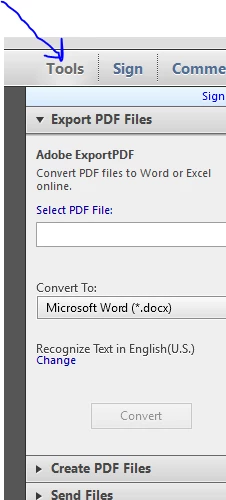
Well, I may have a work around. I don't know which version of Adobe Acrobat that Adobe started having the program default to showing a  panel on the right side of the window but this panel looks like the root of the problem. The panel shows Tools / Sign In / and Comments. Simply click on the words Tools / Sign In / Comments (whichever one you have showing) to make the panel go away. Exit acrobat. Execute acrobat. Error is gone. Renable panel. Error will reappear almost immediately.

My experience is the message only shows when one of these panels are visible. I tested on Acrobat Reader X and XI with the same result. Hiding the panel gets rid of the error.

--John

16 replies

Participant
July 1, 2013

After I had installed Office 2013 and upgraded from Reader X to Reader XI, I started to get the above error when opening any PDF file.

To resolve this I uninstalled Reader XI and reinstalled Reader X.

No error since.

June 27, 2013

I get the error and I don't use Outlook, don't want to use Outlook and have deleted Outlook from my computer.  Why is Adobe forcing me to use Outlook?  It is ridiculus, I use Google Apps, set that as default and I still get the stupid error.  Between the Creative Cloud and now this, I am ready to drop Adobe from all of our computers.

Mark

Participating Frequently
June 27, 2013

I wish someone would fix this, or provide a workaround or something.  It is so annoying.

Participating Frequently
June 7, 2013

Same issue here, using Outlook 2010 as my default email client on Win 7 and Acrobat Pro XI (through Creative Cloud).  Has anyone found a real fix?  I use 32-bit Win7 and Acrobat.

Participant
May 23, 2013

I have the exact same problem with Reader, both 11.0.3 and 10.1.7. I'm using 64 bit Windows 8 and 64 bit Microsoft Office 2013 (including Outlook). Changing the email preferences in Reader and Windows does not make a difference. The only way to eliminate the error is to roll back to the previous version of Reader.

May 26, 2013

Hi Vette06,

Thanks for the info.  I've rolled back to Reader 10 then 9 but didn't have any luck.  Which versoin do you have installed, and are you running Acrobat Pro also?

May 26, 2013

I've found the partial fix at the following link: http://answers.microsoft.com/en-us/office/forum/office_2013_release-outlook/error-when-launching-outlook-in-windows-8/82f8588e-e8d9-4230-8559-0429982a378c - see reply from HurdleRemoved regarding a registry edit. 

I say this is a partial fix because this only worked with Acrobat Pro XI, but in Reader I'm still getting the no default mail client error.

pwillener
Legend
May 23, 2013

Aceracer27 wrote:

deleated MSMAPI32.DLL

Why?

May 24, 2013

Hi Pat, was following a suggestion that allowing Outlook to recreate MSMAPI32.DLL (i.e. delete the file then Outlook recreates it upon restart) may fix the issue.

pwillener
Legend
May 24, 2013

Ah, thank you for the explanation!

Regarding Email Accounts in Preferences; there is - here is a screenshot of my Preferences in Acrobat 11.0.3

Adobe Employee
May 22, 2013

What happens if you set an email account at Acrobat's Preferences Panel > Email Accounts?

May 24, 2013

Hi Rebecca,

There isn't an email catagory in Preferences for Acrobat Pro.  It is set to Outlook 2013 in Adobe Reader.  Reader has has the same issue.