
Question
Acrobat Reader 2020 Classic will not set as default for .pdf files
We are using Acrobat Reader 2017 Classic right now.
But we want to switch to the new version 2020 classic.
With the Customization Wizard we have generated a .mst transform file.
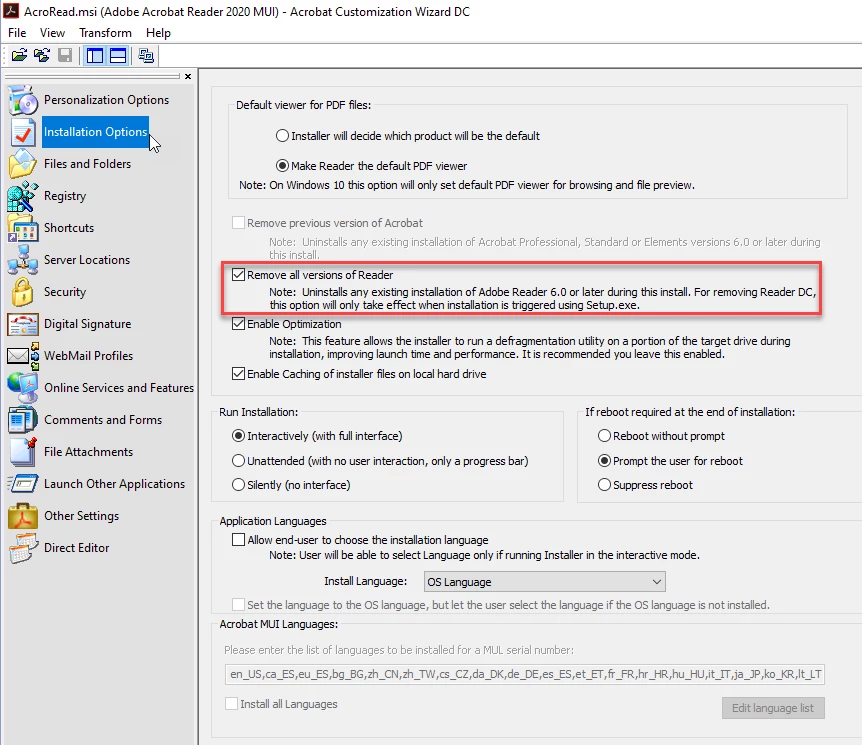
By 'Installation Options' we set
To install the Acrobat Reader we using this commandline
msiexec /i <pathtomsi>\AcroRead.msi /qn /norestart TRANSFORMS=<pathtomst>\AcroRead.mstAfter finishing the install I try to open an pdf file and get this message
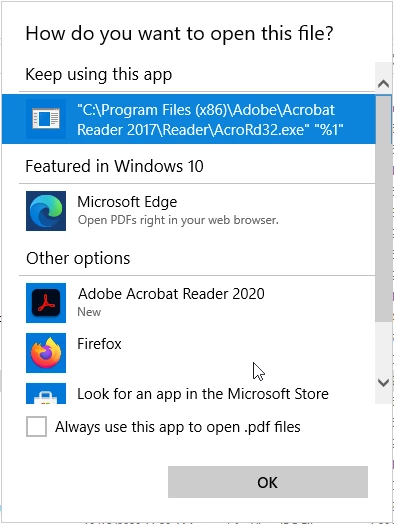
If we uninstall the Acrobat Reader 2017 Classic before and then installing version 2020 all works perfectly.
So I think there is a problem with the uninstall routine during the installation.
Has anybody the same issue, or is there somebody from Adobe who could check this?
Thanks!


 AdChoices