
Participant
October 14, 2025
Question

Acrobat Reader: Advanced Search: untitled

  • October 14, 2025
  • 3 replies
  • 281 views

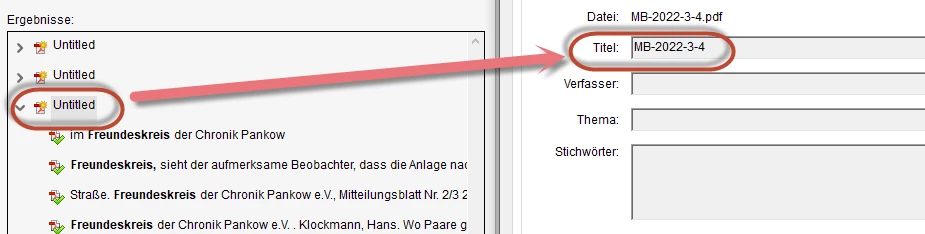
The advanced search result shows for some files the name 'untitled'.  I could identify that this information is found in the Title filed of file description/metadata. I could change the information in the file and started the advanced search again. In search result the file name is again 'untitled'. 


I assume that there is  a cache. Is this correct? How can I delete the cache? is there an automatic process that deletes the cache? How often?

Is there an other reason why  search resullt don't show the correct title?
Win 10, Acrobat Reader latest version 

3 replies

Bernd Alheit
Community Expert
Community Expert
October 15, 2025

You can clear the cache in the preferences of Acrobat Reader.

JR Boulay
Community Expert
Community Expert
October 14, 2025

[MOVED TO THE ACROBAT READER DISCUSSIONS]

Acrobate du PDF, InDesigner et Photoshopographe
try67
Community Expert
Community Expert
October 14, 2025

You can't change the file's metadata with the free Reader. Are you sure that's what you're using?

ralf_1172Author
Participant
October 14, 2025

I know. I changed the metadata with an other tool  (PDF24). The screenshot shows the actual information in the file.

try67
Community Expert
Community Expert
October 14, 2025

Hmmm, that is strange. Maybe the search tool is using the XMP metadata tags, instead of the PDF ones.