


Acrobat Reader crashes opening LibreOffice user guide
Previously reported at https://bugs.documentfoundation.org/show_bug.cgi?id=172842 where it was confirmed by another user (running Windows 11) but not resolved. I am running Windows 10.
I downloaded the Libre Office user guide and opened it. Acrobat Reader crashed.
I downloaded it again and did a binary compare - both versions were identical, and Acrobat Reader crashes each time.
I open hundreds of PDFs and have never seen Acrobat Reader crash before.
I am using Adobe Acrobat Reader version 2026.001.21691 (64 bit).
I checked for updates and at the time of writing there are none.
I opened the file in PDF Creator v11.30.1 which did not crash.
Procedure to trigger the crash:
Open https://books.libreoffice.org/en/ -
Clicking “Download PDF” button opens https://nextcloud.documentfoundation.org/s/rbd2ipG6RP8F779
I click the three dots on the LH side of the black bar and downloaded the file.
Opening that file crashes Acrobat Reader.
User guide details:
File timestamp: 2026-07-10 10:25:28
File size: 28,042,338 bytes
File crc32: 77fed130
Event logs:
----------------------------------------------------------------------------------
Faulting application name: Acrobat.exe, version: 26.1.21691.0, time stamp: 0x6a3c1a43
Faulting module name: Acrobat.dll, version: 26.1.21691.0, time stamp: 0x6a3c1a3d
Exception code: 0xc000041d
Fault offset: 0x0000000003584047
Faulting process ID: 0x1488
Faulting application start time: 0x01dd162284512a4e
Faulting application path: C:\Program Files\Adobe\Acrobat DC\Acrobat\Acrobat.exe
Faulting module path: C:\Program Files\Adobe\Acrobat DC\Acrobat\Acrobat.dll
Report ID: a76000e9-736c-43b3-988d-84c2e5c51581
Faulting package full name:
Faulting package-relative application ID:
----------------------------------------------------------------------------------
Faulting application name: Acrobat.exe, version: 26.1.21691.0, time stamp: 0x6a3c1a43
Faulting module name: Acrobat.dll, version: 26.1.21691.0, time stamp: 0x6a3c1a3d
Exception code: 0xc000041d
Fault offset: 0x0000000003584047
Faulting process ID: 0x28d0
Faulting application start time: 0x01dd1622952bd8cc
Faulting application path: C:\Program Files\Adobe\Acrobat DC\Acrobat\Acrobat.exe
Faulting module path: C:\Program Files\Adobe\Acrobat DC\Acrobat\Acrobat.dll
Report ID: c9d10963-0e6f-4b74-abcb-35c6b903a3f3
Faulting package full name:
Faulting package-relative application ID:
----------------------------------------------------------------------------------
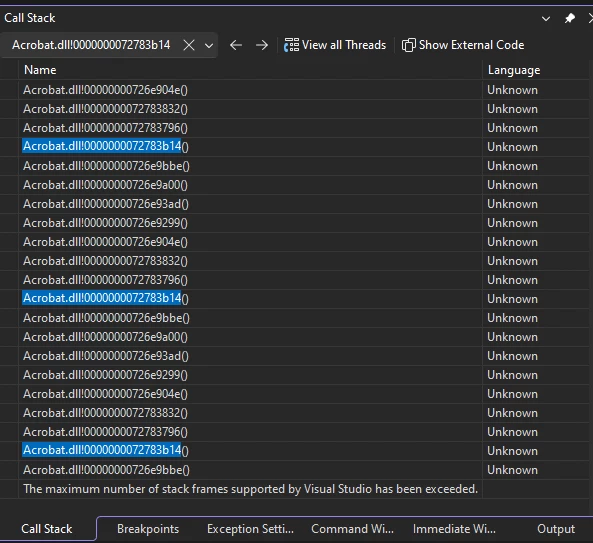
I do have Visual Studio on this machine but I don’t use it, so I don’t know how to export the call stack. I did notice that after the first dozen or so entries the same 8 entries were repeated over and over again.
 AdChoices