
Acrobat Reader DC changes to Acrobat DC after update
Hi
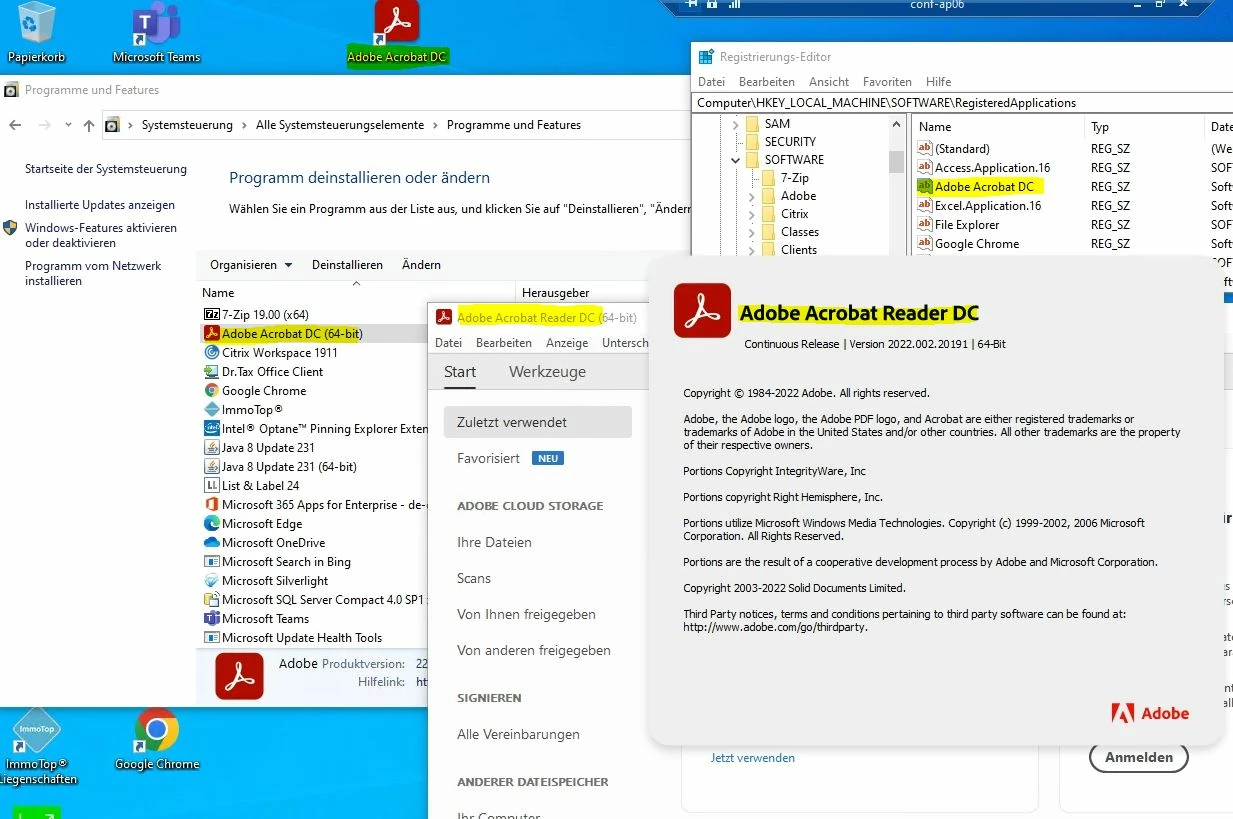
We're using Adobe Acrobat Reader DC as our primary PDF application and manage the default file type associations using GroupPolicy (as outlined here: https://www.adobe.com/devnet-docs/acrobatetk/tools/AdminGuide/pdfviewer.html). This used to work very well in the past, but lately we've noticed that some of our users were loosing this setting and .pdf started to be opening in MS Edge again. After some troubleshooting, I've noticed that the version changed from Adobe Acrobat Reader DC to Adobe Acrobat DC, which means that the ProgID changed and thus, the default file type associations through Group Policy would no longer work (Reader uses the ProgID "AcroExch.Document.DC" while Acrobat is using "Acrobat.Document.DC"). While the application itself shows "Adobe Acrobat Reader DC" in the "about Adobe Acrobat" window, it'll turn up as "Adobe Acrobat DC" in the registry and in the control panel. Everytime this happend, the application was updated prior so I think the updates are causing this.
Any help would be greatly appreciated.


 AdChoices