Known Participant
September 8, 2018
Question

Acrobat Reader DC no option to print 2 sided

  • September 8, 2018
  • 2 replies
  • 1040 views

I downloaded and installed Adobe Acrobat Reader DC on my iMac running macOS Sierra 10.12.6. I own a Brother HL-L6200DW duplex (2-sided) printer. According to Adobe when I click on the print button I should see an option to Print on both sides of the paper.
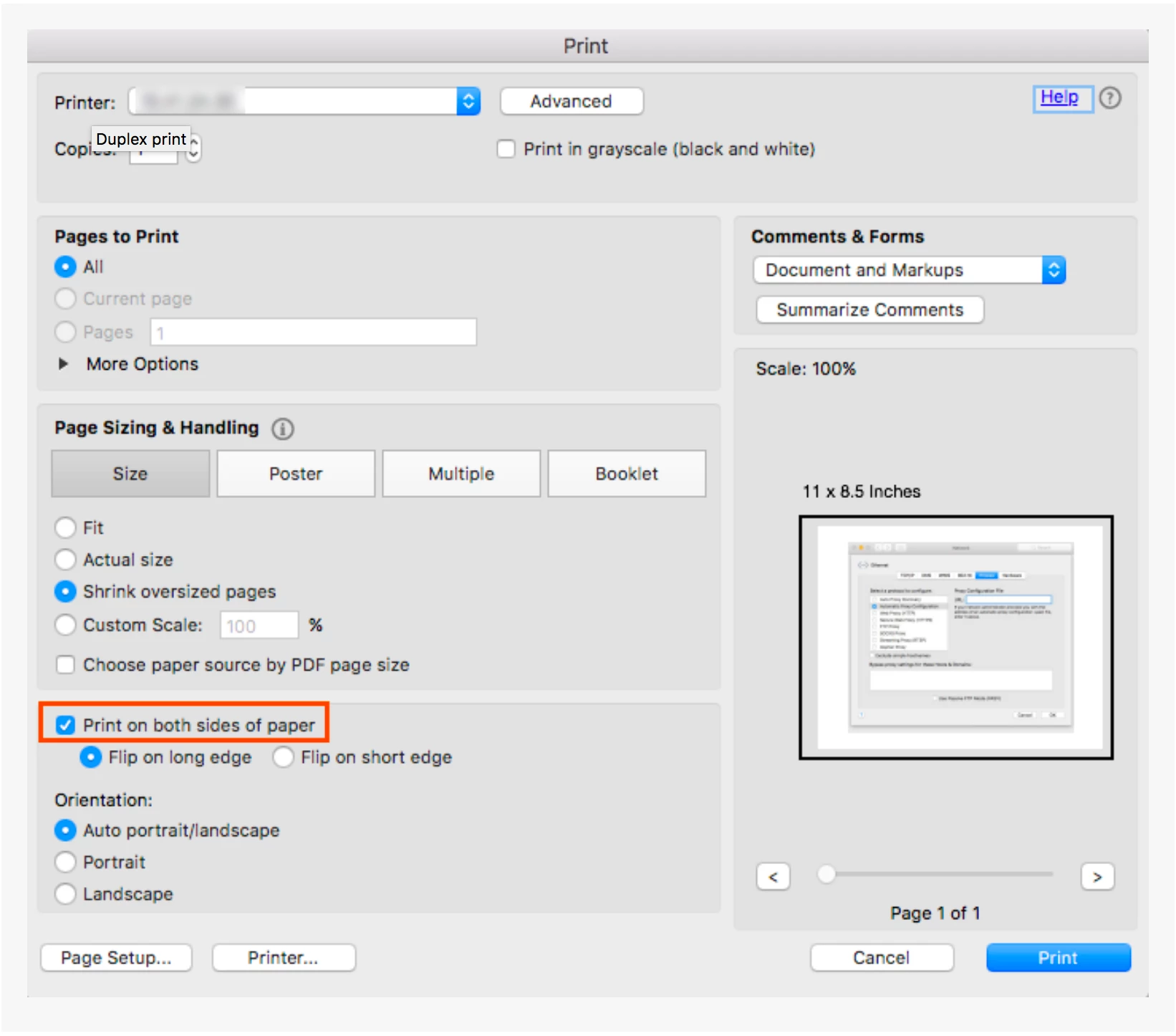
But on my print dialog box this is NOT there.

Can someone help please?

This topic has been closed for replies.

2 replies

Participant
October 24, 2018

Currently on IMAC with 10.13.6 High Sierra + Canon TS6020 + Most recent Acrobat DC. No way to print 2 sided from Acrobat.
I have been having to export a PDF then open in Preview in order to get the option to print Two-sided.

robertc92072904
Participant
September 14, 2018

I have a similar problem.  I am using a MAC with latest OS software High Sierra10.13.6.  HP Officejet Pro 8620 that does support two sided printing connected over internet.  The "two sided option" does NOT show up on the Acrobat print dialog (as described above).  There is a checkbox in the "Printer..." dialog presented by the MAC OS, but it is unchecked.  Nonetheless, the document always prints two sided.

Help please.