
Participant
May 26, 2021
Answered

Acrobat reader does accept image formats but only .pdf while importing graphic for digital signature

  • May 26, 2021
  • 2 replies
  • 7350 views

Hello Community, I am using Acrobat Reader DC (Version 2021.001.20155)


When I try to assign a graphic to my digital signature, I get to choose only .pdf files and not image files such as .png, .jpeg etc (See attached image).   The signature image needs to have transparent background so that it does not hide the logo. Although I managed to create a pdf file of the signature image with a transparent background (long process), it would have been better if I had an option to choose .png file directly.  Can we expect an update on this?
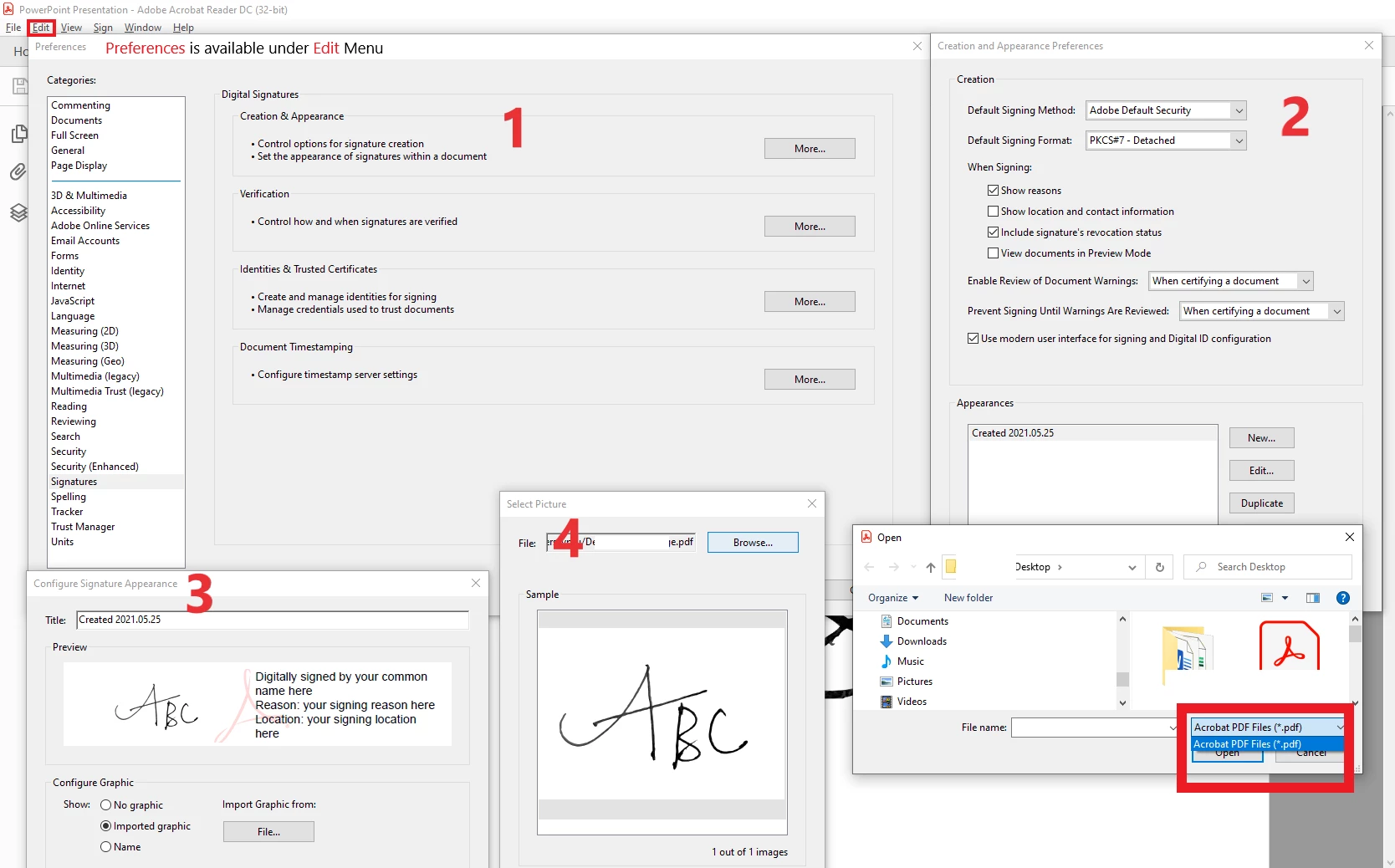
 

This topic has been closed for replies.
Correct answer Bernd Alheit

When you use Adobe Acrobat you can use image files.

2 replies

Bernd Alheit
Community Expert
Bernd AlheitCommunity ExpertCorrect answer
Community Expert
May 26, 2021

When you use Adobe Acrobat you can use image files.

Participant
May 26, 2021

Hi Bernd Alheit,


Thank you so much for your reply and it is very helpful. Acrobat Pro DC does support several formats including .png. I was using Acrobat Reader DC free version. I have a pro version too but somehow I missed to check there earlier.


Nonetheless, I still wonder if it is intentional to keep this option exclusive to Acrobat Pro DC or it is just missed to be included in free version.

try67
Community Expert
Community Expert
May 29, 2021

My guess is the latter. It used to only be possible to only select PDF files in earlier versions of Reader when selecting an icon for a button field, but now you can select image files, too. I think this feature was just left out from that upgrade, since it doesn't make much sense not to allow it in one place and allow it elsewhere.

Participant
May 26, 2021

I am not able to replace the image in the question. Here is a better version.