Participating Frequently
September 8, 2021
Question

Acrobat Reader Windows 64bits crash when 3rdParty Plugin installed

  • September 8, 2021
  • 3 replies
  • 486 views

Steps to reproduce:

1. Install Acrobat Reader 64bits on Windows

2. Install any 3rdPargy Acrobat Reader plug-in,  e.g. the "BasicPlugin" from Acrobat SDK samples

3. Launch Acrobat Reader 64bits

4. Acrobat Reader 64bits was launched, but after 3~4 seconds, Application crashed.

Screenshots & debug call stacks:
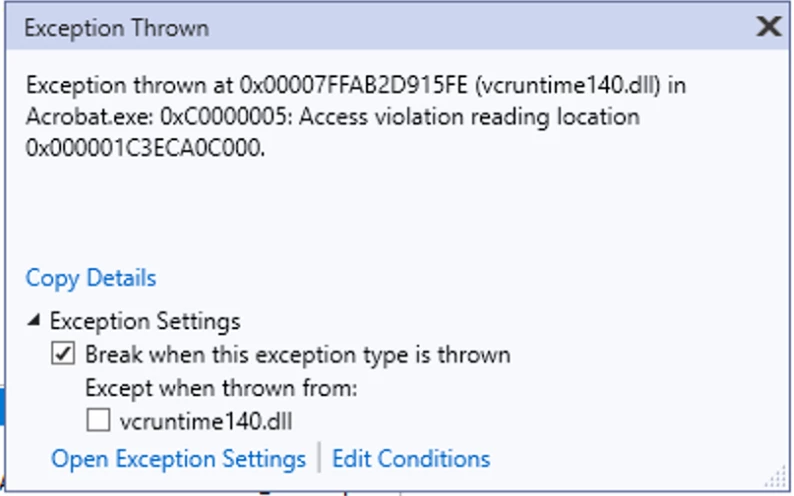
 

Notes:

* Only an issue on Windows

* Only an issue on Acrobat Reader 64bits. Plug-in works fine on Acrobat 64bits and Acrobat Reader 32bits.

Please consider fixing the crash.


This topic has been closed for replies.

3 replies

JR Boulay
Community Expert
Community Expert
September 9, 2021

MOVED TO THE ACROBAT READER FORUM

Acrobate du PDF, InDesigner et Photoshopographe
Legend
September 8, 2021

Reader should not crash, but perhaps you should not be doing this, either.

Reader is supposed to ignore a plug-in that has not been Reader enabled. Your plugin should not be installed when running Reader since you do not have a Reader key from Adobe. 


Adobe do not offer support in these forums (we are just users). Please report the issue, though. Here is the page https://www.adobe.com/products/wishform.html

NEXUAuthor
Participating Frequently
September 9, 2021

Thanks for response, but our plugin are reader enabled.  We do have a reader key to enable plugin in reader.

Like I mentioned in previous message, our plugin runs fine in Acrobat Reader 32bits. This seems to be an issue of Acrobat Reader 64 bits itself (memory fail).


I'll report issue to the wishform.html

NEXUAuthor
Participating Frequently
September 8, 2021

It seems no where I can upload the source & binaries. If needed, I can share the sample code & binaries. Please let me know: neil.xu@esko.com