October 17, 2018
Answered

Acrobat v19 - Emailing Has Become a Pain

  • October 17, 2018
  • 2 replies
  • 935 views

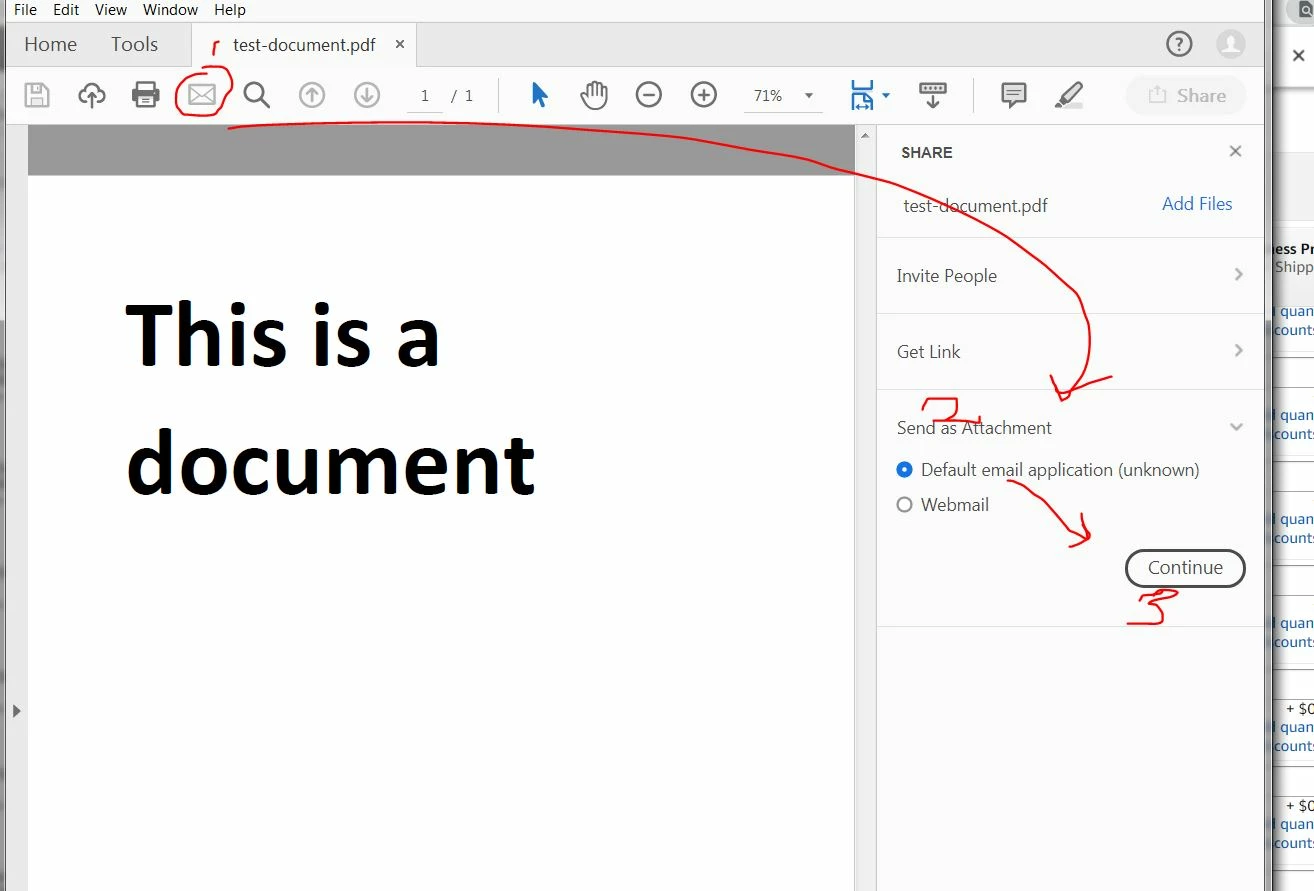
Emailing .pdf documents has become a pain, since moving to version 19.  I used to be able to click the email button and it would automatically open up a new email, with the document attached. Now, it takes 3 clicks, instead of 1. In Preferences, I have Default email application checked, which is fine - it does go to the right email app, but sheesh - why the extra clicks?

This topic has been closed for replies.
Correct answer AkanchhaS8194121

Hi Truckprousa,

Sorry to hear about your experience with the latest version.

With the Acrobat and Acrobat Reader DC October 2018 release (19.008.20071), we have introduced a Unified Sharing experience that allows you to easily invite people for collaborating on documents across desktop, mobile, and web.

With the new unified sharing experience, the existing Send, or Attach to Email entry points, like the Email icon  in the top bar now takes you to the new unified share pane. We encourage you to use our new sharing options.

We appreciate your feedback on the same, use this form to request new features or suggest modifications to existing features- Feature Request/Bug Report Form

However, if you use Send documents as attachment frequently for your work, you can change the behavior of the Email icon  to one-click Attach to email experience using the registry/plist file mentioned below. After applying this fix, you can continue to use the Adobe Document Cloud sharing options, using the Share button in the top right.

Here is help document with the detailed steps- How to use the email icon to directly send file as attachment

Regards,

Akanchha

2 replies

Participant
March 2, 2020

How can I get this attachment?  Just keeps coming up with 404 error


try67
Community Expert
Community Expert
March 3, 2020
AkanchhaS8194121
AkanchhaS8194121Correct answer
Legend
October 17, 2018

Hi Truckprousa,

Sorry to hear about your experience with the latest version.

With the Acrobat and Acrobat Reader DC October 2018 release (19.008.20071), we have introduced a Unified Sharing experience that allows you to easily invite people for collaborating on documents across desktop, mobile, and web.

With the new unified sharing experience, the existing Send, or Attach to Email entry points, like the Email icon  in the top bar now takes you to the new unified share pane. We encourage you to use our new sharing options.

We appreciate your feedback on the same, use this form to request new features or suggest modifications to existing features- Feature Request/Bug Report Form

However, if you use Send documents as attachment frequently for your work, you can change the behavior of the Email icon  to one-click Attach to email experience using the registry/plist file mentioned below. After applying this fix, you can continue to use the Adobe Document Cloud sharing options, using the Share button in the top right.

Here is help document with the detailed steps- How to use the email icon to directly send file as attachment

Regards,

Akanchha
October 17, 2018

Thanks. Pretty dumb change, considering most people probably use this functionality at work and need to send attachments through email. I get the whole cloud sharing thing, but no thanks. Users shouldn't be forced to use do hack the registry, but I'm glad that you did have a solution for me.     

AkanchhaS8194121
Legend
October 19, 2018

Thanks for your understanding.

We know that the changes in the Acrobat UI with the latest update were not appreciated by all the users. Your Feedback is valuable for us, and it will be considered in future release.

Thanks,

Akanchha