

Participant
January 13, 2017
Answered

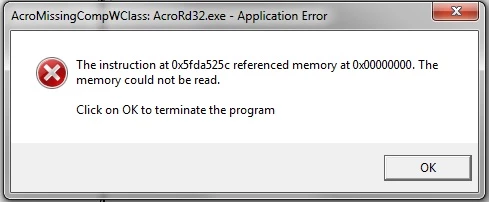
Acromissingcompwclass: AcroRD32.exe Application error

  • January 13, 2017
  • 9 replies
  • 29829 views

Hi:

I have all of a sudden been receiving the following error. When I click ok I am kicked out of the program.  I cannot access pdfs to print them as a result.  Help?
    This topic has been closed for replies.
    Correct answer pinoy831boy

    Not sure why it's happening.  I'm sure there's an error with DC. Here's the link for the reinstallation of Reader.  In Step 3, select Reader 11 and not DC.  Hope this helps.  Let me know. Thanks!

    Adobe - Adobe Acrobat Reader DC Distribution

    9 replies

    Adorobat
    Participating Frequently
    January 17, 2017

    Hi all,

    Try to follow the steps given below and see if that resolves the issue:

    1- Locate Reader's shortcut on desktop>right click select Properties

    2- Under Compatibility tab>uncheck the box next to Run this program in compatibility mode for>then click Apply>OK

    marcyd72530009
    Participant
    January 17, 2017

    When I went under the Compatibility tab, the box to Run this program in compatibility mode was not checked.  I checked the box for my operating System...Windows 7...and for now it's working.  Did an update remove the check in the box?  I'm getting frustrated with Adobe working for a day or two and then crashing again, leaving me without a reader and desperate to find a way to get it to work again.

    Adorobat
    Participating Frequently
    January 17, 2017

    Hi marcyd72530009,

    Looking at your problem, there seems to be some change, currently i am not aware what actually changed, and it seems checking the compatibility option is working.

    marcyd72530009
    Participant
    January 17, 2017

    I got rid of Adobe DC and reinstalled Windows 7 Reader 11 and now it's crashing again.  Can you help?

    Participant
    January 14, 2017

    I have the same problem there seems to be a major problem with Adobe reader I have uninstalled ,cleaned ,reinstalled and tried all the steps suggested .I have given up and requested a hard copy of the document I wanted to print .Very frustrating .Is there an alternative to Adobe?

    January 13, 2017

    i am also having the same problem....worked fine yesterday....i have now spent an entire day trying all the suggestions on the web to no avail.   i use pdf files alot in business....don't know what to do!!!  Help!!!!

    pinoy831boyCorrect answer
    Participant
    January 13, 2017

    Not sure why it's happening.  I'm sure there's an error with DC. Here's the link for the reinstallation of Reader.  In Step 3, select Reader 11 and not DC.  Hope this helps.  Let me know. Thanks!

    Adobe - Adobe Acrobat Reader DC Distribution

    January 13, 2017

    Same problem all morning!!

    Participant
    January 13, 2017

    I am having the some error, have used the clean up tool, uninstalled and reinstalled and still not resolved

    Participant
    January 13, 2017

    I've noticed that the problem does not resolve if you reinstall DC after using the cleaning tool.  I reinstalled XI instead and the problem seems resolved.  But yes, it's still an issue if you want to use DC.

    Participant
    January 13, 2017

    Hi pinoy831boy:

    I went through the cleaning tool and reinstall DC and it did not resolve.  How did you find XI to install?  I think I only saw Reader ii or something like that.  Why is this happening!

    Adorobat
    Participating Frequently
    January 13, 2017

    Hi nicolef17116956, marcyd72530009

    Try to follow the steps given in the following link:

    Re: APPLICATION ERROR 

    Also, confirm the version of Reader installed on the machine.

    To check the version, launch Reader>click Help menu>select About Adobe Acrobat Reader

    marcyd72530009
    Participant
    January 13, 2017

    I'm also having the same problem.  You can't do anything, can't read if more than a page long. You just get kicked out.

    January 13, 2017

    I also have the same problem since Friday morning 13 January with Mozilla FireFox but not with Explorer.

    - Suppressed FireFox and re-installed

    - Suppressed Acrobat Reader DC and re-installed

    Still been kicked-off

    I'm suspecting an update been done between Thursday and Friday (?)
