
Participant
November 2, 2016
Question

AcroRd32.exe - Application Error,,

  • November 2, 2016
  • 2 replies
  • 2482 views

Hi All,

I had a problem after I was asked by Coursea to allow Adobe Flash to detect my web camera. To this request I allowed a script file to download from Adobe. The camera was not detected. The verigy identity section was not completed.

What happens next is each time I open a PDF file using Adobe Reader XI (Free Reader) I got a error message. Plus an annoying sound!

The error message is below. I had already reinstalled Adobe Reader XI, and uninstalled Flash Player.  My browser is Google Chrome and its set for interfacing with Adobe. Maybe there is more in the Chrome browser.

My request is how to stop the Application Error message???

I had after reinstalling Adobe Reader XI reinstalled the antivirus protection program Trend.
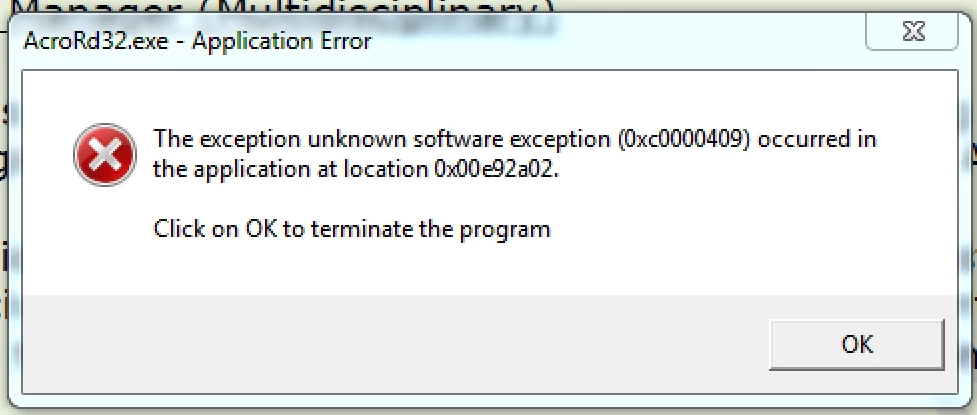
Kind Regards,

Karl.

This topic has been closed for replies.

2 replies

Adorobat
Participating Frequently
November 3, 2016

Yes, Adobe Reader DC is a free application.

Adorobat
Participating Frequently
November 3, 2016

Hi Karl,

Could you please try removing Acrobat XI using Cleaner tool from here: Download Adobe Reader and Acrobat Cleaner Tool - Adobe Labs , restart the computer, and reinstall Reader XI from here: Adobe - Adobe Acrobat Reader DC Distribution  (select your operating system, language, and version accordingly)

Which operating system is installed on the machine?

Participant
November 3, 2016

Hi Adobe Forum,

The OS is Windows 7.I am not on the subscription service.Does Adobe DC has a reader without subscription? Before I install. Cheers and Thanks.

[personal information removed by moderator]