
malkad25551387
Participant
October 12, 2018
Answered

Adding comments to text replacement gone??

  • October 12, 2018
  • 1 reply
  • 382 views

Hi there,

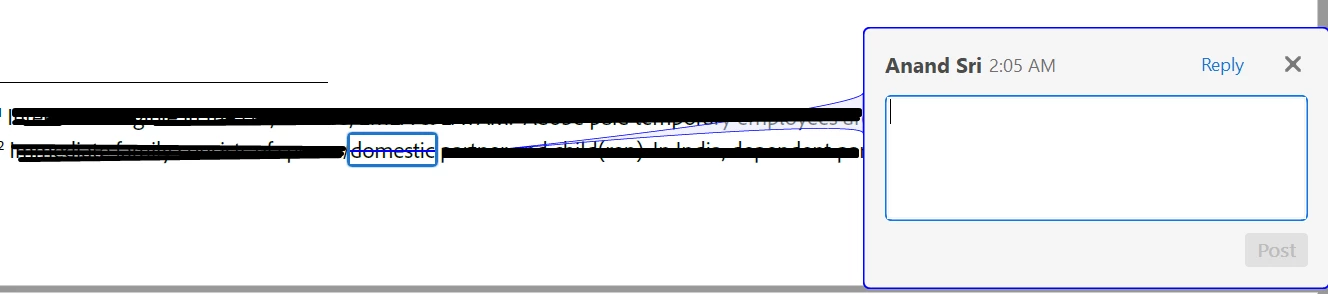
Today I updated my reader and now, when I want to add a comment to a text replacement (the blue line through a word) it does not open automatically like it used to. I now have to reselect the word I want to comment on.

Is this intentionally, if so, please bring it back, because this is terrible!

If not, does anybody know if I can fix it myself??

Specs

Asus laptop

Windows 10

Version 19.2048 of Adobe

Thank you,

Malka

p.s. I'm translating from a Dutch version of Adobe, so not 100% sure it's the right name for the function, but if you select a word and right click, it's the third option.
This topic has been closed for replies.
Correct answer AnandSri

Hello Malkad,

We're sorry for the trouble you had, what is the dot version of Adobe Reader installed? To identify to the version, please take help from the article Identify the product and its version for Acrobat and Reader DC

Are you referring to the 'StrikeThrough' option in 'Commenting Tool'?

When I highlight any word and right-click>select Strikethrough Text>I am getting the comment pop-up.

navigate to Preferences > Commenting>Pop-Up open Behaviour>Choose all the options.

You may also refer to Mark up text with edits, Adobe Acrobat

Make sure that you have the latest version of Adobe Reader 19.008.20074 installed, check for any pending updates from help>check for updates, reboot the machine and check.

If you still experience any issue, use Acrobat cleaner tool to remove Adobe Reader Download Adobe Reader and Acrobat Cleaner Tool - Adobe Labs

Reboot the machine and install Adobe Reader from Adobe - Adobe Acrobat Reader DC Distribution

once Adobe Reader is installed, download and install the latest patch of Adobe Reader from help>check for updates.

Let us know how it goes and share your observation.

Thanks,

Anand Sri.

1 reply

AnandSri
AnandSriCorrect answer
Legend
October 12, 2018

Hello Malkad,

We're sorry for the trouble you had, what is the dot version of Adobe Reader installed? To identify to the version, please take help from the article Identify the product and its version for Acrobat and Reader DC

Are you referring to the 'StrikeThrough' option in 'Commenting Tool'?

When I highlight any word and right-click>select Strikethrough Text>I am getting the comment pop-up.

navigate to Preferences > Commenting>Pop-Up open Behaviour>Choose all the options.

You may also refer to Mark up text with edits, Adobe Acrobat

Make sure that you have the latest version of Adobe Reader 19.008.20074 installed, check for any pending updates from help>check for updates, reboot the machine and check.

If you still experience any issue, use Acrobat cleaner tool to remove Adobe Reader Download Adobe Reader and Acrobat Cleaner Tool - Adobe Labs

Reboot the machine and install Adobe Reader from Adobe - Adobe Acrobat Reader DC Distribution

once Adobe Reader is installed, download and install the latest patch of Adobe Reader from help>check for updates.

Let us know how it goes and share your observation.

Thanks,

Anand Sri.