
Participant
August 15, 2019
Question

Adding MS-Word files into existing PDF via Organize Pages Tool

  • August 15, 2019
  • 3 replies
  • 2936 views

I have an existing PDF, and I'm adding various documents into it, some of which are .docx files. I'm 100% certain that on my old PC, I could select the .docx file, insert it, and then Adobe would automatically open the file, convert it to pdf, and put the pages in my pdf document.

On my new setup (Lenovo Thinkpad T490 running Windows 10, Adobe Acrobat Pro DC 2019.012.20035, I get this error instead:
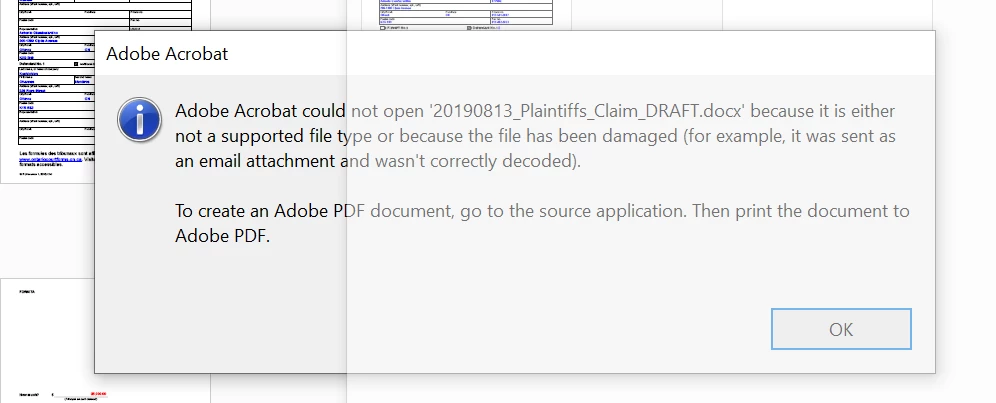
I know for a fact that my file is not damaged. And yes. I could just print to PDF, and THEN insert. But I will end up having to do this 50+ a day in my work, and I really don't want to. Anyone know how to rectify this for my new laptop? Is it an issue with Office or with Acrobat?

Thank you in advance.

    This topic has been closed for replies.

    3 replies

    Amal.
    Legend
    August 16, 2019

    Hi Antoniog,

    Apologies for the trouble caused, as stated above you are experiencing issues while adding word files to PDF files, correct?

    ++Adding on to the suggestions by try67 and jane-e

    You may also try to update the application to the latest version 19.012.20036. Go to Help > Check for Updates. To know more about the latest version available please refer to the link - DC Release Notes — Release Notes for Acrobat DC Products

    You may also refer to the help article in the link -  Combine or merge files into a single PDF, Adobe Acrobat DC

    Let us know if that works for you

    Regards,

    Amal

    Participant
    August 16, 2019

    @amalj Thanks for your suggestion, however I am apparently on the most up to date version of Acrobat Pro. I have all my other premium features (signature, redaction, etc.) working fine. It just doesn't seem to be talking to MS-Word properly.


    I would also note, at the same time, that when I right-click on .docx files on my explorer, I have the option of converting files to PDF, or merging files into a single PDF. I do not see these options on this PC.

    Any suggestions you can provide would be greatly appreciative. I remember in the past there were certain toggle boxes I had to do in Acrobat to give windows certain permissions (e.g., so I could see a preview image of PDFs in Explorer), but I don't know if there's something comparable for Office.

    jane-e
    Community Expert
    Community Expert
    August 15, 2019

    Hi

    If you have the paid version of Acrobat, you can use the Combine Documents feature and include pdfs, images, and Office documents (if Office is installed). But not with the free Acrobat Reader where you posted.

    Can you confirm your version?

    Jane

    Participant
    August 16, 2019

    Yes, I have it and have been able to do so on my other PCs, this seems to be a unique issue with my new laptop. For some reason I could not post to the acrobat forums so I posted to the reader forums. Apologies if this caused confusion.

    try67
    Community Expert
    Community Expert
    August 15, 2019

    Do you have Office installed? If so, which version?

    Participant
    August 16, 2019

    Office 365, version 1907, subscription up to date.