

teaganp63573311
Participant
Oct 3, 2018 5:30 AM UTC
Answered

Adobe 19.008.20071 Not Printing Vector Images

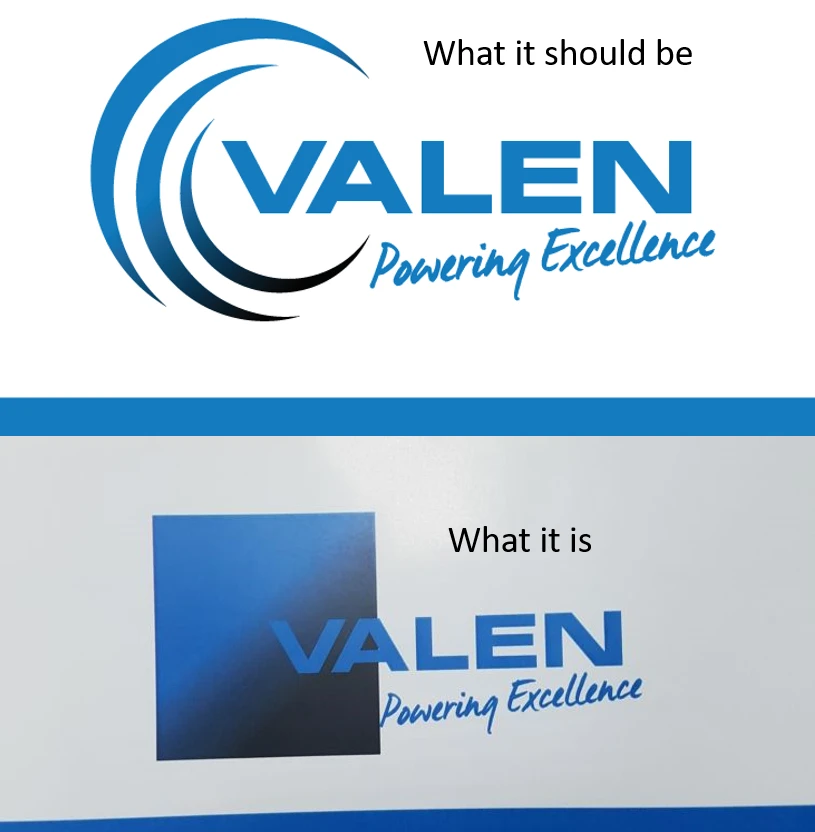
Trying to print a pdf with a vector image but the vector image is printing as a square full coloured image instead.

Version of Adobe Reader DC 19.008.20071 newly updated.
This topic is closed to new replies. Start a new post to keep the conversation going.
Vishal@PDFCorrect answer
Adobe Employee
Oct 8, 2018 12:46 PM UTC

Adobe Acrobat and Reader official update (19.008.20074) containing the fix for this issue is now available. This update will be automatically pushed to all existing installations of Acrobat and Reader. If you want, you may also manually trigger the update early by opening the application and going to Help > Check for Updates.

More information about this release is here: 19.008.20074 Optional update, October 08, 2018 — Release Notes for Acrobat DC Products

Please try it out and let us know your feedback.

Thanks for your patience and support!

-Vishal

11 replies

Participating Frequently
Oct 8, 2018 10:28 AM UTC

Also have the same problem!!!

First the Email sending problem, now this!!!

Stop sending new updates filled with bugs and necessary "new" features!!!

Translate
Vishal@PDFCorrect answer
Adobe Employee
Oct 8, 2018 12:46 PM UTC

Adobe Acrobat and Reader official update (19.008.20074) containing the fix for this issue is now available. This update will be automatically pushed to all existing installations of Acrobat and Reader. If you want, you may also manually trigger the update early by opening the application and going to Help > Check for Updates.

More information about this release is here: 19.008.20074 Optional update, October 08, 2018 — Release Notes for Acrobat DC Products

Please try it out and let us know your feedback.

Thanks for your patience and support!

-Vishal

Translate
Participating Frequently
Oct 8, 2018 2:01 PM UTC

Just updated and this new update fixed the vector images problems. thkx.

Translate
Participant
Oct 5, 2018 5:53 AM UTC

Am having the same issues - images printing as a big square image rather than in their shape. Any idea of when fix will be available?

Translate
Participant
Oct 4, 2018 3:50 PM UTC

In printing options, if you select Advanced, mark the "Print as an Image" option... This is a solution while Adobe corrects this bug.

Translate
stevet87336292
Participant
Oct 4, 2018 4:00 PM UTC

I am having the same problem with the new update as well once the glitch is fixed do we need to reinstall?

Translate
John T Smith
Community Expert
Community Expert
Oct 4, 2018 4:02 PM UTC

This is a public forum with "some" Adobe staff participation, use the links below to make a report

https://www.adobe.com/cfusion/mmform/index.cfm?name=wishform for feature requests or bug reports

-or Feedback forum https://forums.adobe.com/community/creative_cloud/desktop-app/content

Translate
Adobe Employee
Oct 3, 2018 8:28 AM UTC

Hi teaganp63573311​,

Thank you for reporting this issue. Please provide the following details:

1. Sample PDF that you are having problem with

2. Printer driver and model

3. Your OS version

Regards,

Ritesh

Translate
teaganp63573311
Participant
Oct 3, 2018 10:14 PM UTC

Hi Ritesh...​

1. Sample PDF Dropbox - Force Fire Proposal front 1.pdf

2. Printer driver and model: KONICA MINOLTA C360SeriesPCL

3. OS Version: Windows 10 Pro / Version: 1803 / OS build: 17134.285

*We tried printing this on different printers and had the same result. We also tried printing it on different computers and had the same result. The only way this would print correctly was on an older version of Adobe Reader.
So I don't think it's any of our devices, I think it's the updated Adobe Reader*

Translate
