

Participant
November 14, 2020
Question

Adobe Acrobat printing margins.

  • November 14, 2020
  • 2 replies
  • 511 views

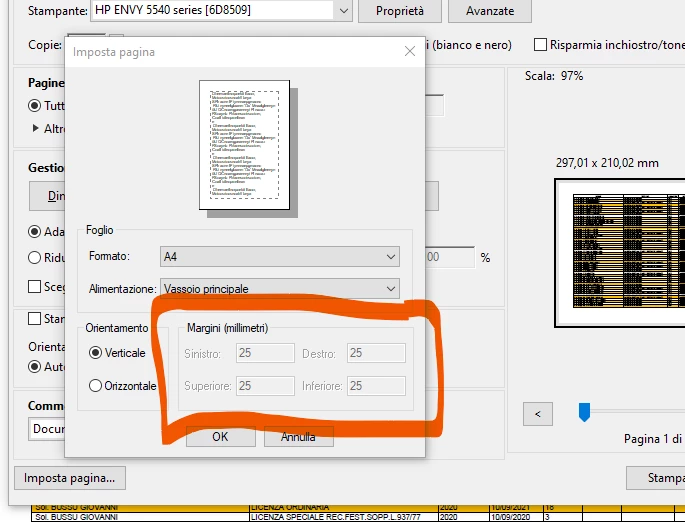
Print windows -> bottom left --> page setup/page settings --> I can't change the page margins! Any suggestion?

 

This topic has been closed for replies.

2 replies

Legend
November 14, 2020

You can't change these values. They are only for use in certain apps.

You can print two ways in Acrobat Reader

1. Print actual size. You get the designed margins. If too large or too close to the page size, something is cut off.

2. Scale to fit. The page is scaled to fit inside the printer's margins.

You cannot adjust margin. But you can scale the pages.

Participant
November 14, 2020

Scaling the page doesn't resolve my issue. The margins are too big for my needings. 2,5 cm...at least 0,8 or 1 cm!

radzmar
Community Expert
Community Expert
November 14, 2020

The margins are defined by the printers driver. Check if you can set them in the driver settings. 

Participant
November 14, 2020

How can I access to the driver settings?

radzmar
Community Expert
Community Expert
November 15, 2020

Click the [Proprietà] button shown in your screenshot to open the printer driver dialog. Maybe you can set the printers margins there. In it's a printer for printing photographies, you should be able to select a borderless printout.