
Participant
December 12, 2019
Answered

Adobe Acrobat Reader 2019.021.20058 Protected mode problem

  • December 12, 2019
  • 3 replies
  • 7110 views
Since the latest update (2019.021.20058) quite a few of our users are finding if they try to open a PDF Acrobat Reader is taking a long time to open, they are then presented with the error message below
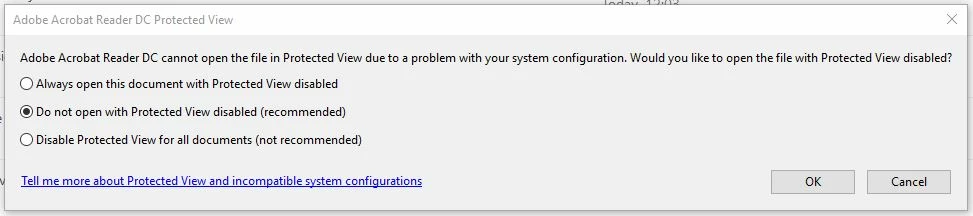


 This doesn't happen on version 19.021.20056 but if you then update the same installation to 20058 the issue starts occuring. I don't really want to turn protected mode off for everyone so is there anyway to work out what is conflicting with the newer version? We are on Windows 10 (happens on 1803 and 1809).


Many thanks.

This topic has been closed for replies.
Correct answer AnandSri

Hi JSmithAP,


Thanks for your time and patience thus far and for your cooperation.


The latest patch of Acrobat/Reader DC version 19.021.20061 Optional update, December 19, 2019 containing the fix is live now.

Please install the latest patch from the help menu of Acrobat/Reader > select check for updates. 

Reboot the machine after installing the latest patch.


For detailed information about the latest patch, please refer to the Release Notes.

Please let us know if you experience any issues.


Also, please confirm that the issue is getting resolved or not after installing the latest patch. 


Regards,

Anand Sri.

3 replies

AnandSri
Community Manager
AnandSriCommunity ManagerCorrect answer
Community Manager
December 19, 2019

Hi JSmithAP,


Thanks for your time and patience thus far and for your cooperation.


The latest patch of Acrobat/Reader DC version 19.021.20061 Optional update, December 19, 2019 containing the fix is live now.

Please install the latest patch from the help menu of Acrobat/Reader > select check for updates. 

Reboot the machine after installing the latest patch.


For detailed information about the latest patch, please refer to the Release Notes.

Please let us know if you experience any issues.


Also, please confirm that the issue is getting resolved or not after installing the latest patch. 


Regards,

Anand Sri.

Participant
December 23, 2019

Hi,


Yes the issue no longer occurs after the latest patch is installed. 


Many thanks.

Adobe Employee
December 13, 2019

Hi JSmithAP,


Sorry for the inconvenience caused. Please let me know the below:

  1. Does it happen on the same machine that issue is not reproducible with 19.021.20056 but reproducible with 20058?
  2. Antivirus / Encryption software installed on the machine?
  3. Does it happen with all the files for some user or files opened from any specific location?
  4. Please share process monitor logs. Use the process monitor tool as shared by AnandSri.


Thanks,

Shakti K

Participant
December 13, 2019

Hi,


1. Yes, it works on the same machine with 19.021.20056 but if you then upgrade to 20058 on the same machine the error starts occuring. I've just discovered that it does seem to work after a complete uninstall and reinstall though, I thought I'd tried this but maybe only tried a repair.

2. Uninstalling anti virus from the machine made no difference, the issue still occured even with no anti virus running.

3. It occurred for files from network locations and local files.


I guess we'll need to do a complete uninstall and re-install for users who have issues if we want to keep the security on.

Adobe Employee
December 13, 2019

Thanks for the information JSmithAP.

Can you please share the process monitor logs when the issue occurs.

We'll investigate further and find the root cause of the issue.


Thanks,

Shakti K

AnandSri
Community Manager
Community Manager
December 12, 2019

Hi JSmithAP,


We're sorry for the trouble you had with the latest verison of Adobe Reader DC 2019.021.20058. 

Are you trying to open the PDF files saved locally or from a network/shared drive?

Adobe Reader is taking time to open any specific type of PDF file like a scanned PDF or a PDF form or is it slow with all the PDF files?


Try adding the file and folder path of the PDF files from Edit>Preferences>Security (Enhanced) > 'Add file' and 'Add Folder Path' > Click OK, restart the application and check.


If security software is installed, then try disabling it and then check the performance of Adobe Reader while opening the PDF files.


Would it be possible to share a screen recording of the issue along with few sample files through which you can reproduce the issue at your end?

If yes, please share the recording and a few sample files through a Private message only so that we can try to reproduce the issue at our end?

Also, collect the process monitor logs of the affected machine by downloading the Process Monitor tool

Please run the tool, reproduce the issue, save the logs and share it with us.


Thanks for your time and patience.


Regards,

Anand Sri.


Participant
December 14, 2019

Hi Anand Sri,

I am having this same issue. It has occured on a windows 10 1807 maching and a Windows 10 1909 machine, and started on both machines after I applied the Microsoft December updates. The "1909" machine is running Acrobat Pro 2019.021.20058, the OS is Windows 10 Pro 1909 18363.535. The latest Windows updates installed KB4530684 and KB4533002. Acrobat is installed from Creative Cloud. I tried uninstalling  then reinstallilng Acrobat through the creative cloud interface and that did not resolve the problem.

Adobe Employee
December 15, 2019

Hi SDroppers,


Sorry for the inconvenience caused.

Please let me know below information:

  1. Send the exact snapshot of your error.
  2. Can you uninstall MS KB update and please check if it resolves the issue?


Thanks,

Shakti K