BrianH77947495
Participant
October 3, 2018
Answered

Adobe Acrobat Reader DC 2019.008.20071 Printing bugs

  • October 3, 2018
  • 3 replies
  • 8351 views

Good afternoon, I bear some bad news but I'm here to help!
The recent update to Adobe Acrobat Reader DC (version 2019.008.20071) has some issues printing things that previously behaved properly.
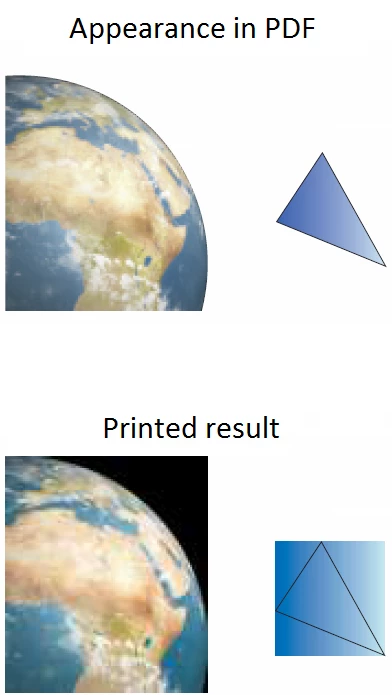
I have uploaded an original PDF here and a PDF of what you see upon printing here. My testing notes are in the files, and replicated below.

The Globe:

Bitmap prints in Adobe Acrobat Reader DC 2019.008.20071 with black filling the rectangle of the object. The black is technically part of the raw bitmap, but should not be visible (Addendum: the black of the bitmap has been cut out using a tool in CorelDraw).

Previous versions of Adobe Acrobat Reader DC printed this fine, and Classic Track Adobe Acrobat Reader 2017.008.30051 prints this ok.

The Triangle:

Linear gradient fill created in CorelDraw 2017, prints in Adobe Acrobat Reader DC 2019.008.20071 with whole gradient filling the rectangle around the object.

Previous versions of Adobe Acrobat Reader DC printed this fine, and Classic Track Adobe Acrobat Reader 2017.008.30051 prints this ok.

Second Triangle (shown only in files):

Elliptical gradient fill created in CorelDraw 2017, prints in Adobe Acrobat Reader DC 2019.008.20071 (and other versions) just fine.

General notes:

Printing was tested on Windows 7 and Windows 10.

Printing was tested on 3 FujiXerox printers:

DocuCentre-V C2275

DocuCentre-VI C3370

DocuPrint CP405 d

Printing was tested on Windows 10 print to PDF, and Windows 7 Microsoft XPS DocumentWriter.

The described results above held true for all of the above tests.

Printing to Adobe PDF from inside Adobe Acrobat Reader DC 2019.008.20071 does display on screen correctly (though obviously is not a solution to the above issues).

This bug is very likely related to:

Adobe 19.008.20071 Not Printing Vector Images

and possibly related to:

Acrobat DC latest update

+other printing related bug reports.

I can upload the CorelDraw file original if that's of use to you.

As an immediate personal fix I've installed the Classic Track version of Acrobat Reader found here. I hope you're able to fix this soon though as we have customers and warehouses that need to be able to print things correctly.

Thanks for your help and I hope you find this useful,

-Brian Houston

This topic has been closed for replies.
Correct answer Vishal@PDF

Acrobat team has a identified a fix for the print issue which has recently surfaced (with Oct 2 update).

We are evaluating the fix currently and will roll out patch soon. We are also getting it validated with some of the users like you-all so that we know it is addressing all scenarios.

For validation, I will be sending direct messages with more details. Please get it tested and provide us feedback.

-Vishal


Adobe Acrobat and Reader official update (19.008.20074) containing the fix for this issue is now available. This update will be automatically pushed to all existing installations of Acrobat and Reader. If you want, you may also manually trigger the update early by opening the application and going to Help > Check for Updates.

More information about this release is here: 19.008.20074 Optional update, October 08, 2018 — Release Notes for Acrobat DC Products

Please try it out and let us know your feedback.

Thanks for your patience and support!

-Vishal

3 replies

antoniob26154039
Participant
October 5, 2018

In my company too we are experiencing issues printing images.

Is there any aproach of when would be the issues solved?

Is very har to downgrade acrobat DC Pro.

I had to install 2015 version, because I am unable to find a .exe of the previous version:

2018.011.20063

Participant
October 4, 2018

Hello, Brian.

I'd prefer not downgrade my version. Instead, selecting "Print as an image" option, in advanced features, you can print the vector images as you've seen.

Unfortunelly, this is not a permanent solution, and you need to mark it every time you print a job. I hope Adobe fixes this bug A.S.A.P.

Adobe Employee
October 4, 2018

Thanks a lot Brian for the files and detailed notes on the issues. This is really helpful. We are working on priority to fix this issue and will soon release an update.

-Vishal

Participant
October 4, 2018

Vishal,

Do you have an URL to your bug system so that one could poll the progress and figure out if a fix for this is about hours, days or weeks ?

Thanks.

--

Eric

Adobe Employee
October 5, 2018

Eric,

Sorry, we don't have public url of our bug database. But please be assured that we are working on a resolution on priority. A fix has been identified and we are further evaluating it.

We will keep you up updated on the progress.

-Vishal