
Participant
December 10, 2019
Question

Adobe Acrobat Reader DC 2019.021.20056 on Windows 10 does not open last saved view

  • December 10, 2019
  • 1 reply
  • 1887 views

Adobe Acrobat Reader DC (Continuous version 2019.021.20056 on Windows 10) does not open last saved view or location despite setting in Preferences.

I had set the Page Display to Read Mode and Two Page Display.

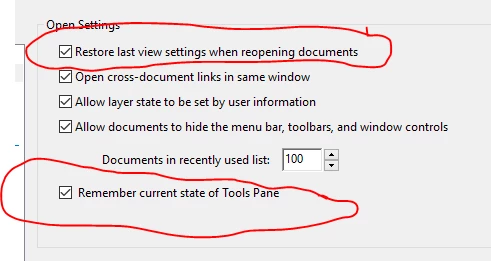
I set the Preferences as in the screenshot below. However when I reopen Reader, it does goes to the cover of the document, not to the last page.
It is frustrating when advertised features do not work.


[Title Edited by Moderator]


This topic has been closed for replies.

1 reply

Amal.
Community Manager
Community Manager
December 11, 2019

Hi there 


We are sorry for the trouble. As described, Adobe Acrobat DC does not open the last saved view setting of the document.


Is this a behavior with a particular PDF or with all the PDF files? Please try to open a new PDF file and check.


for the testing purpose, please try to turn off the protected view. Go to Edit  > Preferences > Enhanced Security > Turn off the protected view and uncheck the Enhanced security > Click OK and check.

Note: Please turn on the security after testing, irrespective of the result.


A new version of the Adobe Acrobat / Reader DC got released recently, version 19.21.20058. Make sure you have the latest version go to Help > Check for Updates. 

You may also download the patch manually using the link here: https://www.adobe.com/devnet-docs/acrobatetk/tools/ReleaseNotesDC/index.html


Let us know how it goes. 


Regards

Amal


likejudoAuthor
Participant
December 12, 2019

It was this book on Git https://github.com/progit/progit2/releases/download/2.1.178/progit.pdf

I tried the steps you said but it was of no avail.


Amal.
Community Manager
Community Manager
December 17, 2019

Hi there 


Thanks for sharing the PDF file with us for testing. 


Since this a behavior with this particular file. The initial view setting of this PDF is set by the author or creator. You may need to contact the author of the file to change the initial view settings.


You may also refer to the steps provided in the help article here (https://helpx.adobe.com/in/acrobat/using/viewing-pdfs-viewing-preferences.html#change_the_pdf_a_viewing_mode) and see if that helps.


Regards

Amal