
christopherd53746888
Participant
April 21, 2018
Answered

Adobe Acrobat Reader DC asking for a password
  • April 21, 2018
  • 1 reply
  • 9064 views

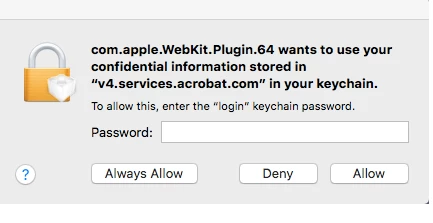
Every time I open a PDF with Adobe Acrobat Reader DC, the app keeps asking me for a password. I get the pop-up window as shown above.

What is the solution to get rid of this message? Does it have to do with security settings?

Thanks for your help.
This topic has been closed for replies.
Correct answer Adorobat

Hi Christopher,

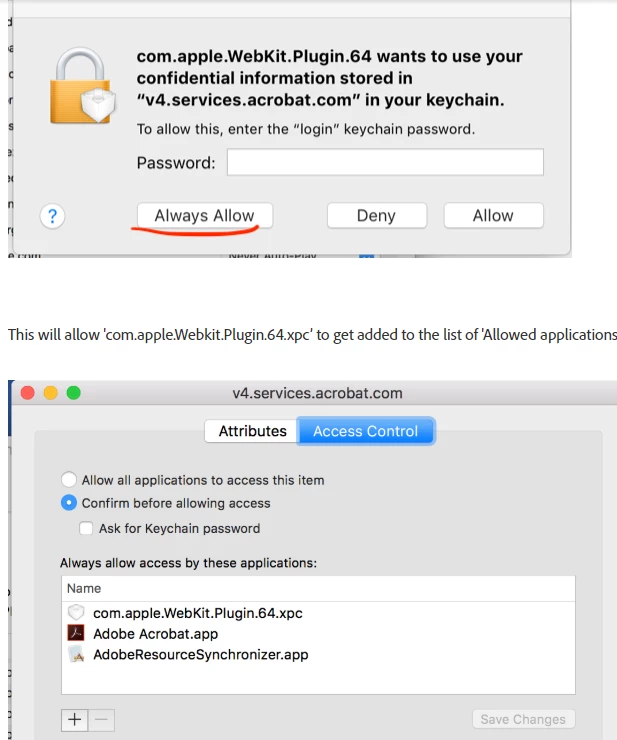
Could you try entering your password and click on  'Always Allow' (Don't hit Enter). 

Below is the screenshot:

You may refer to the following forum thread discussing similar issue:

"com.apple.webkit.plugin.64 want to use your confidential information"

Thank You,

Shivam

1 reply

Adorobat
Community Manager
Community Manager
April 26, 2018

Hi Christopherd,

Please try updating Reader to the latest patch available by clicking  "Check for updates" option under "Help" menu, reboot the machine after installing update and check. You may also download updates from here: DC Release Notes — Release Notes for Acrobat DC Products

Let us know if you need any help.

Shivam

christopherd53746888
Participant
April 26, 2018

Hi Adorobat,

Unfortunately, I have the latest version and the problem persists...

Thank you for your help,

Christopher D.

Adorobat
Community Manager
AdorobatCommunity ManagerCorrect answer
Community Manager
April 27, 2018

Hi Christopher,

Could you try entering your password and click on  'Always Allow' (Don't hit Enter). 

Below is the screenshot:

You may refer to the following forum thread discussing similar issue:

"com.apple.webkit.plugin.64 want to use your confidential information"

Thank You,

Shivam