Participant
March 27, 2019
Answered

Adobe Acrobat Reader DC - error message for pdf sent via email and dropbox

  • March 27, 2019
  • 3 replies
  • 6154 views

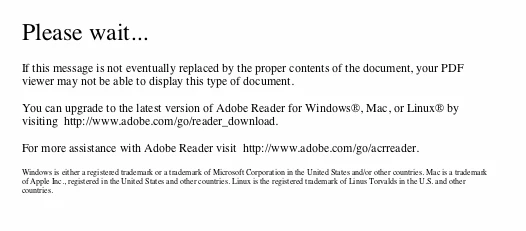
I got this error message, have now downloaded the latest version, see the new format, and still the files do not appear in my mail or dropbox.  I'm on a mac, senders are both on a PC. Can anyone help? thank you!

    This topic has been closed for replies.
    Correct answer ~graffiti

    This message is seen directly in my inbox when I just click on the email. I haven't opened the email or clicked on the attachment. (but when I do nothing is different) Since the error message is a one page PDF, I can see it in the body of the email. It is as if the pfd has converted itself to this message only.


    Hmm.

    If you see an attachment that is an actual pdf file, try saving it without opening it. How you do that exactly varies from one email client to the other but you should have that option. What it sounds like is happening is you are viewing your email in a web browser and your browser is attempting to preview the file in the body of the email but it isn't using Reader. It's using it's own browser. If I had to guess, I would say that this is also supposed to be a form of some type?

    In the end, probably not an Adobe Reader issue but more a web browser issue. Try and download that pdf file...

    3 replies

    Participant
    March 12, 2020

    I encountered the same issue.  It was my Norton antivirus script control.  I you to deactive the "adobe" part so I wont block whenever I download PDF.  It appears on my iphone with the same error.

    Participant
    March 12, 2020
    I don’t understand what you are saying, sorry. Please explain again about the reactive the adobe part.
    Thank You

    Sent from my iPad
    Participant
    November 6, 2019

    I can't receive an email with a pdf attached

    Participant
    November 6, 2019

    I can not receive an email with a pdf attached, ehy

    ~graffiti
    Legend
    March 27, 2019

    It appears as though you are trying to view the pdf within a browser and not actually opening in Reader, is this correct?

    If so, don't try to open the pdf. Download it, open Reader then use File>Open to open the pdf. The browser is probably using it's own pdf viewer.

    Participant
    March 27, 2019

    Good suggestion. But no, the only attachment is the error message, the actual PDF did not come in. Same with dropbox.

    Best~

    Katherine

    ~graffiti
    Legend
    March 27, 2019

    I'm not sure I'm understanding what you are doing here. Are you saying you don't see a .pdf as an attachment? Can you run through the exact steps you take to get to these files and try to open them. The message you are getting is generally when you click a link to an attachment to open it and it doesn't see Reader.