
Leung_HO
Participant
August 12, 2019
Question

adobe acrobat reader DC stop responding when typing chinese

  • August 12, 2019
  • 1 reply
  • 1482 views

Adobe Acrobat Reader DC stop responding when typing Chinese in fillable PDF, please help

Windows 10 Pro 1903 10.18362.175

Adobe Acrobat Reader DC 19.8.20071.41678

Extended Asian Language font pack for Adobe Acrobat Reader DC 19.008.20071
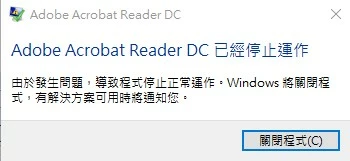
記錄檔名稱:         Application

來源:            Windows Error Reporting

日期:            12/8/2019 14:17:59

事件識別碼:         1001

    This topic has been closed for replies.

    1 reply

    AkanchhaS8194121
    Legend
    August 13, 2019

    Hi Leung.ho,

    As shared, you have been working on Adobe Acrobat Reader DC 19.008.20071.

    Acrobat and Reader official update (19.012.20036)  is available. This update will be automatically pushed to all existing installations of Acrobat and Reader. If you want, you may also manually trigger the update early by opening the application and going to Help > Check for Updates. Or refer to DC Release Notes — Release Notes for Acrobat DC Products 

    Let us know if that update makes any difference.

    Thanks,

    Akanchha

    Leung_HO
    Leung_HOAuthor
    Participant
    August 14, 2019

    Dear Akanchha

    Thanks for reply

    I update Adobe Acrobat Reader DC to 19.12.20036.14839 and try the same process still get the same error.

    記錄檔名稱:         Application

    來源:            Windows Error Reporting

    日期:            14/8/2019 11:34:56

    事件識別碼:         1001

    工作類別:          無

    層級:            資訊

    關鍵字:           傳統

    使用者:           不適用

    電腦:            WOEDT219

    描述:

    錯誤容器 ,類型 0

    事件名稱: APPCRASH

    回應: 無法使用

    Cab 識別碼: 0

    問題簽章:

    P1: AcroRd32.exe

    P2: 19.12.20036.14839

    P3: 5d41fdde

    P4: ntdll.dll

    P5: 10.0.18362.1

    P6: 9bbcb4a9

    P7: c0000005

    P8: 00063248

    P9:

    P10:

    附加檔案:

    \\?\C:\ProgramData\Microsoft\Windows\WER\Temp\WER6F87.tmp.WERInternalMetadata.xml

    這些檔案可能在這裡:

    \\?\C:\ProgramData\Microsoft\Windows\WER\ReportQueue\AppCrash_AcroRd32.exe_9b8f203288d25b38301045a781d827e15ba6e833_608be186_871a9a7d-548c-4869-b36b-5e7006c5ec14

    分析符號:

    重新檢查解決方案: 0

    報告識別碼: ed687009-db0f-4a25-a961-e235c2ca8654

    報告狀態: 524388

    雜湊化容器:

    Cab GUID: 0

    事件 Xml:

    <Event xmlns="http://schemas.microsoft.com/win/2004/08/events/event">

      <System>

        <Provider Name="Windows Error Reporting" />

        <EventID Qualifiers="0">1001</EventID>

        <Level>4</Level>

        <Task>0</Task>

        <Keywords>0x80000000000000</Keywords>

        <TimeCreated SystemTime="2019-08-14T03:34:56.684030800Z" />

        <EventRecordID>1376</EventRecordID>

        <Channel>Application</Channel>

        <Computer>WOEDT219</Computer>

        <Security />

      </System>

      <EventData>

        <Data>

        </Data>

        <Data>0</Data>

        <Data>APPCRASH</Data>

        <Data>無法使用</Data>

        <Data>0</Data>

        <Data>AcroRd32.exe</Data>

        <Data>19.12.20036.14839</Data>

        <Data>5d41fdde</Data>

        <Data>ntdll.dll</Data>

        <Data>10.0.18362.1</Data>

        <Data>9bbcb4a9</Data>

        <Data>c0000005</Data>

        <Data>00063248</Data>

        <Data>

        </Data>

        <Data>

        </Data>

        <Data>

    \\?\C:\ProgramData\Microsoft\Windows\WER\Temp\WER6F87.tmp.WERInternalMetadata.xml</Data>

        <Data>\\?\C:\ProgramData\Microsoft\Windows\WER\ReportQueue\AppCrash_AcroRd32.exe_9b8f203288d25b38301045a781d827e15ba6e833_608be186_871a9a7d-548c-4869-b36b-5e7006c5ec14</Data>

        <Data>

        </Data>

        <Data>0</Data>

        <Data>ed687009-db0f-4a25-a961-e235c2ca8654</Data>

        <Data>524388</Data>

        <Data>

        </Data>

        <Data>0</Data>

      </EventData>

    </Event>