
Participant
May 21, 2024
Answered

Adobe Acrobat Reader installer installs Acrobat Pro instead

  • May 21, 2024
  • 2 replies
  • 3187 views

Confirmed on macOS 14.3.1 and macOS 14.5.


Previously, Acrobat Pro (paid) and Acrobat Reader (free) could both be downloaded, installed and run separately. Now, the Adobe Reader installer installs the app 'Adobe Acrobat', but when you open it, it has some branding for Reader. It's quite confusing.


To confirm, I download the app from https://get.adobe.com/uk/reader/ and run the installer multiple times, which completes without any errors but still produces the same result: in the Applications folder, it installs 'Adobe Acrobat' (not Reader) - see screenshot.
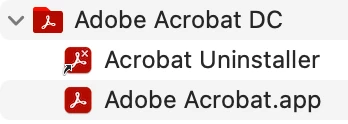
 

I've tried the Acrocleaner tool (https://www.adobe.com/devnet-docs/acrobatetk/tools/Labs/AcroCleanerMac.dmg) - after running the downloaded file and completing the cleanup, I cleared my bin and restarted the machine, then tried to reinstall Acrobat Reader from a fresh download, but still had the same result.


Adobe support confirm this is the first case received and there is no system health error.


If anyone has any experience with this or can comment on an update pushed by Adobe (perhaps to combine the two apps?), it would be much appreciated.


Thank you.

Correct answer Amal Jaiswal

Hi ​@darcyc52058815 


++ Adding to the correct answer shared above


The 64-bit application is a unified application for Acrobat and Acrobat Reader. If you have installed Acrobat Reader 64-bit and you purchase an Acrobat subscription, the Acrobat Reader 64-bit application will upgrade to become a fully functional Acrobat 64-bit application. For more information check the help article https://helpx.adobe.com/acrobat/kb/about-acrobat-reader-dc-migration-to-64-bit.html 

~Amal

2 replies

Amal Jaiswal
Community Manager
Amal JaiswalCommunity ManagerCorrect answer
Community Manager
May 12, 2026

Hi ​@darcyc52058815 


++ Adding to the correct answer shared above


The 64-bit application is a unified application for Acrobat and Acrobat Reader. If you have installed Acrobat Reader 64-bit and you purchase an Acrobat subscription, the Acrobat Reader 64-bit application will upgrade to become a fully functional Acrobat 64-bit application. For more information check the help article https://helpx.adobe.com/acrobat/kb/about-acrobat-reader-dc-migration-to-64-bit.html 

~Amal

darcyc52058815
Participating Frequently
June 23, 2026

So you’re telling me that I cannot have a paid Creative Cloud subscription with Adobe Illustrator while simultaneously having a free version of Adobe Acrobat? 

That seems to be the case and it is ridiculous. My current work-around is to quit Creative Cloud and use Adobe Acrobat. Eventually, after maybe 1-2 days, it stops working and I re-download the free version. I’ve downloaded it about 15 times in the last month. That’s teh only workaround I can have. 

Terrible product. Adobe Acrobat free version should just be included in Creative Cloud as a free downloadable product.

Meenakshi0101
Community Manager
Community Manager
June 23, 2026

Hi darcyc52058815,


Sorry to hear about your experience.


Upon checking, I see that you have an active Adobe Illustrator subscription. You should be able to install the free version of Acrobat Reader without any issues. Please try the following steps to see if they help resolve the problem:

  • Remove the application and run the cleaner tool (https://www.adobe.com/devnet-docs/acrobatetk/tools/Labs/cleaner.html).
  • Reboot the machine 
  • Install Adobe Acrobat Reader from the following page: https://get.adobe.com/reader/enterprise/. 


If you continue to experience the same issue after following these steps, please let us know.


Thanks,

Meenakshi

Meenakshi_Negi
Legend
June 3, 2024

Hi ITadmin@NexGen,


Thank you for reaching out.


There is a single installer for Acrobat and Reader 64-bit. If you install Acrobat Reader and have a subscription, once you sign in using your Adobe ID, the application will upgrade from Reader to Acrobat.

If you do not have a subscription, it will work as Acrobat Reader. 

Hope the information helps. 


Let us know if you have any questions. 


Thanks,

Meenakshi


Got your issue resolved? Please label the response as 'Correct Answer' to help your fellow community members find a solution to similar problems.

Participant
June 3, 2024

Hi Meenakshi,


Thank you for confirming this.


Firstly, this won't work for a lot of businesses - virtual machine sharing is very common with hybrid work these days, where multiple staff access the same machine but require different levels of software. We've always paid for Acrobat Pro for staff who need it, those who don't just use Reader for simple tasks. This will cause a lot of trouble for a lot of people, not just us.

Secondly, you need to inform your staff - I guarantee you countless hours are being spent on trying to resolve "bugs" that are actually expected behaviour - that includes my own experience - it's infuriating!!


Thanks again for your help, but it leaves us absolutely nowhere to go but away from Adobe.