
Participant
April 12, 2017
Answered

Adobe Acrobat Reader Saving Issue(Restrictions)

  • April 12, 2017
  • 2 replies
  • 3006 views

Hi Team,

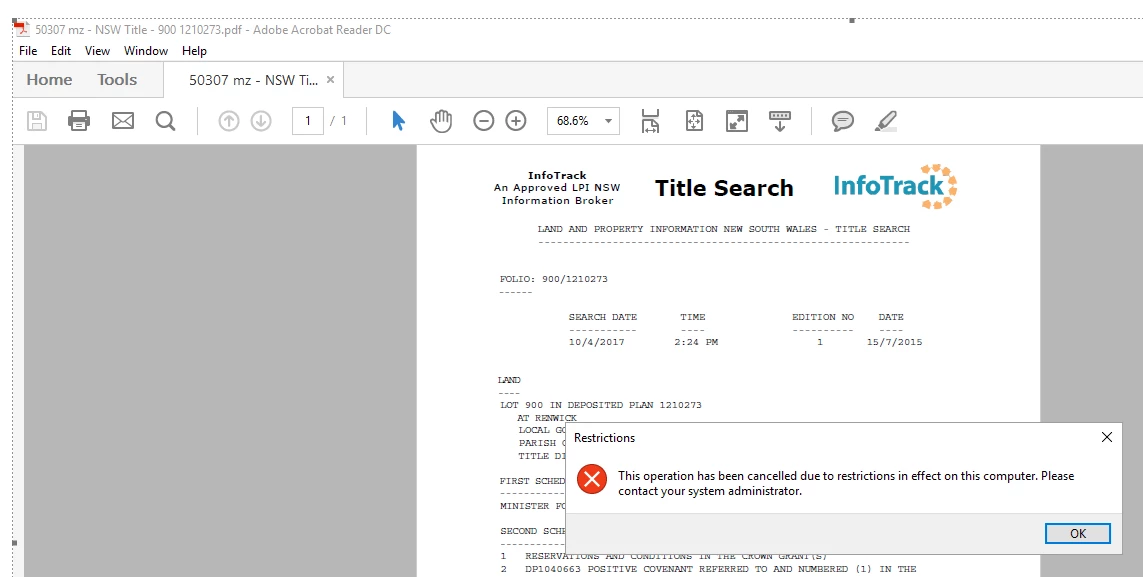
Unable to save pdf attachment from outlook it says "Restrictions". Please find the attached screenshot.

This happens after launching pdf file from outlook & when you hit file-save it gives the below error. When you hit OK- it goes to folder where you want to save the file.
    This topic has been closed for replies.
    Correct answer Sunil_Soni

    Hello jasminebhanus37859496,

    It does look like Microsoft issue, You can refer followings for similar issues:

    https://www.msoutlook.info/question/242  : Try setting Reader DC as default app for PDFs.

    This operation has been canceled due to restrictions in effect on this - Microsoft Community

    https://support.microsoft.com/en-in/help/310049/hyperlinks-are-not-working-in-outlook

    Please let us know if these helps.

    2 replies

    Participant
    February 19, 2024

    Adobe has beome useless top me as I cn print a down loaded pDF but not able to save a PDF as the save icon like many others I have seen here and on social media is greyed out. Why Adobe are and have not addressed this very common issue goodness only knows.

    Sunil_Soni
    Adobe Employee
    Adobe Employee
    April 12, 2017

    Hello jasminebhanus37859496 ,

    Kindly save the attachment to your machine first and then try to do the workflow.

    Please keep us posted how it goes.

    -Thanks

    Acrobat Team

    Participant
    April 12, 2017

    Hi Sunil,

    Am able to save the attachment before launching pdf, but it doesn't allow me to save in the first place after I launched pdf-file- save. It pulls the restrictions message & then asking me to save. Is there anyway I can get rid of restrictions message?

    Sunil_Soni
    Adobe Employee
    Sunil_SoniCorrect answer
    Adobe Employee
    April 12, 2017

    Hello jasminebhanus37859496,

    It does look like Microsoft issue, You can refer followings for similar issues:

    https://www.msoutlook.info/question/242  : Try setting Reader DC as default app for PDFs.

    This operation has been canceled due to restrictions in effect on this - Microsoft Community

    https://support.microsoft.com/en-in/help/310049/hyperlinks-are-not-working-in-outlook

    Please let us know if these helps.