
bflmpsvz2
Known Participant
May 5, 2024
Question

Adobe Acrobat Reader takes 30sec to open pdf.

  • May 5, 2024
  • 2 replies
  • 777 views

After restart, my Adobe Acrobat Reader Version 2023.008.20555 | 64bit on Windows 10 works fine.

But after some time it takes 30 sec to open a  pdf, when I download it from the  Internet or when I use double click on some local pdf. (When I drag the pdf file into Acrobat window, it still works fine - opens it immediately).

 I have found that in that wrong state, an attempt to open pdf file starts new instance of the Reader, and after 30 sec it is closed and only then the pdf file is opened:
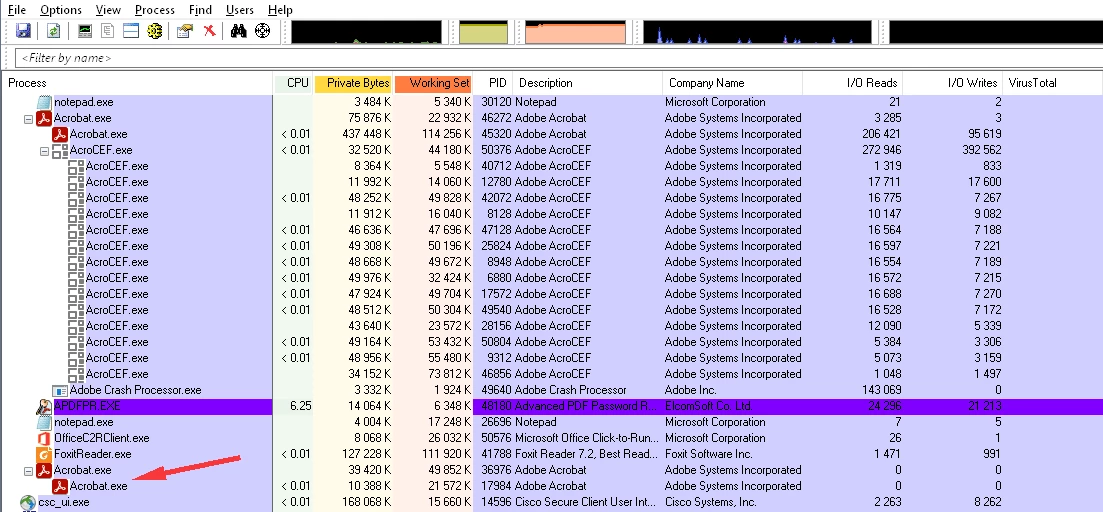
 

I have tried plenty of tips found on the Internet, but nothing helped. The only temporary solution is the restart of the Reader, but after while the situation is wrong again. What to do?

This topic has been closed for replies.

2 replies

JR Boulay
Community Expert
Community Expert
June 3, 2024

[MOVED TO THE ACROBAT READER DISCUSSIONS]

Acrobate du PDF, InDesigner et Photoshopographe
Amal.
Community Manager
Community Manager
May 28, 2024

Hi there 
 
Hope you are doing well and sorry to hear that
 
Is this an issue with a particular PDF file or with all the PDFs? Please try with a different PDF file and check. If the file is stored on a shared network/drive please download it to your computer locally and then try again.
 
Please update the application to the recent version 24.02.20759. Go to Help > Check for updates and reboot the computer once and see if that works.


~Amal

bflmpsvz2
bflmpsvz2Author
Known Participant
June 3, 2024

All PDFs. Stored on harddisk. Upgraded to version 24.02.20759, no change.

In the meantime, I tried old AdbeRdr11008_en_US.exe , I has the same problem.  It must be something in combination of Adobe and Windows settings..?