

Participant
March 18, 2018
Answered

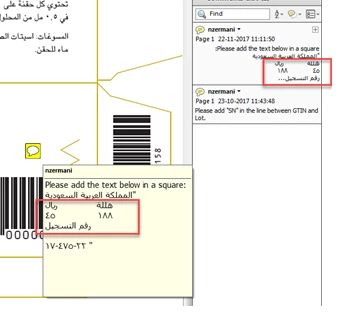
Adobe annotation issue in arabic language. Numbers gets mirrored in comment box
  • March 18, 2018
  • 3 replies
  • 1610 views

Numbers get mirroed in the annotation box

Version - 9.4.7 Adobe acrobat Standard

Need immediate assistance

    This topic is closed to new replies. Start a new post to keep the conversation going.
    Correct answer Tariq Dar

    Hi Divyam,

    Sorry for the delay in response.

    Since we can comment using Adobe Reader DC as well, can you try installing the latest version of Adobe Reader on your machine and try Adobe Acrobat Reader DC Install for all versions

    If the issue you are reporting turns out to be a bug, I would like to mention Acrobat XI is declared End of Support product version: End of support for Adobe Acrobat XI and Reader XI

    End of support means that Adobe no longer provides technical support, including product and/or security updates, for all derivatives of a product or product version (localized versions, minor upgrades, operating systems, dot and double-dot releases, and connector products).

    If you have found a workaround, please update this discussion with your findings that will be helpful.

    -Tariq Dar

    3 replies

    Zaid Al Hilali
    Community Expert
    Community Expert
    March 19, 2018

    I'm trying to replicate the issue on my latest Acrobat DC. I don't have older Acrobat any more. Having said that, working with numbers in a mixed language environment specially in Left-to-Right and Right-to-Left scripts whether in Acrobat, InDesign or any other software even Microsoft office will necessary have issues similar to what you're experiencing and we always have to pay attention to numbers flipping, reversing or as you called it mirroring.

    While at Acrobat Pro DC, I didn't have this issue you're experiencing as you can see in the screenshot below, however can you tell me the steps you're following here, are you copying and pasting from Word for example, or typing fresh text straight in the sticky note within Acrobat?

    Participant
    March 21, 2018

    Hi Zaid,

    Thank you for responding to my query!

    We are not typing a fresh text or copying from a document.It was a  pre-edited pdf file provided by artifacts.We have tried updating the adobe version to Acrobat pro 11.0.7.However,it wasn't helpful to get the issue resolved.

    Tariq DarCorrect answer
    Legend
    April 20, 2018

    Hi Divyam,

    Sorry for the delay in response.

    Since we can comment using Adobe Reader DC as well, can you try installing the latest version of Adobe Reader on your machine and try Adobe Acrobat Reader DC Install for all versions

    If the issue you are reporting turns out to be a bug, I would like to mention Acrobat XI is declared End of Support product version: End of support for Adobe Acrobat XI and Reader XI

    End of support means that Adobe no longer provides technical support, including product and/or security updates, for all derivatives of a product or product version (localized versions, minor upgrades, operating systems, dot and double-dot releases, and connector products).

    If you have found a workaround, please update this discussion with your findings that will be helpful.

    -Tariq Dar