
Participant
November 23, 2020
Question

Adobe PDF Quick Print via Outlook Crashes if Adobe Reader Already Open

  • November 23, 2020
  • 4 replies
  • 3781 views

Hi,

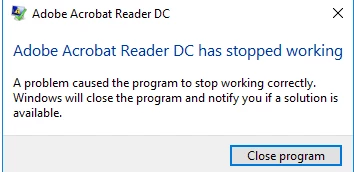
When using the quick print in Outlook with Adobe Reader as the default .pdf printer, If you have adobe reader already open it will crash the program, is there any way to resolve this?

Reader Version 20.013.20064

Faulting application name: AcroRd32.exe, version: 20.13.20064.12623, time stamp: 0x5f91f992
Faulting module name: ntdll.dll, version: 10.0.14393.3630, time stamp: 0x5e8d42d1
Exception code: 0xc0000409
Fault offset: 0x000835d0
Faulting process id: 0x626c
Faulting application start time: 0x01d6c1439163778c
Faulting application path: C:\Program Files (x86)\Adobe\Acrobat Reader DC\Reader\AcroRd32.exe
Faulting module path: C:\Windows\SYSTEM32\ntdll.dll
Report Id: fa14aa29-f22a-4053-91fc-92b02328b401
Faulting package full name: 
Faulting package-relative application ID: 


This topic has been closed for replies.

4 replies

Participant
January 24, 2023

Go into Outlook , Options, add ins, uncheck anything that has to do with creative cloud. This fixed mine and enabled me to use quickprint for a PDF in Outlook. 

Participant
December 9, 2020

Same issue here.  Adobe can we get an answer.  I have uninstall - ran the adobe clean program, reinstalled from a fresh download that was recommended for my OS.  I am having this issue on 2 servers and it is affecting MANY employees.  Please advise!


Participant
December 10, 2020

Hi Guys,

Not sure if a coincidence or not but i installed these windows updates and it seems to have gone away, can you advise if these are installed for you?

KB4486668

KB4486746

KB4486747

KB4486716

KB448675

KB4486748

Participant
December 10, 2020

These updates all reference Office/Outlook 2016.  We do not have version 2016.

Participant
December 7, 2020

Having the exact same issue - anyone solved this?


Thanks.

Participant
November 27, 2020

I get the same problem, posting to see if anyone else has seen this.