
Known Participant
November 1, 2013
Question

Adobe Reader 11.0.05 won't always display the GUI when opening PDF?!

  • November 1, 2013
  • 7 replies
  • 24252 views

I have come across some odd behaviour with Adobe Reader 11.0.05. In particular, the following issues seem to have surfaced since upgrading to 11.x from 9.x.

  1. Opening a PDF from any application, launches an "AcroRd32.exe" process but the GUI is not shown i.e. you don't see a Reader window or PDF. If you try open the PDF again it will launch another instance of that process and still won't show the GUI. Killing all AcroRd32.exe processes via Task Manager and re-opening the PDF will then work.
  2. Some users are experiencing the following error when opening PDFs via IE and other 3rd party apps.
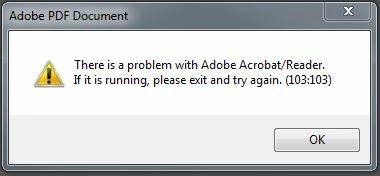
We've deployed 11.0.05 across a few thousand 32-bit Windows 7 PCs and it's a little concerning that PDFs won't always open. At this stage it is very random, maybe 1 out of 5 times it won't show the GUI but launch the process. Our only workaround is to advise users to kill all AcroRd32.exe processes and try again.

Our packaged 11.0.05 was created as follows:

AIP created from 11.0 msi > AIP patched with 11.0.04 msp (Q) > AIP patched with 11.0.05 msp (OOC). Transform was created using Adobe Customization Wizard 11.

Oddly, this does not occur using Adobe Reader 9.5.5 (or other versions of 9.x).

Sounds like 11.x is buggy, anyone else experiencing the same issues??

Thanks!

This topic has been closed for replies.

7 replies

Participant
June 2, 2015

I have a solution for this. It turns out to be an interaction with nVIDIA nView Desktop Manager. I suspect it is the same issue for others here, as at the symptoms match and one of the posts lists nView as being active. Disabling nView solves the problem, but I found a solution by adding application specific nView settings for the Adobe Reader process.

SYMPTOM: Adobe Reader process launches but no window is open when nVIDIA nView Desktop Manager is enabled. When nVIDIA desktop manager is disabled, Adobe Reader behaves normally.

SOLUTION:

1. Open the nVIDIA Desktop Manager and browse to the "Applications" settings.

2. Add "acrord32.exe" to the custom nView Desktop Manager settings.

3. At the bottom of the Individual Application Settings for acrord32, enable "Keep system active while application is open".

4. Apply the changes and kill any existing acrord32.exe process.

Once the changes are applied and the remaining processes killed, you should find you can open PDF documents without any problems. In my case, it appears none of the other settings caused problems.

Opelious
Participant
September 5, 2014

Since there is no answer and this seems like such an obscure problem, I felt I should share this for those who may still be experiencing this issue.

I had a user who was showing all the same signs as listed above while running Reader XI 11.0.08: GUI not loading and processes not closing. I installed Reader X 10.1.10 and the user experienced no issues at all, but this was not an ideal solution. Tried some fixes in this and other threads with minimal results. After running Reader XI as a different user, Reader showed none of the listed symptoms. Tried again as the trouble user and it continued to cause issues, which lead me to determine there was a user profile issue.

I backed up the users' data and proceeded to delete the existing copy through the following steps:

Control Panel > System > Advanced System Settings > User Profile Settings > Select the profile you wish to delete and click delete

After the user logged back in, Reader XI seemed to work fine and there has been no more reported issues with it. This is not a great solution, but it definitely fixes the problem without having to downgrade software.

Participant
September 26, 2014

Thanks. I've been experiencing this with Reader XI 11.0.09. I could sometimes successfully launch it by double-clicking its desktop icon. When Reader appeared, two AcroRd32.exe process would appear in Task Manager; when Reader did not appear, I would observe only a single AcroRd32.exe process in Task Manager. A complete uninstall (including using Adobe Lab's Acrobat removal tool) and reinstall made no difference. Following an earlier suggestion, I turned off the security preference 'Enable Protected Mode at startup' and the problem appears to be fixed. Also, only a single AcroRd32.exe appears in Task Manager. I'm on a Dell Precision T5600, dual Xeon E5-2630, 32 GB RAM, Windows 7 Enterprise.

Pattie F
Community Manager
Community Manager
December 4, 2013

The Adobe Reader group suggests you try to turn off Protected Mode in Edit > Preferences > Security (Enhanced).

There is a checkbox in the top left corner.

Pattie

Participant
December 4, 2013

Pattie:

When I go to turn off the Protected Mode I get a dialog box that says to do so will put my computer at risk.  Is that true? 

Adobe Employee
December 4, 2013

Purpose of Reader XI Protected Mode is to keep your system safe from PDF based exploits and keeping protected mode OFF will leave your system vulnerable.

Adobe Employee
November 29, 2013

Hi Packager,

Please let me know some more information about the environment in which the issue is observed.

Is your system a part of any special environment setup like Citrix etc. ?

Also, is it possible for you to share the process monitor and Reader broker logs? You can send me a private message as well.

Steps to take Reader broker logs:

1) Launch Reader and enable protected mode via Edit -> Preferences -> Security (Enhanced) and check Enable protected mode at startup. Press OK and close Reader.

2) Launch Reader again and enable broker logging via Edit -> Preferences -> Security (Enhanced) and check Create protected mode log file. Close Reader.

3) Now Open the PDF file in Reader by which issue is reproduced.

4) After issue is successfully reproduced , go to Edit -> Preferences -> Security (Enhanced) and press button "View log" and send the log file.

or goto %temp% and send AdbeReaderBroker.log file.

Steps to take process monitor logs:

1) Download process monitor from http://technet.microsoft.com/en-in/sysinternals/bb896645

2) Launch process monitor (procmon.exe)

3) Goto filter (Ctrl+L) and set Process Name is "AcroRd32.exe" and Add then Apply and OK.

4) Now launch Reader (after enabling protected mode) and try to reproduce the issue.

5) When the issue is reproduced, save process monitor logs from (Process monitor's File->Save) as a .PML file and send.

Thanks,

Shakti K

Participant
November 4, 2013

Yes, I am always having problems. Microsoft fixed the problem for me but it has reverted back to a trial I downloaded. I can't access my PDF at all.

Packager wrote:

I have come across some odd behaviour with Adobe Reader 11.0.05. In particular, the following issues seem to have surfaced since upgrading to 11.x from 9.x.

  1. Opening a PDF from any application, launches an "AcroRd32.exe" process but the GUI is not shown i.e. you don't see a Reader window or PDF. If you try open the PDF again it will launch another instance of that process and still won't show the GUI. Killing all AcroRd32.exe processes via Task Manager and re-opening the PDF will then work.
  2. Some users are experiencing the following error when opening PDFs via IE and other 3rd party apps.

We've deployed 11.0.05 across a few thousand 32-bit Windows 7 PCs and it's a little concerning that PDFs won't always open. At this stage it is very random, maybe 1 out of 5 times it won't show the GUI but launch the process. Our only workaround is to advise users to kill all AcroRd32.exe processes and try again.

Our packaged 11.0.05 was created as follows:

AIP created from 11.0 msi > AIP patched with 11.0.04 msp (Q) > AIP patched with 11.0.05 msp (OOC). Transform was created using Adobe Customization Wizard 11.

Oddly, this does not occur using Adobe Reader 9.5.5 (or other versions of 9.x).

Sounds like 11.x is buggy, anyone else experiencing the same issues??

Thanks!

Packager wrote:

I have come across some odd behaviour with Adobe Reader 11.0.05. In particular, the following issues seem to have surfaced since upgrading to 11.x from 9.x.

  1. Opening a PDF from any application, launches an "AcroRd32.exe" process but the GUI is not shown i.e. you don't see a Reader window or PDF. If you try open the PDF again it will launch another instance of that process and still won't show the GUI. Killing all AcroRd32.exe processes via Task Manager and re-opening the PDF will then work.
  2. Some users are experiencing the following error when opening PDFs via IE and other 3rd party apps.

We've deployed 11.0.05 across a few thousand 32-bit Windows 7 PCs and it's a little concerning that PDFs won't always open. At this stage it is very random, maybe 1 out of 5 times it won't show the GUI but launch the process. Our only workaround is to advise users to kill all AcroRd32.exe processes and try again.

Our packaged 11.0.05 was created as follows:

AIP created from 11.0 msi > AIP patched with 11.0.04 msp (Q) > AIP patched with 11.0.05 msp (OOC). Transform was created using Adobe Customization Wizard 11.

Oddly, this does not occur using Adobe Reader 9.5.5 (or other versions of 9.x).

Sounds like 11.x is buggy, anyone else experiencing the same issues??

Thanks!

Packager wrote:

I have come across some odd behaviour with Adobe Reader 11.0.05. In particular, the following issues seem to have surfaced since upgrading to 11.x from 9.x.

  1. Opening a PDF from any application, launches an "AcroRd32.exe" process but the GUI is not shown i.e. you don't see a Reader window or PDF. If you try open the PDF again it will launch another instance of that process and still won't show the GUI. Killing all AcroRd32.exe processes via Task Manager and re-opening the PDF will then work.
  2. Some users are experiencing the following error when opening PDFs via IE and other 3rd party apps.

We've deployed 11.0.05 across a few thousand 32-bit Windows 7 PCs and it's a little concerning that PDFs won't always open. At this stage it is very random, maybe 1 out of 5 times it won't show the GUI but launch the process. Our only workaround is to advise users to kill all AcroRd32.exe processes and try again.

Our packaged 11.0.05 was created as follows:

AIP created from 11.0 msi > AIP patched with 11.0.04 msp (Q) > AIP patched with 11.0.05 msp (OOC). Transform was created using Adobe Customization Wizard 11.

Oddly, this does not occur using Adobe Reader 9.5.5 (or other versions of 9.x).

Sounds like 11.x is buggy, anyone else experiencing the same issues??

Thanks!

pwillener
Legend
November 4, 2013

ROO26 wrote:

Yes, I am always having problems. Microsoft fixed the problem for me but it has reverted back to a trial I downloaded. I can't access my PDF at all.

Adobe Reader is a free product; there is no trial version.

Please do not hijack other people's topics with an entirely different problem (and it seems different product too).

Participant
November 4, 2013

How rude you suggest I am hijacking other peoples topics   . For a start, it was a trial Pro download, I know Adobe Reader is FREE. But I am getting the same as the lady who's topic you say I hijacked, No wonder I hate forums, usless if you can't comment on anothers topic.

Maybe this will help, perhaps I am on the wrong track. I am not savvy with all this. This is the first time I have been able to load PDF and that was after I did a system restore.

pwillener
Legend
November 4, 2013

Some of the things I usually recommend to try when Reader is not opening...

  • Using Windows Explorer navigate to C:\Program Files (x86)\Adobe\Reader 11.0\Reader, then double-click on Eula.exe and accept the license agreement
  • Can you open Adobe Reader by itself?  If so, try disabling Protected Mode [Edit | Preferences | Security (Enhanced)].
  • If you cannot open Reader by itself, try to disable Protected Mode in the registry; download, unzip, then run the attached registry script
  • It could even be a malware issue; see http://helpx.adobe.com/acrobat/kb/reader-core-dll-error.html
November 4, 2013

I have the same issue where AcroRd32.exe is running but the GUI is not visible. I tried the 4 things suggested and none works.

Any other suggestions?

System is : Windows 7 - 64

Reader installed: 11.0.04 English for Windows

Same problem existed with previous version.

Thanks!

PackagerAuthor
Known Participant
November 4, 2013

Yep, we had the same problem in 11.0.03 also then skipped straight to 11.0.05.

PackagerAuthor
Known Participant
November 3, 2013

Anyone have these issues with 11.0.05?