
Participating Frequently
December 11, 2018
Answered

Adobe Reader 19.010.20064 crashes on startup on RDS

  • December 11, 2018
  • 21 replies
  • 6944 views

Hello,

Two of my W2016 RDS session host servers auto updated their Adobe Reader DC today and it broke, within several seconds after starting it up it crashes, this is very similar to a previous problem which occurred a number of months ago..

Adobe Acrobat Reader DC 2019.008.20071 crashes after 15 seconds on RDS farm
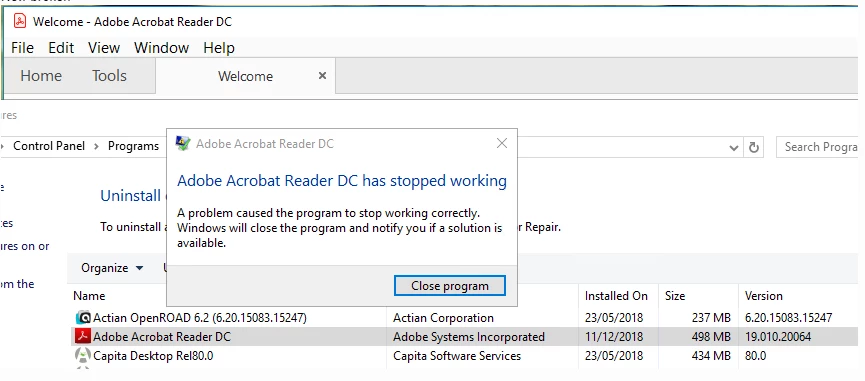
I disabled the auto updating on all servers which hadn't updated.

Surprisingly an install and then reinstall appeared to resolve the issue.

    This topic is closed to new replies. Start a new post to keep the conversation going.
    Correct answer AnandSri

    Hi All,

    Thank you for your time and patience on this.

    The official patch of Acrobat/Reader 19.010.20069 is available now, please install the latest patch from help>check for updates, or install it manually from 19.010.20069 Out of cycle update, January 03, 2019 — Release Notes for Acrobat DC Products

    Reboot the machine if possible and check.

    Let us know if you experience any issue.

    Thanks,

    Anand Sri.

    21 replies

    AnandSri
    Legend
    December 11, 2018

    Hello Ben_pyett,

    We're sorry for the trouble you had with the latest version of Adobe Reader.

    You mentioned that 'an install and then reinstall appeared to resolve the issue'.  Are you still experiencing the crash issue after removing Adobe Reader from the machine and reinstalling the latest available version Adobe Acrobat Reader DC 2019.010.20064?

    If not, would it be possible to reboot the machine once and check?

    have you tried repairing Adobe Reader from help menu>repair installation? If not, please try and check.

    Let us know how it goes and share your observation.

    Thanks,

    Anand Sri.

    Participant
    December 12, 2018

    Hi

    Have the same issue after 10 seconds reader crashes like on the screenshot above. couple months ago we had the same issue with a version then we had te disable protected mode to solve it. This trick doesn't work now.

    We also run it on Windows server 2016 RDS. Pls fix asap!!

    Participant
    December 12, 2018

    When you disable from HKCU the protected mode at startup it doesnt crash. When you disable it from HKLM protected mode it still crashes.