
Participating Frequently
December 11, 2018
Answered

Adobe Reader 19.010.20064 crashes on startup on RDS

  • December 11, 2018
  • 11 replies
  • 6908 views

Hello,

Two of my W2016 RDS session host servers auto updated their Adobe Reader DC today and it broke, within several seconds after starting it up it crashes, this is very similar to a previous problem which occurred a number of months ago..

Adobe Acrobat Reader DC 2019.008.20071 crashes after 15 seconds on RDS farm
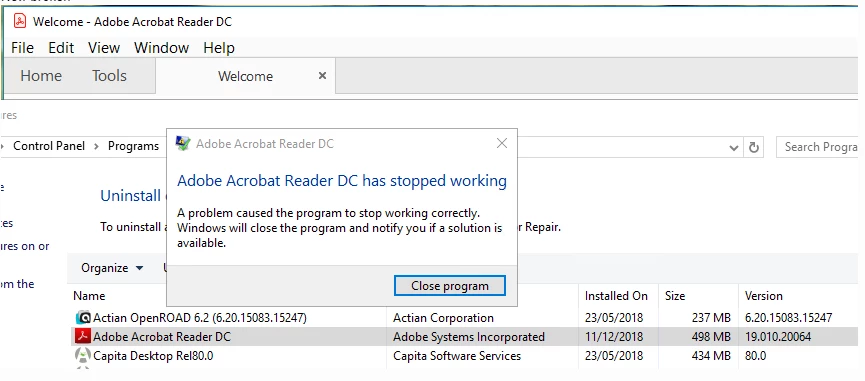
I disabled the auto updating on all servers which hadn't updated.

Surprisingly an install and then reinstall appeared to resolve the issue.

    This topic has been closed for replies.
    Correct answer AnandSri

    Hi All,

    Thank you for your time and patience on this.

    The official patch of Acrobat/Reader 19.010.20069 is available now, please install the latest patch from help>check for updates, or install it manually from 19.010.20069 Out of cycle update, January 03, 2019 — Release Notes for Acrobat DC Products

    Reboot the machine if possible and check.

    Let us know if you experience any issue.

    Thanks,

    Anand Sri.

    11 replies

    AnandSri
    Community Manager
    AnandSriCommunity ManagerCorrect answer
    Community Manager
    January 3, 2019

    Hi All,

    Thank you for your time and patience on this.

    The official patch of Acrobat/Reader 19.010.20069 is available now, please install the latest patch from help>check for updates, or install it manually from 19.010.20069 Out of cycle update, January 03, 2019 — Release Notes for Acrobat DC Products

    Reboot the machine if possible and check.

    Let us know if you experience any issue.

    Thanks,

    Anand Sri.

    AnandSri
    Community Manager
    Community Manager
    January 3, 2019

    Hi All,

    Thank you for your time and patience on this.

    The official patch of Acrobat/Reader 19.010.20069 is available now, please install the latest patch from help>check for updates, or install it manually from 19.010.20069 Out of cycle update, January 03, 2019 — Release Notes for Acrobat DC Products

    Reboot the machine if possible and check.

    Let us know if you experience any issue.

    Thanks,

    Anand Sri.

    GeoffisIT
    Participating Frequently
    December 30, 2018

    Hi,

    I have the same problem with the latest Acrobat Reader DC update 2019.010.20064

    This is the second time an update had caused the same problem.

    Back in October, I updated to 2019.008.20071 and  Acrobat Reader always stopped working after about 15 seconds.

    A few days later a fix was released with 2019.008.20074.

    See another discussion:      Re: Adobe Acrobat Reader DC has stopped working

    All has been okay for a couple of months until now in late December when I updated to version 2019.010.20064 and the problem has reappeared!!

    A look at what the fix was back in October might shed some light on the path the developers should be taking in fixing the current update.

    A similar discussion on another thread with this forum indicates that a number of other users are experiencing this problem Adobe Reader DC 2019 closes after a few seconds

    GeoffisIT
    Participating Frequently
    January 10, 2019

    The latest patch of Acrobat/Reader >>>>>> 19.010.20069 fixes the problem.

    charmainej51385214
    Participant
    December 13, 2018

    As mentioned before, this is the second edition of Acrobat in a row with this issue! Get it together, Adobe! Especially with the automatic updates installed.  Also, how about a workaround solution for those of us who don't have administrative rights to edit the registry key, etc.

    Participant
    December 13, 2018

    The workaround to make it not crash is really just one registry key and a reboot away !

    • Keypath: HKLM\SOFTWARE\Wow6432Node\Policies\Adobe\Acrobat Reader\DC\FeatureLockDown
    • Value name: bProtectedMode
    • Value type: REG_DWORD
    • Value data: 0
    Participant
    December 13, 2018

    Hi,

    We have the same issue, Reader DC ver 2019.010.20064 crashes after 10 - 15 seconds. We are using 2012 R2 RDS farm with user roaming profiles.

    Thanks

    Ayush__Jain
    Adobe Employee
    Adobe Employee
    December 13, 2018

    Hi,

    I would request you to kindly share the Crash dumps when Reader Crashes for you.

    Here is how you can collect the crash dump :

    When Reader Crashes (If you get this error message "Adobe Reader has stopped working") , Can you please share with us the Crash Logs .

    For Getting the Crash Logs:

    1.       When Acrobat Reader Crashes , Open Windows Task Manager
    2.       -> Got To Processes, There you can see a process "Adobe Acrobat Reader DC" / AcroRd32.exe
    3.       Right Click on this process and click "Create Dump File"
    4.       Dump file will be created in the Temp folder of user (as specified on the dialog you get after creating dump files).
    5.       Save this DMP file on any Cloud Storage and Share the link for that with us on mail at ajain@adobe.com

    We will try to analyze your issue on priority once you share this information with us.

    Thanks,

    Ayush Jain

    ben_pyettAuthor
    Participating Frequently
    December 13, 2018

    Crash dump just emailed as per request

    Ayush__Jain
    Adobe Employee
    Adobe Employee
    December 14, 2018

    Hi,

    Thanks for your Revert, however the one you’ve Shared are Logs and not the Dump file.

    Requesting you to kindly share the dump file with me as per the steps that I’ve mentioned on the above post.

    Thanks

    Ayush Jain

    Participant
    December 12, 2018

    The following procedure solved the problem for our customer's RDS farm

    How To: Disable Adobe Reader DC Protected Mode – TDSheridan Lab

    Both the HKCU as the HKLM options work.

    For the HKLM you must take into account that you are setting a policy, hence after setting the registry key

    • Keypath: HKLM\SOFTWARE\Wow6432Node\Policies\Adobe\Acrobat Reader\DC\FeatureLockDown
    • Value name: bProtectedMode
    • Value type: REG_DWORD
    • Value data: 0 to disable

    and before testing it, you need to do a gpupdate /force (do not logout/reboot)

    I have put it into a GPO with positive results (after rebooting the server).

    But indeed, it is with fear that we upgrade the acrobat reader nowadays.

    AnandSri
    Community Manager
    Community Manager
    December 12, 2018

    Hi All,

    Thank you for sharing the details, would you mind collecting the logs of the machine throwing the error message and share it by direct/private message only How Do I Send Private Message

    I have shared the details on how to collect the log files by direct message, please check your email inbox.

    Thanks for your time and patience thus far.

    Regards,

    Anand Sri.

    gregm12244668
    Participant
    December 12, 2018

    We are experiencing this same issue on all of our clients' terminal servers, in multiple states.

    ben_pyettAuthor
    Participating Frequently
    December 12, 2018

    Hello,

    I was clearly having a bad day, as I realised that I accidentally included the wrong screen shot in the first post, which shows the wrong version of Adobe Reader, the one that crashes is 19.010.20064 and was right in the initial posts description and is correct in the screen shots included below.

    I was also wrong that a re-install resolved the issue, I clearly wasn't patient enough, as just retried the server and it still crashes, so I'm un-installing, downgrading and pausing auto-updating until I read in this thread that an fix has been found.

    Although we're now seriously reconsidering the merits of having auto-updating enabled across or RDS platform as twice in as many months your updates have impacted all of our servers and rendered the product unusable.

    Log Name:      Application

    Source:        Application Error

    Date:          12/12/2018 16:43:35

    Event ID:      1000

    Task Category: (100)

    Level:         Error

    Keywords:      Classic

    User:          N/A

    Computer:      cbcazshmd04.cbc.ad.colchester.gov.uk

    Description:

    Faulting application name: AcroRd32.exe, version: 19.10.20064.48846, time stamp: 0x5c06cd7c

    Faulting module name: ucrtbase.dll, version: 10.0.14393.2097, time stamp: 0x5a820b25

    Exception code: 0xc0000409

    Fault offset: 0x000891eb

    Faulting process id: 0x9080

    Faulting application start time: 0x01d49239c99f6808

    Faulting application path: C:\Program Files (x86)\Adobe\Acrobat Reader DC\Reader\AcroRd32.exe

    Faulting module path: C:\Windows\System32\ucrtbase.dll

    Report Id: 9a262567-d0c0-41ff-9ebf-62697f072b2c

    Faulting package full name:

    Faulting package-relative application ID:

    Event Xml:

    <Event xmlns="http://schemas.microsoft.com/win/2004/08/events/event">

      <System>

        <Provider Name="Application Error" />

        <EventID Qualifiers="0">1000</EventID>

        <Level>2</Level>

        <Task>100</Task>

        <Keywords>0x80000000000000</Keywords>

        <TimeCreated SystemTime="2018-12-12T16:43:35.293727800Z" />

        <EventRecordID>176281</EventRecordID>

        <Channel>Application</Channel>

        <Computer>cbcazshmd04.cbc.ad.colchester.gov.uk</Computer>

        <Security />

      </System>

      <EventData>

        <Data>AcroRd32.exe</Data>

        <Data>19.10.20064.48846</Data>

        <Data>5c06cd7c</Data>

        <Data>ucrtbase.dll</Data>

        <Data>10.0.14393.2097</Data>

        <Data>5a820b25</Data>

        <Data>c0000409</Data>

        <Data>000891eb</Data>

        <Data>9080</Data>

        <Data>01d49239c99f6808</Data>

        <Data>C:\Program Files (x86)\Adobe\Acrobat Reader DC\Reader\AcroRd32.exe</Data>

        <Data>C:\Windows\System32\ucrtbase.dll</Data>

        <Data>9a262567-d0c0-41ff-9ebf-62697f072b2c</Data>

        <Data>

        </Data>

        <Data>

        </Data>

      </EventData>

    </Event>