Inspiring
December 4, 2025
Question

Adobe Reader 25.1.20982.0 Crash

  • December 4, 2025
  • 2 replies
  • 3864 views

Hi

In our Enterprise we Upgrade Adobe Reader x86 from 25.1.20813.0 to 25.1.20982.0.

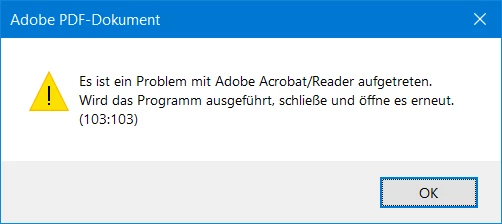
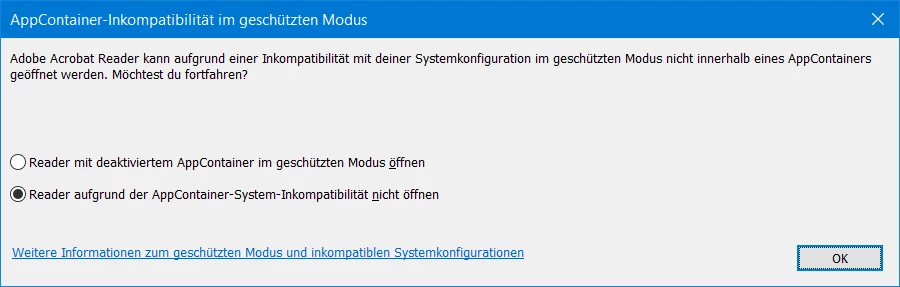
After that most but not all client (W10 and W11) can't open Adobe Reader and get the following errors
AR1.png

or in Browser 

AR2.png

What should I do to fix this?


2 replies

CanRFAuthor
Inspiring
December 4, 2025

Dear Support

I rename HKEY_LOCAL_MACHINE\SOFTWARE\Policies\Adobe to Adobe$ so no policies exist until next refresh.

I get AppContainer–Inkompatibilität im geschützten Modus prompt as above.


I set HKEY_LOCAL_MACHINE\SOFTWARE\Policies\Adobe\Acrobat Reader\DC\FeatureLockdown

bProtectedMode: 0

bEnableProtectedModeAppContainer: 0 or 1

I get 

ar3.png


I set HKEY_LOCAL_MACHINE\SOFTWARE\Policies\Adobe\Acrobat Reader\DC\FeatureLockdown

bProtectedMode: 1

bEnableProtectedModeAppContainer: 0

AdobeReader does not start any more.

AnandSri
Legend
December 4, 2025

Thank you for sharing the detailed information, @CanRF.


I will have this checked internally and will let you know the results after the tests. Additionally, if the issue persists, please provide the exact version of the OS details from the affected user's machine. And, the Logs from the affected machine. To collect the logs, please refer to this article on collecting all logs from the affected machine: Adobe Acrobat Diagnostics. Please share the log ID with us for further investigation: https://adobe.ly/49W7nmJ


Thanks,

Anand Sri.

CanRFAuthor
Inspiring
December 4, 2025

Dear Support

I try to create a CrashDump but without success.

I add as admin to the registry


[HKEY_LOCAL_MACHINE\SOFTWARE\Microsoft\Windows\Windows Error Reporting\LocalDumps]
"DumpCount"=dword:00000010
"DumpType"=dword:00000002
"DumpFolder"=hex(2):25,00,4c,00,4f,00,43,00,41,00,4c,00,41,00,50,00,50,00,44,\
00,41,00,54,00,41,00,25,00,5c,00,43,00,72,00,61,00,73,00,68,00,44,00,75,00,\
6d,00,70,00,73,00,00,00


I run AdobeReader with and without ProtectedMode (GPO).

There is no CrashDump nor the Crashdump Folder created.


AnandSri
Legend
December 4, 2025

Hello @CanRF


I hope you are doing well, and thank you for reaching out.


Thanks for sharing the error screenshots and version details. To help you better, could you please confirm the following:

  • Are you using any specific deployment method (e.g., SCCM, Intune, GPO) to push the update to the Reader?
  • Are there any custom security settings or AppLocker/Defender configurations applied in your environment?
  • Can you confirm whether Protected Mode is enabled by default for all users?
  • Does the issue occur only when opening Reader directly, or also when opening PDFs in the browser?


Symptoms (from your screenshots):

  • AppContainer–Inkompatibilität im geschützten Modus prompt
  • “Es ist ein Problem … (103:103)” restart message

These indicate the Reader is failing to start inside AppContainer while Protected Mode is enabled after the upgrade. This is commonly due to endpoint security or policy conflicts


Suggestions:

1) Policy change (pilot ring first):
Disable AppContainer but keep Protected Mode ON via Group Policy/registry.
2) Endpoint security check (if you must keep AppContainer ON):
Add exceptions or adjust Exploit Protection for Acrobat/Reader, AcroCEF, and AdobeCollabSync in your EDR/AV
 
See this article for more information: https://adobe.ly/4pRUhfa
 
Regards,
Anand Sri.
CanRFAuthor
Inspiring
December 4, 2025

Hi AnandSri

Thanks for your replay.

  • Are you using any specific deployment method (e.g., SCCM, Intune, GPO) to push the update to the Reader?
    I create an admin Install Point and the client take the update at next boot. This works for the last 10 years well.
  • Are there any custom security settings custom security settings or AppLocker/Defender or AppLocker/Defender configurations applied in your environment?
    There are lots of custom security settings and AppLocker and Defender in our environment. This as before.
  • Can you confirm whether Protected Mode is enabled by default for all users?
    Protected Mode is enabled by GPO.
  • Does the issue occur only when opening Reader directly, or also when opening PDFs in the browser?
    In both cases. On Message is when opening Reader directly and the other when opening PDFs in the browser.
 
 
These indicate the Reader is failing to start inside AppContainer while Protected Mode is enabled after the upgrade. This is commonly due to endpoint security or policy conflicts
For the last 10 years it works fine in our environment. Rollback to 25.1.20813.0 works fine in our environment
 

Suggestions:

1) Policy change (pilot ring first):
Disable AppContainer but keep Protected Mode ON via Group Policy/registry.
  I find the info under Preference Reference for Acrobat and Adobe Reader so I will test
 
2) Endpoint security check (if you must keep AppContainer ON):
Add exceptions or adjust Exploit Protection for Acrobat/Reader, AcroCEF, and AdobeCollabSync in your EDR/AV
  I will test
Thanks for more explanations.
CanRF
AnandSri
Legend
December 4, 2025

Thank you for sharing the detailed information, @CanRF.


I will have this checked internally and will let you know how it goes after the tests. Additionally, if the issue persists, please provide the exact version of the OS details from the affected user's machine. And, the Logs from the affected machine. To collect the logs, please refer to this article on collecting all logs from the affected machine: Adobe Acrobat Diagnostics. Please share the log ID with us for further investigation: https://adobe.ly/49W7nmJ


Thanks,

Anand Sri.