
alt30123282
Participant
April 28, 2019
Question

Adobe Reader DC does not show fonts

  • April 28, 2019
  • 3 replies
  • 1592 views

Hi,

I am facing a super annoying problem of adobe DC does not show the majority of fonts. I am just seeing blank pages for most of the PDF documents I try to open.

Anybody can help?

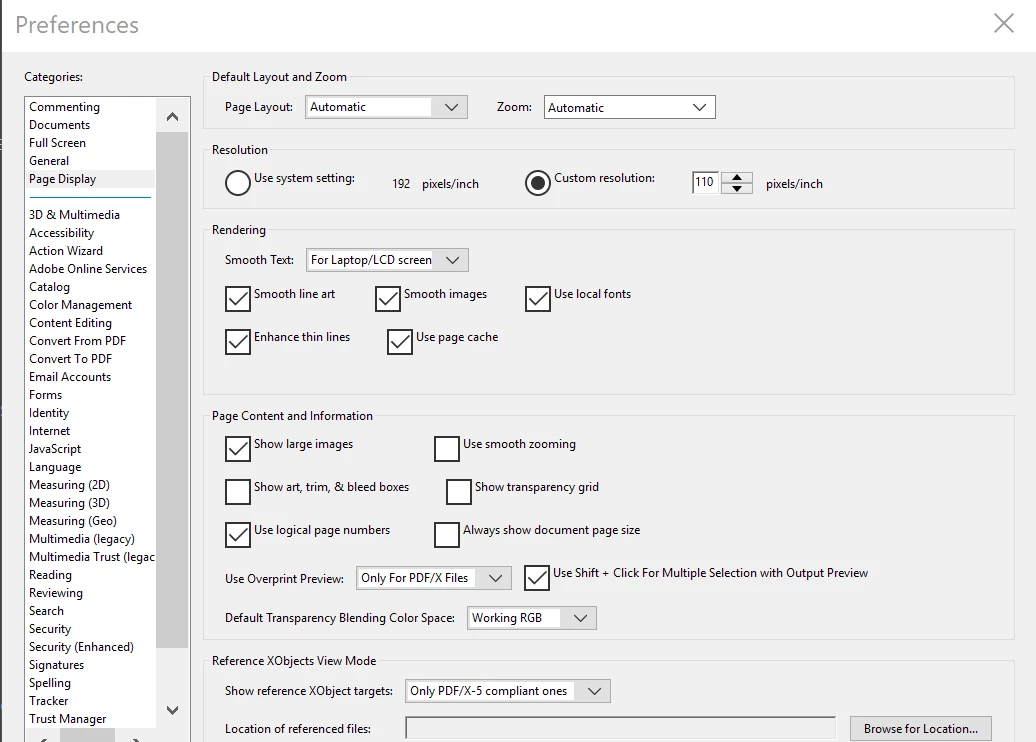
I have checked this thread and similar threads Reader doesn't recognize installed font  but the trick there (i.e. checking "use local fonts") doesn't work for me.

The screenshot below shows that the use local fonts is checked.
This topic has been closed for replies.

3 replies

alt30123282
Participant
May 1, 2019

still no help with this super annoying error!?

I mentioned what the error is, but here is a screenshot

alt30123282
Participant
April 28, 2019

Windows 10 pro latest update

Adobe Acrobat Pro DC version 2019.010.20 (most updated)

The error says:

Cannot find or create the font Arial (or Times or Other fonts!). Some characters may not display or print correctly and I am seeing blank pages instead of text

try67
Community Expert
Community Expert
April 28, 2019

Post a screenshot of what you're seeing, exactly.

Also, what exact version of Reader is it, and what's your OS version?