


Inspiring
November 22, 2021
Answered

Adobe Reader DC prompts for credentials when sending email through Outlook

  • November 22, 2021
  • 1 reply
  • 1961 views

Hi,


Our users are encountering the following problem:

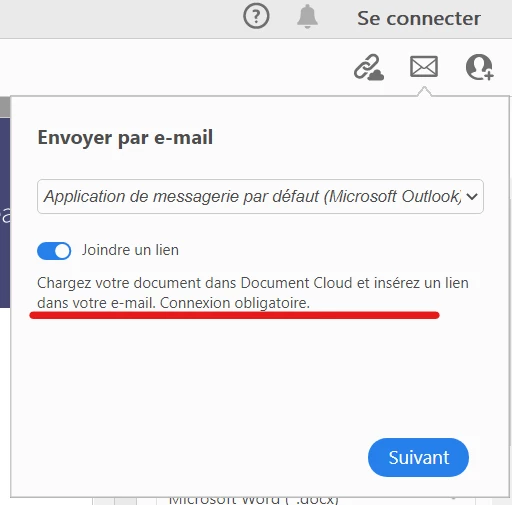
When they want to send a PDF through Adobe Reader DC (32-bit) version 2021.007.20099 , they normally click on the envelop icon located on the upper ribbon and it opens their email client (Outlook) they are now instead prompted to input an Adobe account credentials, is that feature not anymore available for free ??


Thank you very much in advance for your assistance 🙂


Olivier.
This topic has been closed for replies.
Correct answer Olivier Rayon

Hi Amal,


As replied earlier this setting is already applied but it does not solve the issue 😞

Regards.


Olivier.


Hi Amal,

I just found out the reason of our issue :

We unselected that and we are now able to send emails through Outlook !

Kind Regards.


Olivier.

1 reply

Amal.
Legend
November 22, 2021

Hi Olivier


Hope you are doing well and sorry for the trouble. As described, Adobe Reader DC prompts for credentials when sending email through Outlook.


Would you mind sharing the version of the Adobe Acrobat Reader DC you are using? To check the version go to Help > About Acrobat and make sure you have the recent version 21.07.20099 installed. Go to Help > Check for updates and reboot the computer once.


Also please go through the help page https://helpx.adobe.com/acrobat/kb/attach-to-email-not-working.html and see if that works for you.


Regards

Amal

Inspiring
November 23, 2021

Hi Amal,

First of all thank you for your prompt reply.

We are indeed using the latest version :

Concerning the link provided :

  • Exchange is already online
  • nothing is blocked through ou AV.

Awaiting for your feedback.

Regards.

Olivier.


Amal.
Legend
November 23, 2021

Hi there


Please try to change your outlook account settings as described in the help page shared earlier and reboot the computer once and see if that works.


Regards

Amal