
Adobe Reader Display Corruption
Hi Guys,
I have one user with this issue in Adobe Reader (works fine in other PDF Readers). When you open any PDF it comes up OK but the second you click, or even wave your mouse, in the body of the PDF the screen gets corrupted - like this: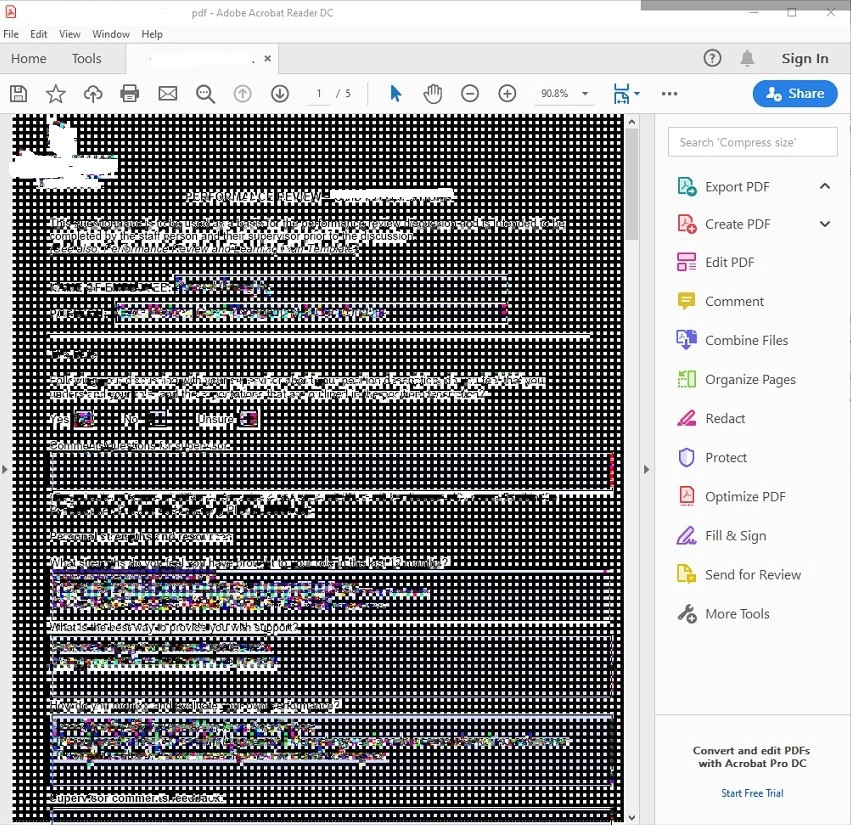
Click off the main window ie in the menu's or even scroll bars and the corruption disappears. Click or move the mouse over the body of the PDF and it immediately does this again.
No-one else has this issue and they can all open and view the same PDF the user is trying to access. I've updated Reader to the latest version. I've done a repair, uninstall/re-install. Just downloaded and installed the latest Radeon Drivers (Radeon 5 3400G CPU) etc to no avail. I've checked and unchecked 'Show Large Images' in Preferences (run across that one before!)
I installed another PDF reader and its opening them fine - only seems to be affecting Adobe Reader and only on this PC.
Any ideas? Running Win 10, Office 2016 Pro Plus and not much else at all 😉


 AdChoices