


Adobe Reader displays distorted characters on some PDFs
Hello, I have a problem with Acrobat Reader DC displaying wierd characters on some PDFs but only under a regular user (non-admin user in Domain) on a PC. Admin user can see the PDF properly.
Version - Latest Adobe Acrobat Reader DC - 2021.001.20140
OS: Windows 10 Pro
Additionals: I have installed the language pack for Adobe Reader 21 (Problem occured even before the installation)
Here is an example of the issue:
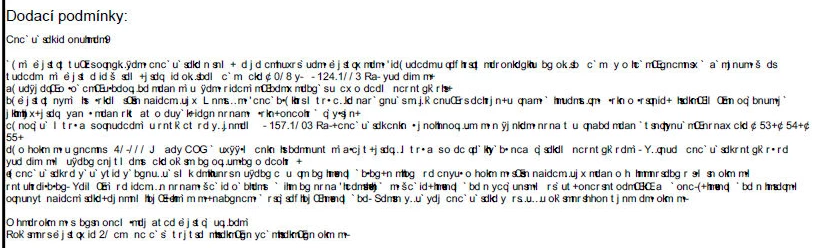
When the same PDF is opened in Mozzila it displays more character but is still distorted. When open in Chrome, it displays everything properly, but when I run Adobe Reader as an Admin under the users account it is still distorted. When I log in as Admin on the same computer and open the PDF, it displays correctly.
From other community posts here I have found that the issue may be missing fonts. Or the embeded fonts that are not recognized and Adobe Reader tries to replace them with something else. But why does it work under Admin and not under user? Are some fornt restricted from "basic users"? Is there a way to stop this issue and how?
I have tried reinstallation which did not help.
I will be glad for any piece of advice. Thanks in advance,
Daniel
 AdChoices