
Adobe Reader displays glyphs incorrectly at certain zoom levels
This is the PDF document from one of our customers. Open the attached PDF, note holes in 't', 'x', 'e' etc letters at certain zoom levels, 150% for example. If you zoom to 300% and above, the holes vanish. This only happens in Adobe Reader, all other PDF viewers display the document correctly.
This PDF contains 'Andika' and 'Mulish' fonts with some glyphs defined with overlapping of outlines. For example the 't' letter defined like this:
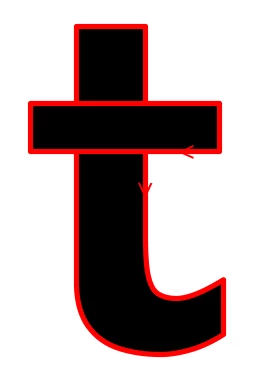
It has two sub-paths with clockwise order of the points, so when non-zero winding rule is used it should be rendred as solely black. However, when even-odd rule is applied, the hole appears in the middle:
 and that is the case, what we beleive - the winding rule changes when zoom level changes. Note that this only happens to fonts, written using 'CIDFontType0C' font format (OpenType CFF). If the same glyphs are written as TTF, no such artifacts appear.


 AdChoices