
Participant
June 27, 2013
Answered

Adobe Reader HFT error when signing PDF Documents

  • June 27, 2013
  • 16 replies
  • 32350 views

When signing pdfs located on a DFS replicated directory some of our users recieve the below error message.

No other application is accessing the file at the times these files are signed as confirmed by proccess monitor.

Has anyone else seen this error message before?
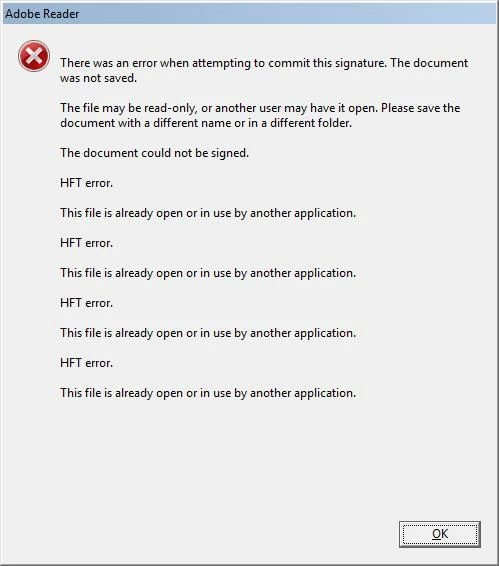
Correct answer James A Hiltz CET

I have recently run into this error and worked on resolving it.

What I found is this was a sinking error with our server and my signature.

My signature was stored on my desktop and the documents I was signing are located on our server.

To resolve the issue I moved my signature to a secure location on our server and the error no longer occurred.

16 replies

Participant
July 3, 2014

"With LiveCycle Data Services, information can be synchronized across clients and applications" (Adobe LiveCycle - Wikipedia, the free encyclopedia)

check to see if that is activated

July 3, 2014

We don't use dropbox here, it happens to some, but not all...  argh!!  seems to only happen on portfolios created from Livecycle forms.  If I extract page 1 (where sigs go) it fixes it.  but this is not a reasonable solution.

Participant
July 3, 2014

June 3, 2014

I'm having the same issue...did anyone come up with anything else on this?  I'm not sure that we're using any syncing programs here, so not sure if that's the cause/fix for our issues... 

Participant
August 23, 2013

this occurs when something else is using your signature file. i disabled dropbox and it worked, so i assume dropbox was doing something funky. disable any syncing programs and try again

Participant
July 23, 2014

saving it to a non-dropbox folder worked for me.

oliverfrank
Participant
December 21, 2014

Has just worked for me too.  Thanks for the advice.

Participant
July 20, 2013

Anyone ever find a solution? Having same problem.