
Adobe Reader not responding to the Go To Page command
Good Morning Everyone,
My apologies if this has been posted, using the search bar up top, as well as Google and Bing to try search the page, I was unable to locate any posts about this.
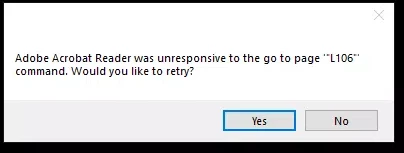
Replaced the workstation for a user at one of my clients, and they use an application called Gregg Catelog which opens a PDF to specific pages using Acrobat Reader. Except, since upgrading their computer this does not happen. It will open to the first page, and then in the background a prompt comes up 'Adobe Acrobat Reader was unresponsive to the go to page "L106" command. Would you like to retry?" message.
Have tried adjusting all settings in Edit -> Preferenances but unable to find a specific setting which allows this setting to work.
Application was installed from get.adobe.com/ca/reader/, but also tried using chocolatey and nuget to install Adobe Reader and has made no difference.
Thanks in advanced for helping, and I hope its something blatantly obvious and not due to a COM object or something similar not registerring correctly on the users' workstation.


 AdChoices