Participant
August 11, 2023
Answered

Adobe Reader Version 2023.003.20269 64 bit china font can't view issues

  • August 11, 2023
  • 7 replies
  • 4139 views

Dear All

    當我使用Adobe Reader 最新版本加入中文文字後,當儲存完再開啟時某些文字不能顯示問題.
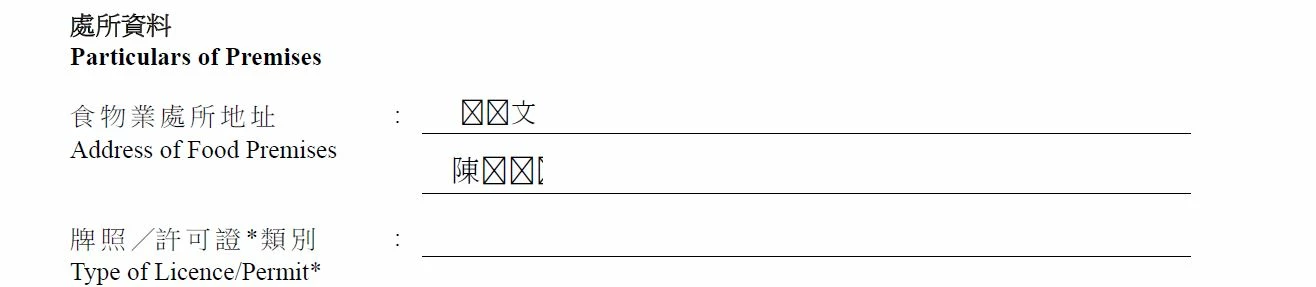

This topic has been closed for replies.
Correct answer Vinod Dobhal

Hi All,


The font corruption issue has been fixed in the latest update of Adobe Acrobat 23.003.20284.2636a55. Please try updating the application to the latest version.


Thanks,

Vinod

7 replies

Vinod DobhalCorrect answer
Adobe Employee
August 24, 2023

Hi All,


The font corruption issue has been fixed in the latest update of Adobe Acrobat 23.003.20284.2636a55. Please try updating the application to the latest version.


Thanks,

Vinod

Participant
August 24, 2023
Hi,
Is it OK for Win 8.1 ?


Best Regards


Tony
Participant
August 18, 2023

Same problem as me also

AkanchhaS8194121
Legend
August 20, 2023

Hello Everyone,


Sorry to hear about the trouble caused.

This issue has been reported with the latest version of Acrobat/Reader.

It has already been escalated, and it is under discussion. Our engineering team is working on the fix and a bug has been logged.

As soon as we hear an update from them will keep you posted.


Thanks,

Akanchha 

Participant
August 17, 2023

Same problem here. Hope it gets solved soon!!!

Participating Frequently
August 18, 2023

My mistake, don't save on reader, keep using Microsoft Print to PDF. Once save on reader must have chinese character problme 

Participating Frequently
August 17, 2023

Temporary solution, after input chinese text, use print , select Microsft Print to PDF (Windows 10/Windows 11 build in), print the document and save it. You can view the Chinese and also this version can input and view again the chinese text when reopen

Participant
August 17, 2023

Same problem in Thai font


Participant
August 16, 2023

I have the sane problem also. Hope it can be solved soon.


Participating Frequently
August 11, 2023

Same problem here after updating 2023.003.20269 version

Participant
August 16, 2023

I got the same problem