
Participant
September 27, 2019
Question

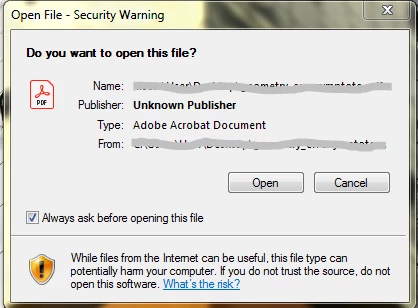
Always getting warning before opening pdfs in adobe acrobat

  • September 27, 2019
  • 2 replies
  • 1563 views

I had never experienced this problem, but suddenly, since yesterday, I have been getting a warning prompt when I try to open a pdf in Acrobat. This is becoming troublesome, and I would appreciate it if someone would suggest how to stop getting this.


    This topic has been closed for replies.

    2 replies

    Amal.
    Community Manager
    Community Manager
    September 30, 2019

    Hi There,


    ++ Adding on to the correct suggestion by radzmar


    You may also refer to the similar discussion - https://community.adobe.com/t5/Acrobat/Disable-Security-Warning/td-p/7557151


    Let us know if that works for you


    Regards

    Amal


    Participant
    September 30, 2019

    Thanks for responding! I am not having any problem related to opening links in a document, as they are working fine for me. What is annoying me are the warning messages that are popping up every time. 


    Also, I am a bit hesitant about using the Registry Editor, as I fear I may mess up somewhere. But I'll see if I can try that out.

    radzmar
    Community Expert
    Community Expert
    September 28, 2019

    This is not a warning from Acrobat but from Windows. You might have applied some new security settings.

    Try this, to turn it off: https://superuser.com/questions/818988/disable-the-security-warning-do-you-want-to-open-this-file-unknown-publisher

    Participant
    September 30, 2019

    Thanks for the response! Well, I didn't change any security settings, as far as I can remember. However, I just remembered that this started happening right after I uninstalled some programs that I had not been using for a long time, like Asymptote, GhostScript, Strawberry Pearl, PyCharm etc. Could this be any reason why the warnings have started showing up?


    Also, I am a bit hesitant about the registry editor, seeing that I know next to nothing about it, so I would be glad for some alternative.