Hi Bruceb,
Sorry to hear that you have been experiencing a lot of trouble.
As the application is not launching, so we would recommend you to uninstall it completely using the cleaner tool- Download Adobe Reader and Acrobat Cleaner Tool - Adobe Labs and re-download it through- Adobe - Adobe Acrobat Reader DC Distribution
If you still experience the same problem even after reinstalling it then you may check the application in Hidden Admin account.
You need to create a Hidden Administrator account for testing purpose following the steps mentioned below-
Enable Built-in Administrator Account in Windows
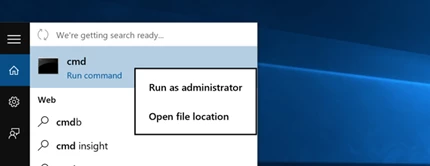
First you’ll need to open a command prompt in administrator mode by right-clicking and choosing “Run as administrator” (or use the Ctrl+Shift+Enter shortcut from the search box).
Note that this works the same in all versions of Windows. Just search for cmd and then right-click on the command prompt icon in the Start menu or Start screen.
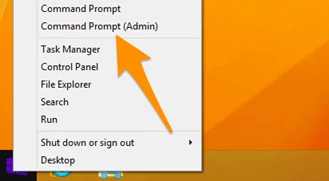
If you are in Windows 8.x or 10 you can right-click on the Start button and choose to open a command prompt that way.
1- Now type the following command:-
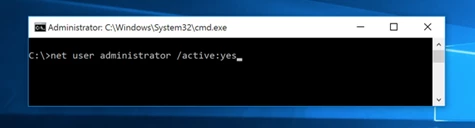
2- You should see a message that the command completed successfully. Log out, and you’ll now see the Administrator account as a choice. (Note that this screenshot is from Vista, but this works on Windows 7 and Windows 8 and Windows 10)
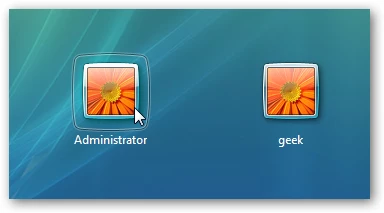
You’ll note that there’s no password for this account, so if you want to leave it enabled you should change the password.
Disable Built-in Administrator Account
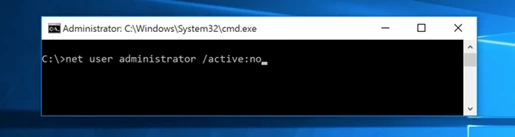
Make sure you are logged on as your regular user account, and then open an administrator mode command prompt as above. Type the following command:
net user administrator /active:no
Let us know if none of the solution provided works for you.
Regards,
Akanchha

 AdChoices