
July 25, 2018
Answered

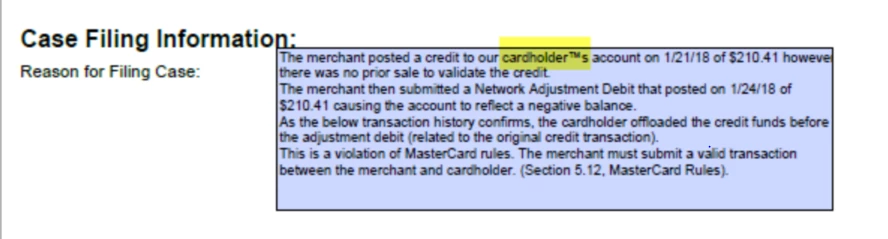
Apostrophes on an eForm are being converted into trademark symbols when viewing in the Adobe Acrobat Reader however it is fine when viewing in chrome
  • July 25, 2018
  • 5 replies
  • 3759 views

Apostrophes on an eForm are being converted into trademark symbols when viewing in the Adobe Acrobat Reader however it is fine when viewing in chrome

Correct answer sarahp67244842

Not sure if this will work for you, but updating the i0S of my ipad seemed to resolve my issue (for now).

5 replies

Participant
January 8, 2025

Same problem here, it seems to happen when I'm using the Helvetic font but try to save as a PDF. 

Participant
August 3, 2023

I'm experiencing the same issue but the ' is being changed to the copyright symbol (C). When you click in the field to edit the text, it changes back to the correct ' symbol. Also, when printing the document it is printing correctly, it's just changing to a copyright symbol when viewing the form in Adobe Acrobat Pro (on a PC computer).

Participant
August 25, 2022

Also having this issue when pasting into into PDF using uipath & powershell script. Same data posted on other pdf forms does not have this issue. Is this specific to the type of font used in the form?

Inspiring
October 4, 2018

I have the same problem occasionally when people fill in the form on their devices (usually an ipad) and send it to me. It works fine when I fill it in on my desktop. The form was created in Microsoft Word then printed to pdf and turned into a fillable form.

Another interesting aspect is that when the filled in form with the error is sent to me, the apostrophe is shown as the trademark symbol, but when I click in the form field it switches back to the apostrophe, just to witch back when I click out. And if I type into the same form field, then click elsewhere on the form, the trademark symbol disappears and stays gone. I'm finding this very mysterious and assume it's a coding situation that gets confused between devices... Any insight or "easy" fixes anyone can give me?

sarahp67244842Correct answer
Inspiring
November 5, 2018

Not sure if this will work for you, but updating the i0S of my ipad seemed to resolve my issue (for now).

Participant
March 5, 2022

In my case though, it's not related to an iPad. If I open the PDF in the browser, it looks correct. If I open it in Adobe, the issue above happens.


try67
Community Expert
Community Expert
July 25, 2018

Very strange... Do you know what application was used to fill in the form? Can you share a sample file with us?

July 25, 2018

The eform was generated from Pega application. This is pretty much straight forward, the application is generating a pdf form after mapping its data, that's it.

Legend
July 25, 2018

A PDF form actually contains  two views of the information. It is the job of the form filling app to make sure the two views look the same. I suspect your Pega app is not doing this right. To confirm we'd need to see a shared file. Please make one without sensitive info, share it, and reply with the public URL.