Participant
Aug 24, 2020 9:32 PM UTC
Answered

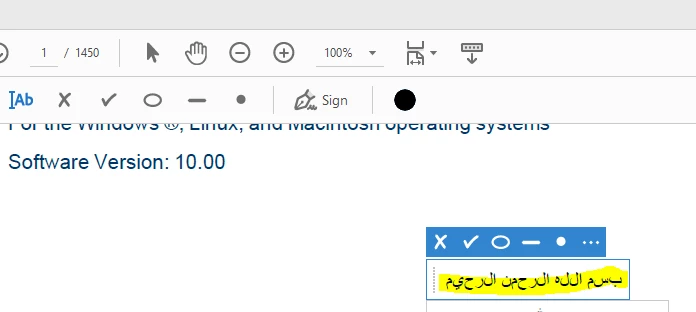
Arabic letters are separted in sign and fill

good day dears, 

i'm facing an issue in sign and fill when i try to write in arabic as shown in the attached screenshot

the letters are separed indivdually it has to be connected.

my version is 2020.012.20043
Zaid Al Hilali
Zaid Al HilaliCorrect answer
Community Expert
Feb 16, 2021 8:59 AM UTC

Adobe Fill and Sign doesn't support the Arabic language fully yet, we have requested the Acrobat team to fix this bug as shown here.

I believe the issue is fixable if the Acrobat development team would look at this test I made… Type Arabic in Fill & Sign, the letters are incorrectly disjointed, exit Fill & Sign environment, choose to Edit the PDF, and add any character to the sentence I typed in Fill & Sign, even when adding a simple space, you will see the characters joins normally as they should appear!

14 replies

Participant
Oct 19, 2026 2:57 AM UTC

This happens because the Fill & Sign text tool doesn’t support Arabic shaping, so each letter is drawn on its own and the word comes out separated. A few things that work:

1- In Acrobat Pro: Edit → Preferences → Language → turn on “Enable Right-to-Left language options”, then restart Acrobat. Use Prepare Form to add a text field, set its font to one that supports Arabic (Arial, Tahoma or Segoe UI), and type in the field instead of using Fill & Sign.
2- If you only have Reader: type the text in Word, make it the right size, and paste it onto the page as an image. It isn’t editable afterwards, but the letters stay joined.
3- Check the result in another viewer (Chrome or Edge) before sending, because some viewers show Arabic form fields differently.


Disclosure: I build a browser PDF editor made for Arabic, GenPDF, which keeps letters joined when you type or fill in Arabic. It has a free daily plan if you want to try your file there: genpdf.com/ar

Translate
Zaid Al Hilali
Community Expert
Zaid Al HilaliCommunity ExpertCorrect answer
Community Expert
Feb 16, 2021 8:59 AM UTC

Adobe Fill and Sign doesn't support the Arabic language fully yet, we have requested the Acrobat team to fix this bug as shown here.

I believe the issue is fixable if the Acrobat development team would look at this test I made… Type Arabic in Fill & Sign, the letters are incorrectly disjointed, exit Fill & Sign environment, choose to Edit the PDF, and add any character to the sentence I typed in Fill & Sign, even when adding a simple space, you will see the characters joins normally as they should appear!

Translate
Participant
Jan 21, 2024 8:03 PM UTC

Has there been any update regarding this? If not, can you recommend any other software because I have a need to fill in some urgent forms in Arabic and cannot find a single PDF filler software that supports Arabic texts with no issues.

Translate
Zaid Al Hilali
Community Expert
Community Expert
Jan 21, 2024 8:14 PM UTC

Marhaba Rita. I can see Adobe started to fix some Arabic support issues with Acrobat on Android platform, so I'm pretty sure they're finally looking at those pending issues we've reported long ago. 

I was assured that there is no "Cough cough racism cough cough" in this delay 🙂, nevertheless, it is bad for Adobe and bad for us customers to wait so long and are still waiting for a fix. 

Translate