


Participant
October 13, 2021
Question

Attempted to Covert PDF to Word Document and all pdf files on computer are in wrong format

  • October 13, 2021
  • 2 replies
  • 328 views

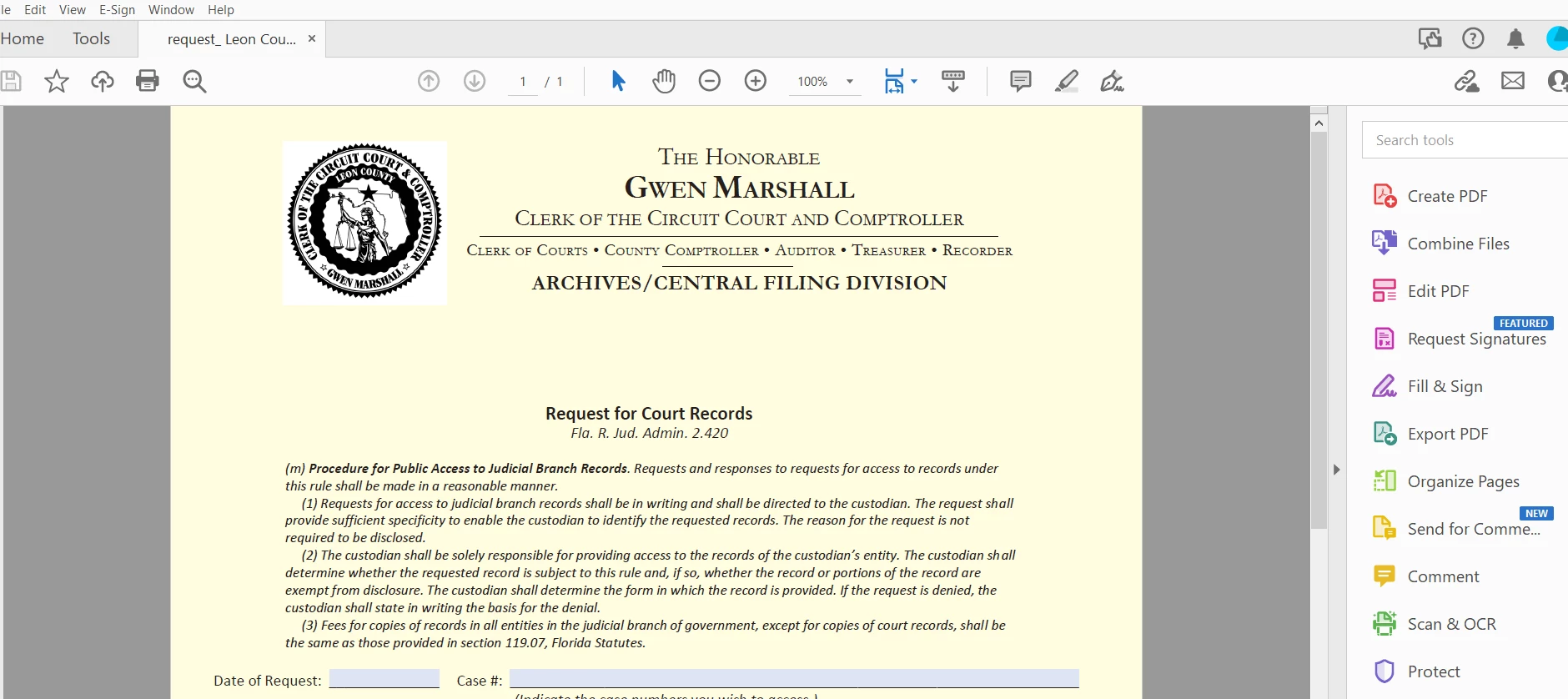
 I wanted to convert a pdf  file to a word document, so I started to fill out the form to  purchase Adobe Acrobat Pro DC, but I changed my mind and did not complete the subscription.  As a result, all the  Adobe Acrobat files I have on my computer were automatically converted to  the  strange format  shown below with  all the options on the side and on the top, cluttering the pdf.  How  do I  restore  the document to a clean pdf. Thanks for your input.  I  use Windows 10, and I unistalled the Adobe Reader App, and downloaded Adobe Reader and the files were still corrupted.


    This topic has been closed for replies.

    2 replies

    Bernd Alheit
    Community Expert
    Community Expert
    December 1, 2021

    The PDF file looks correct.

    Ria Tagra
    Inspiring
    December 1, 2021

    Hi 


    Sorry for the delayed response.


    As you said that the conversion isn't going through from pdf to word or word to pdf so is there any error message that you get?

    Or are you trying the conversion through the web or desktop application?

    You may try the conversion online once and see if that works- https://cloud.acrobat.com/


    You may refer to the following link for any troubleshooting: Troubleshooting Create PDF, Export PDF, Adobe Send, Fill & Sign … services(PDFPack or Document Cloud...


    Let us know if that doesn't work.


    Regards,

    Ria