Hi Sharee,
Looking at the description given above, seems you have Adobe Acrobat Reader set up in your startup programs. Which is resulting the application to open automatically on startup.
You may disable Acrobat Reader from startup menu following the steps suggested below:
Your login items are listed in settings. One of the easiest ways to control startup items is inside System Preferences > Users & Groups.
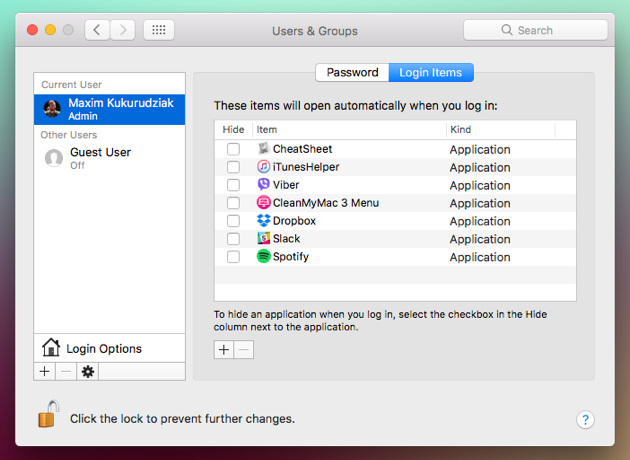
Manually removing or adding Mac startup programs
- Open System Preferences.
- Go to Users & Groups.
- Choose your nickname on the right.
- Choose Login items tab.
- Check startup programs you want to remove.
- Press the “–” sign below.
- You’re done.
- If you need to add an item back, press “+” and choose the app you’d like add.
- Then restart your Mac to see the changes.
Let us know if it still doesn't help and launches Acrobat Reader on startup.
Thanks,
Akanchha





 AdChoices